web
You’re offline. This is a read only version of the page.
close
Skip to main content

Announcements

No record found.

News and Announcements icon
Community site session details

Community site session details

Session Id :
Finance | Project Operations, Human Resources, ...
Suggested Answer

Automatic email Vendor Payment Advice

(1) ShareShare
ReportReport
Posted on by 52

Hi D365 Experts,

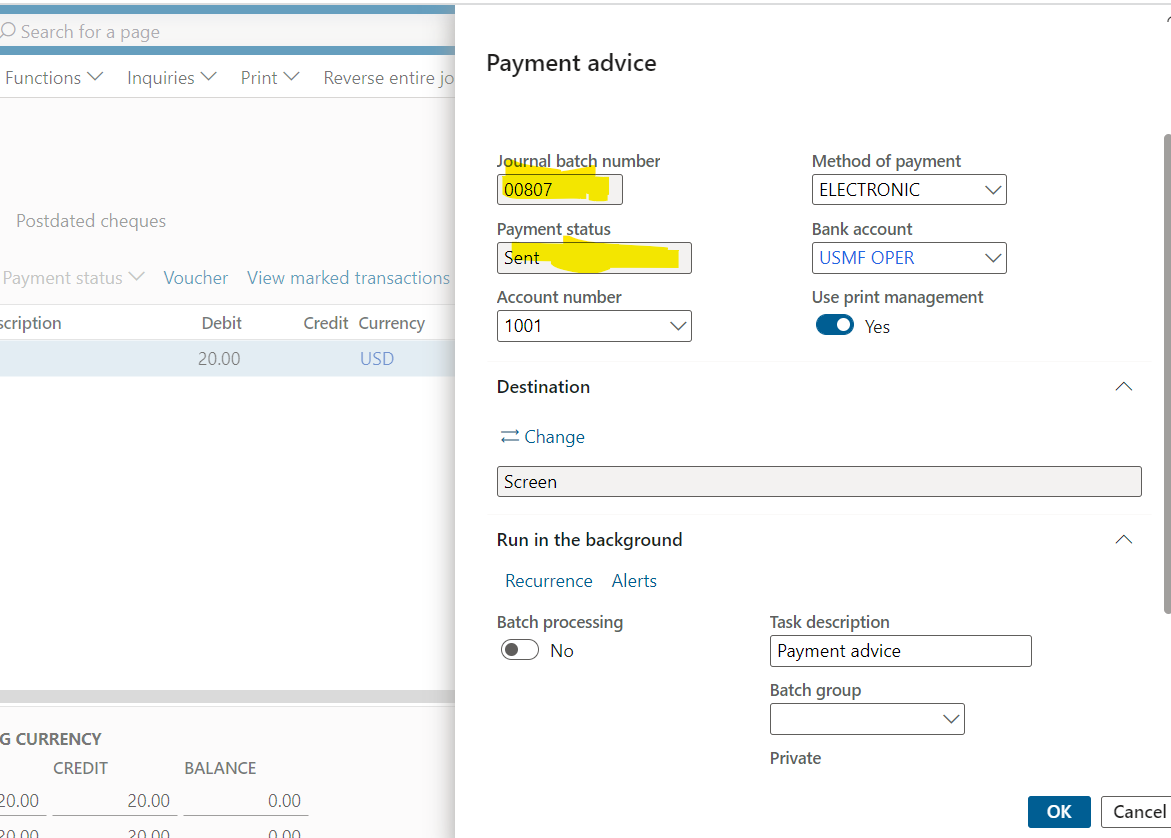
Enable batch processing for bank payment advice reports is enabled and print management configuration is done. I am able to sent payment advice to required email.

The requirement is to send payment advice emails to vendors automatically for the new payments having status of Sent /Approved. It should not send email, if a email already sent to vendor. How to achieve this in D365 FO. With Batch processing it is giving the same payment advice again and again for same batch number again and again.

Is there a way i can get this payment advice form directly rather then from vendor payment journal so that I can select the filters. Please suggest some workaround to achieve this.
pastedimage1670762363925v1.png

I have the same question (0)
  • Suggested answer
    Ramit Paul Profile Picture
    22,803 Most Valuable Professional on at

    Hi,

    When you don't want to send an email for an already sent payment advice, don't select the "Use print management" option while printing, and also turn off the 'batch processing" to no.

    Another option is, in the print management setup, enable the "Save to print archive" to Yes, the print will be available in the organization admin module in print archive form.

    pastedimage1670764575990v1.png

  • D365 Functional Profile Picture
    52 on at

    Hi Mr. Ramit,

    Thanks for replying. Actually the requirement is:

    1. Payment advice should send automatically to vendor after we post a vendor payment journal. All line status is sent/approved. Is there any option, can we set a recurring batch process in D365 to achieve this that once we post a payment journal then D365 sent payment advice as per batch running time to vendors as per print management configurations.

    2. Also, if one payment advice is sent to vendor, it should not send again.

    Thanks.

  • Suggested answer
    Ramit Paul Profile Picture
    22,803 Most Valuable Professional on at

    Hi,

    Payment advice only you can send when the payment file is generated with having status is sent.

    There is no process to send payment advice at the time of posting payment journal.

  • SylwiaC Profile Picture
    5 on at

    Hi,

    Do you know how default title of the email and text body should be completed in Print Management? I completed this data in PM but still missing in email received.

    Regards,

    Sylwia

  • nunomaia Profile Picture
    25 Moderator on at

    You can implement your scenario with Power Automate.

    - Define destination of payment advice to be SharePoint in Electronic Reporting.

    When you post payments in vendor journal, vendor Payment Advice is also printed to SharePoint.

    - Implement a Power Automate to be triggered when a Payment Advice is generated and send a composed email to the Vendor.  

Under review

Thank you for your reply! To ensure a great experience for everyone, your content is awaiting approval by our Community Managers. Please check back later.

Helpful resources

Quick Links

Introducing the 2026 Season 1 community Super Users

Congratulations to our 2026 Super Stars!

Congratulations to our 2025 Community Spotlights

Thanks to all of our 2025 Community Spotlight stars!

Leaderboard > Finance | Project Operations, Human Resources, AX, GP, SL

#1
André Arnaud de Calavon Profile Picture

André Arnaud de Cal... 590 Super User 2026 Season 1

#2
Giorgio Bonacorsi Profile Picture

Giorgio Bonacorsi 349

#3
Diego Mancassola Profile Picture

Diego Mancassola 263

Last 30 days Overall leaderboard

Product updates

Dynamics 365 release plans
