web
You’re offline. This is a read only version of the page.
close
Skip to main content

Notifications

Announcements

Community site session details

Community site session details

Session Id :
Finance | Project Operations, Human Resources, ...
Suggested Answer

MT940 Bank statement format setup issue(Unable to get the processing group in lookup)

(0) ShareShare
ReportReport
Posted on by 5

Hi Every one,

 In D365 F&O I am setting up the advance bank reconciliation process to the Banks and while doing the setups I am facing issue in Bank statement format setup.

Earlier system has allowed me to select the "Processing group" and "File type" in  Bank statement format setup form and also the field "Generic electronic import format" check box is in disabled mode.
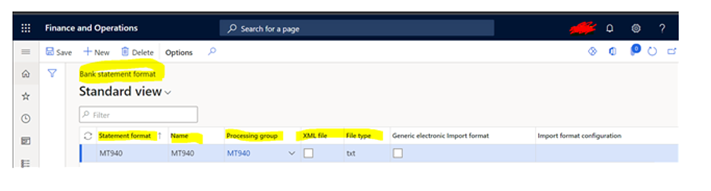
pastedimage1644591712658v1.png

But now the same thing we are trying to setup in customer environment system is not allowing and giving the error "Import format configuration must be specified."

1.Processing group which I have created is not appearing in the lookup.

2."Generic electronic import format" the check box is enabled by default and it is asking the "Import format configuration". 

3.Not able to select the check box of XML and field "File Type" is not editing to do our setup
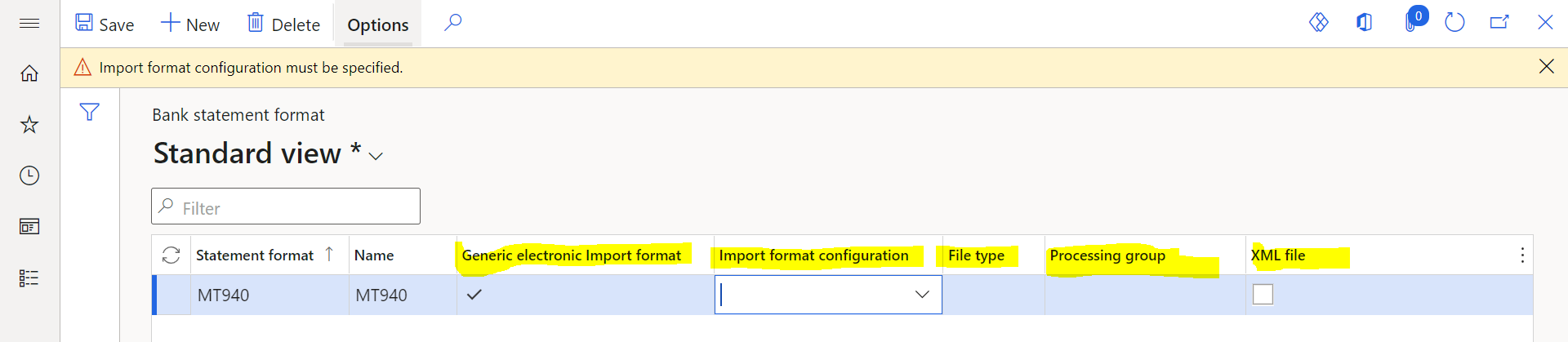
 pastedimage1644591903034v1.png

I have the same question (0)
  • Community Member Profile Picture
    on at

    Facing the same issue here.

    It will be helpful if some one can suggest the way forward. Did not find anything on docs.microsoft as well.

  • carolk Profile Picture
    210 on at

    It is has now changed to use Electronic Reporting configurations "Bank statement model" to map the bank statements,

    I have yet to find any documentation on this and the documented setup no longer works (all formats are set as Generic electronic format as default)

  • DCTX Profile Picture
    235 on at

    Following as we to have been using MT940 via DM.  I have attempted to load the ER version and the file fails to pass values as "Real."  No documentation, no support...

  • Pasqual Profile Picture
    17 on at

    I have the same problem as the documentation is not updated to the current setup. I have just created a support ticket. Keep you posted with the reply of Microsoft.

    2022_2D00_04_2D00_25-17_5F00_08_5F00_16_2D00_Bank-statement-format-_2D002D00_-Finance-and-Operations-und-17-weitere-Seiten-_2D00_-Gesch_E400_ft.pnghhh

  • Suggested answer
    saurabh bharti Profile Picture
    15,039 Moderator on at

    In latest version it has moved to ER, like processing group you might need to create ER for the same.

  • Suggested answer
    Alireza Eshaghzadeh Profile Picture
    14,738 Super User 2025 Season 2 on at

    Hi,

    I have tested in standard D365FO 10.0.26 (10.0.1192.68).

    MT940 Format cannot be activated for XML file since it have not created as XML in its design.

    pastedimage1650961190268v1.png

  • Suggested answer
    Iain Profile Picture
    20 on at

    pastedimage1650971329294v1.png

    You can use the Bank Statement Format data entity in the Data Management Framework to import the data for this configuration still (10.0.25).

    However, I believe using these formats will be deprecated in October.

    Regards

    Iain

  • DCTX Profile Picture
    235 on at

    Just a follow-up on a current status:  I imported the "(MT940 Model) MT940 Bank statement mapping to destination" version 1.7.5 dated 05/05/2022 and "Bank statement Mapping to destination" version 1.7 dated 05/06/2022 from MS's repository and was able to successfully import the MT940 file.

    This is in a test environment with version 10.0.26.  That said, it appears that the transaction description associated with the format code :86: is not pulling in (not a deal killer for sure).  Also, the Credits and Debits appear to be reversed.  We have to swap the signs in the original Data Management files in order to properly reconcile as well.  I am not sure why this is still the case here (Ex: checks are reported as a positive number and need to be negative), so I will need to figure our how to swap the signs or if anyone knows where this can be done, I would be graciously thankful!

  • Community Member Profile Picture
    on at

    Hi - could you provide the actual file/contents of what you imported? I'm struggling to even get the statement imported into Dynamics at this point, and thinking it might be due to how the file I'm imported is set up

  • Suggested answer
    Mushtaq Ahmed Profile Picture
    65 on at

    Please go to Cash &

    Bank Management>Advanced bank reconciliation setup>Bank statement Format

    Here set up the bank statement format then same will available on your required form.

Under review

Thank you for your reply! To ensure a great experience for everyone, your content is awaiting approval by our Community Managers. Please check back later.

Helpful resources

News and Announcements

Season of Giving Solutions is Here!

Quick Links

Responsible AI policies

As AI tools become more common, we’re introducing a Responsible AI Use…

Neeraj Kumar – Community Spotlight

We are honored to recognize Neeraj Kumar as our Community Spotlight honoree for…

Leaderboard > Finance | Project Operations, Human Resources, AX, GP, SL

#1
Abhilash Warrier Profile Picture

Abhilash Warrier 732 Super User 2025 Season 2

#2
André Arnaud de Calavon Profile Picture

André Arnaud de Cal... 413 Super User 2025 Season 2

#3
Martin Dráb Profile Picture

Martin Dráb 289 Most Valuable Professional

Last 30 days Overall leaderboard

Product updates

Dynamics 365 release plans
