web
You’re offline. This is a read only version of the page.
close
Skip to main content

Notifications

Announcements

No record found.

Community site session details

Community site session details

Session Id :
Customer experience | Sales, Customer Insights,...
Unanswered

Invoice Extended Amount Not Calculating On It's Own

(0) ShareShare
ReportReport
Posted on by 205

After years of not using the invoice entity in Dynamics 365 for sales I've been tasked with incorporating it into the mix for a couple different reasons.  Mainly to allow the firm to sync the invoices and transition the accounting stuff to either Dynamics for Finance or Business Central.  The goal is to do this without the use of the Quote and Order entities since they don't fit into our business. 

To give this a shot I set up our Sales Hub app into a sandbox, set up the default price list, set a product family, as well as the products under that family.  One issue is that there isn't a standardized pricing structure to what we invoice our customers.  It's constantly fluctuating which means when a user adds a product to the invoice we need to be able to input the price.  From what I've set up so far it all works as planned except that after entering the product and setting the price of that product it never calculates to the extended amount.  The only way to set the extended amount is to click on the header and enter the extended amount.  At that point it will also show on the invoice extended amount.  I feel like that field should auto calculate based on the products in the invoice.  Am I missing something here?

Hoping there is an easy setting I'm missing somewhere along the line. Any ideas?

Thanks for any insight. 

I have the same question (0)
  • LuHao Profile Picture
    40,892 on at

    Hi partner,

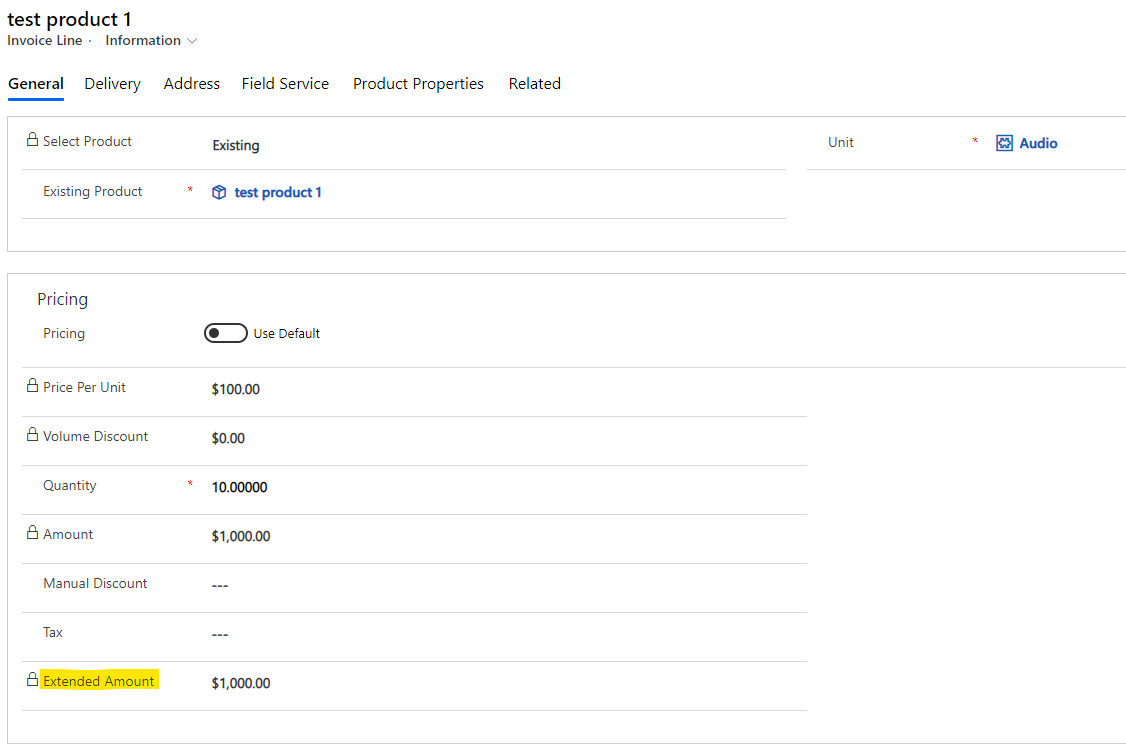
    Extended Amount is a field of Invoice Line, it shows the total amount due for the invoice product, based on the sum of the unit price, quantity, discounts, and tax. 

    pastedimage1586337181020v1.png    pastedimage1586337198388v2.png

    Please note that Extended Amount represents the total amount of Invoice Line (Invoice product), not Invoice.

    In addition, it is locked, we cannot modify it.

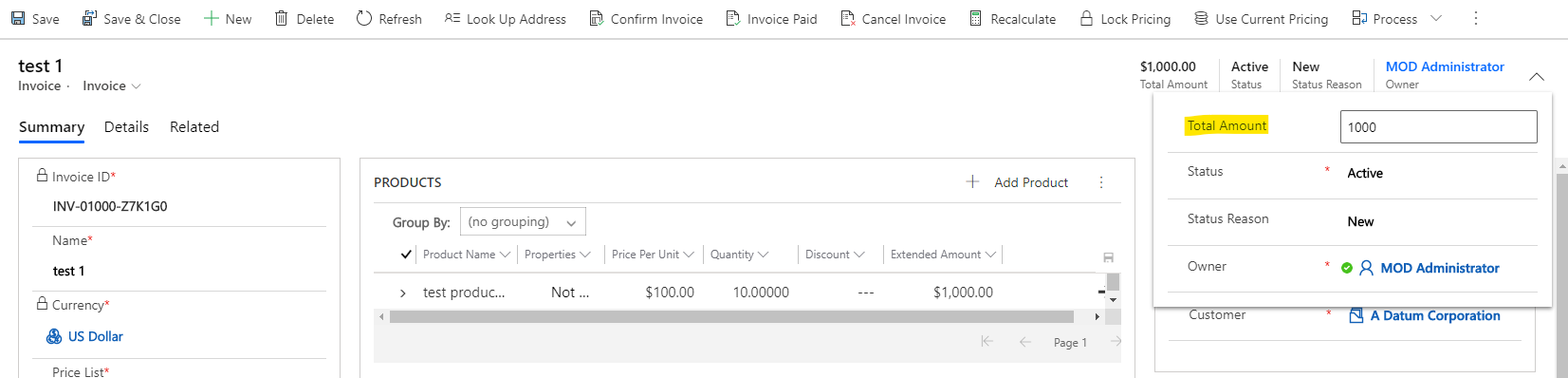
    So does "extended amount" refer to Total Amount? because we can modify it in the head.
    pastedimage1586337361208v3.png

    If so, it shows the total amount due, calculated as the sum of the products, discount, freight, and taxes for the invoice.

    Its value is actually automatically generated based on Invoice products. Of course, you can also modify it manually on the head. After you change the Invoice product, it should be updated automatically.

    The problem you are experiencing now is that Total Amount is no longer automatically updated, right?

    If so, please check if Detail Amount, Pre-Freight Amount and Total Tax are updated automatically by changing the Invoice products.

  • clw Profile Picture
    205 on at

    Hi Hao,

    Thank you for the time to put together such a detailed reply.  I really appreciate your time.

    I follow what you're describing.  The issue I'm running into is that when adding an Invoice Product to an Invoice and setting the price (either default price or override price) as well as adjusting the quantity followed by hitting save, the Invoice Product never calculates an Extended Amount.

    Likewise, neither the Detail Amount, Pre-Freight Amount, nor Total Tax amount auto calculate.  My assumption is that if they were auto calculating that total would be calculated down to the Total Amount field.  Like you detailed, I can update the Total Amount in the header, but I need to understand why these things are not auto calculating.  My hope is that a user can add the Invoice Product's and the Total Amount will calculate itself without them having to manually enter it in the header.

    Any idea you can think of as to why none of these fields are auto calculating?  I can add screen shots when I'm back in front of my computer tomorrow for clarification if needed.

    One thing to add... While we don't have a need for using the Quote entity it does auto calculate all of those fields as expected.  So the Quote works but the Invoice doesn't for some reason. 

    Thank you,

    Chris

  • LuHao Profile Picture
    40,892 on at

    Hi partner,

    In the Sales Hub, switch to App Settings area, open Product Catalog Settings, check if Use system pricing calculation is Yes. If not, select it to Yes

    pastedimage1586418326386v1.png

  • clw Profile Picture
    205 on at

    Hi Hao,

    I've got the settings configured just the same as you do.  Still having the issue though.  Here is what I'm getting when adding an Invoice Product to the Invoice.  

    Screen-Shot-2020_2D00_04_2D00_09-at-12.35.28-PM.png

  • LuHao Profile Picture
    40,892 on at

    Hi partner,

    Please check if you have plugins on Invoice Line.

    If not, then I would recommend you raise a support ticket for this.

  • clw Profile Picture
    205 on at

    So I ended up submitting the ticket to Microsoft to investigate.  

    Though to throw another question into the mix, I logged in as one of our sales people to test some permissions on a totally unrelated entity.  While in there I figured I'd try the invoice under that security profile...it worked!  I don't know how but it did.  Went back to my administrator account and... it still doesn't work!

    I'm just left scratching my head...

  • SergioBap Profile Picture
    15 on at

    Just came across a similar issue and realized that when the price list is not filled in at the invoice level, the amounts won't calculate automatically. Maybe this was the issue.

  • Inogic Profile Picture
    682 on at

    Not sure on the price list optional. Actually it should calculate the extended amount even if price list is not filled in on invoice level, so can you make sure to check the “System pricing calculation” property is enabled or not, as shown in the below screenshot. If the “System Pricing calculation”, is enabled then it will work.

    Product-catlog.jpg

    Hope this helps.

    Thanks!

  • SergioBap Profile Picture
    15 on at

    Hi Roohi, in my case the System Pricing Calculation was set yes, and still it didn't calculate. The moment I filled in the pricelist it did. That is why I thought it would be an interesting clue to someone who comes across this thread (I know I did :)). Cheers,

Under review

Thank you for your reply! To ensure a great experience for everyone, your content is awaiting approval by our Community Managers. Please check back later.

Helpful resources

Quick Links

Responsible AI policies

As AI tools become more common, we’re introducing a Responsible AI Use…

Neeraj Kumar – Community Spotlight

We are honored to recognize Neeraj Kumar as our Community Spotlight honoree for…

Leaderboard > Customer experience | Sales, Customer Insights, CRM

#1
Tom_Gioielli Profile Picture

Tom_Gioielli 170 Super User 2025 Season 2

#2
#ManoVerse Profile Picture

#ManoVerse 70

#3
Jimmy Passeti Profile Picture

Jimmy Passeti 50 Most Valuable Professional

Last 30 days Overall leaderboard

Product updates

Dynamics 365 release plans