web
You’re offline. This is a read only version of the page.
close
Skip to main content

Announcements

No record found.

News and Announcements icon
Community site session details

Community site session details

Session Id :
Service | Customer Service, Contact Center, Fie...
Answered

Cannot add a New Contact in the Contact lookup in a Case.

(0) ShareShare
ReportReport
Posted on by 125

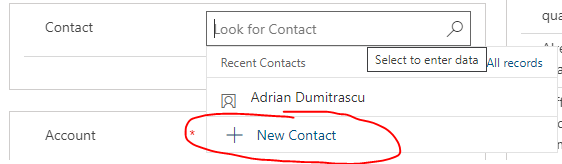
When adding a contact via the lookup field to an Account or Opportunity, you have the option to add a new contact if the person you want is not yet listed in Dynamics 365.

However on a Case you cannot do this, which is frustrating for the Service team as they need to navigate away from the case to add in the contact, then come back.

Specifically, this is what we see for an opporunity:
pastedimage1595387105498v1.png

When it comes to a Case, I see the following:

pastedimage1595387164471v2.png

Is there a setting to allow this?

Note: I can see that in the old web interface you bring up "more records" and can add a new contact.

  • Verified answer
    Anthony Dong Profile Picture
    Microsoft Employee on at

    Hi, 

    Thanks for reporting this issue. Yes, we can replicate it in local environment. In UCI, there is no option to add new Contact in the Lookup field of Case entity 

    pastedimage1595394048183v1.png

    In Classic (old) web, there will be "New" button under "More records"
    pastedimage1595394090873v2.png

    This should be a product bug, 

    we suggest you to contact Microsoft Support team to confirm it. 

  • Verified answer
    Pankaj Gogoi Profile Picture
    3,177 on at
  • Community Member Profile Picture
    on at

    Good morning,

    I have this issue in current version on case form where new contact is missing

    2021 wave release 1

    9.2.2.1041.00172

    this is on the case main form using UCI

  • Suggested answer
    ScottColbourne Profile Picture
    125 on at

    I got this fixed using Microsoft Support.

    From memory the fix is simply to remove the contact lookup field from the form and then re add it.

    It then goes onto the form with the background functionality to add a new contact

  • Community Member Profile Picture
    on at

    Thanks Scott,

    this worked a treat

    Una

Under review

Thank you for your reply! To ensure a great experience for everyone, your content is awaiting approval by our Community Managers. Please check back later.

Helpful resources

Quick Links

Season of Sharing Community Challenge Winners!

Congratulations to our community stars!

Women in Power Builds Momentum

Expanding mentorship, skilling, and AI innovation

Congratulations to the August Top 10 Community Leaders

These are the community rock stars!

Leaderboard > Service | Customer Service, Contact Center, Field Service, Guides

#1
Travis South Profile Picture

Travis South 54

#2
11manish Profile Picture

11manish 37 Super User 2026 Season 2

#3
ParthPatel249 Profile Picture

ParthPatel249 33

Last 30 days Overall leaderboard

Featured topics

Product updates

Dynamics 365 release plans



