web
You’re offline. This is a read only version of the page.
close
Skip to main content

Announcements

News and Announcements icon
Community site session details

Community site session details

Session Id :
Small and medium business | Business Central, N...
Suggested Answer

Purchase Order Report Filters "No." not drilldown Option

(0) ShareShare
ReportReport
Posted on by 666

Good day,

I'm working on a custom report for Purchase Order and Purchase Quotes. I noticed the filters for  Purchase header "No." is not a drilldown option but in Sales Shipment "No." is a drilldown option. I want to make the Purchase Header "No." 'n dill down filter.

Up until now I have tried the following. 
 1 . In the Purchase Header Table. I added a Table Relation to "No." referencing Purchase Header ( referencing the Table it is in). I got the drill down but on selection the ID was either 1 or 0.
 2.  In the Report under data Item Purchase Line I added a RequestFilterFields= "Document No.". I got a drilldown on Document No. but only if I select a Vendor No. ( My Purchase Line is nested inside Purchase Header)

How would I go around to make the purchase Header "No." an Independent Drilldown option?

Sales Shipment Report Filter 
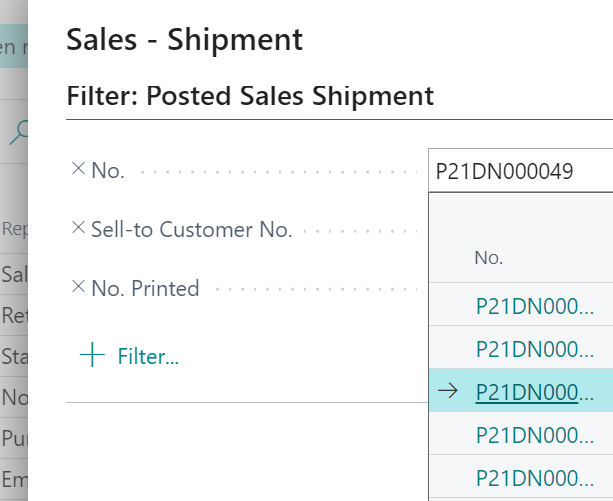
pastedimage1621493132705v1.png

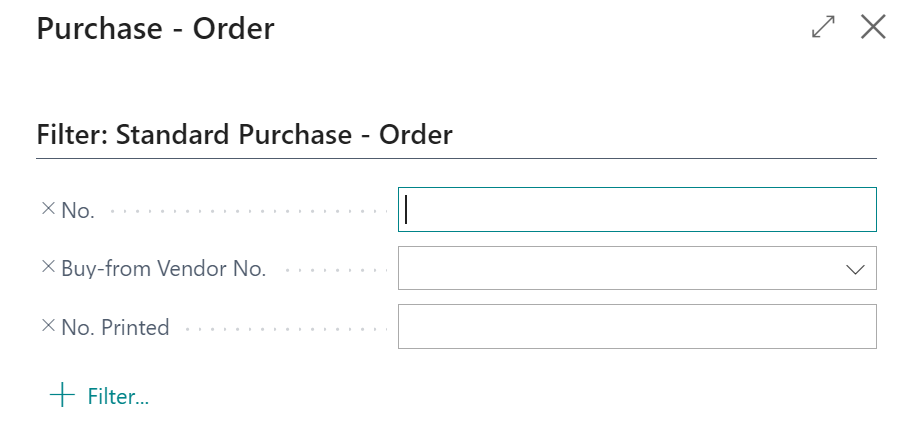
Purchase Order Report Filter

pastedimage1621493177770v2.png

I have the same question (0)
  • Suggested answer
    JAngle Profile Picture
    159 on at

    Primary key of the header table is “Document Type”. Having both the quotes and orders makes this more challenging. If you try setting the report option to use a variable and filter on the “Document Type” you may stand a chance of it working.

    It is not similar to a posted sales shipment as that table holds only shipments not quotes, orders, invoices, blanket orders or purchase return orders.

  • Hein Kruger Profile Picture
    666 on at

    Thank you for the reply.  I have  Filtering by Document type (type Order) in the Data Item (Purchase Header) so it only shows orders. I think creating an additional variable will be the way forward.

Under review

Thank you for your reply! To ensure a great experience for everyone, your content is awaiting approval by our Community Managers. Please check back later.

Helpful resources

Quick Links

Season of Sharing Community Challenge Launch!

Jump in, show your community spirit, and win prizes!

Women in Power Builds Momentum

Expanding mentorship, skilling, and AI innovation

Congratulations to the May Top 10 Community Leaders

These are the community rock stars!

Leaderboard > Small and medium business | Business Central, NAV, RMS

#1
OussamaSabbouh Profile Picture

OussamaSabbouh 2,353 Super User 2026 Season 1

#2
YUN ZHU Profile Picture

YUN ZHU 1,808 Super User 2026 Season 1

#3
AndrewThomas81 Profile Picture

AndrewThomas81 1,371

Last 30 days Overall leaderboard

Featured topics

Microsoft Training Manuals

Product updates

Dynamics 365 release plans