web
You’re offline. This is a read only version of the page.
close
Skip to main content

Notifications

Announcements

No record found.

Community site session details

Community site session details

Session Id :
Microsoft Dynamics AX (Archived)

How to Hide the Values in a Field

(0) ShareShare
ReportReport
Posted on by 132

Dear all,

How to Hide the values (Closed in a Field (Agreement Status) in this Form ?
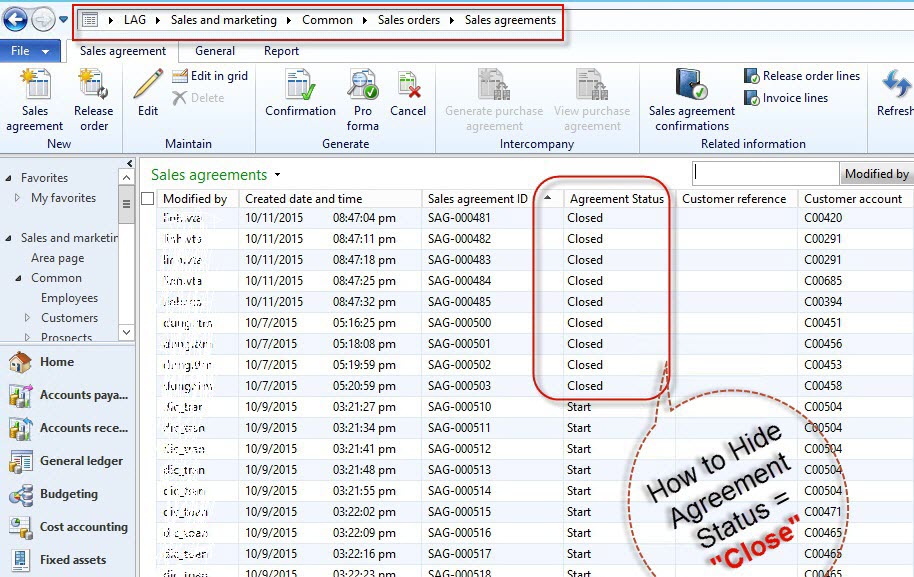
screenshot.1.jpg

If I use the Security Role to do this is right  and how to use the Security Role for do to this?

Anybody know please show me.

Thanks all.

*This post is locked for comments

I have the same question (0)
  • Mea_ Profile Picture
    60,284 on at

    You want to hide all records that has status = closed from grid for specific users ?

  • Living Color Profile Picture
    132 on at

    Dear ievgen Miroshnikov,

    Yes. I want to hide all records that has status = closed from grid for specific users.

  • Suggested answer
    Mea_ Profile Picture
    60,284 on at

    You need to use XDS msdn.microsoft.com/.../hh272123.aspx

    You need to create new policy and assign it to user role you want to restrict.

    You can find all the details and walkthrough there.

  • Suggested answer
    Jonathan  Halland Profile Picture
    11,310 on at

    Hi 

    Do you want to hide these records for convenience or for security reasons?

    There are two fairly simple solutions if you want to do this simply for convenience.

    1. Per user you can filter your records, save the filter and then associate this filter with a custom favourite in AX. E.G. "Open Agreements" etc...

    2. With a small amount of "development" you can create a permenant "Open Agreements" link. This should take less than 5 minutes.

    Basically you need to

    - copy the existing Query associated with the Sales Agreement form. 

    - rename query to "SalesAgreementOpen" and add a range filter to exclude "Closed" agreements

    - copy the existing "Sales Agreement" menu-item and rename it to SalesAgreementOpen and provide a relevant label

    - Change the query node of menu-item to your new query.

    - Add your menu-item to the Sales and Marketing Menu.

  • Mea_ Profile Picture
    60,284 on at

    I think Huy mentioned security role so it's probably connected to security :)

    In this case user can always remove filter criteria and remove restriction this way.

Under review

Thank you for your reply! To ensure a great experience for everyone, your content is awaiting approval by our Community Managers. Please check back later.

Helpful resources

Quick Links

Responsible AI policies

As AI tools become more common, we’re introducing a Responsible AI Use…

Neeraj Kumar – Community Spotlight

We are honored to recognize Neeraj Kumar as our Community Spotlight honoree for…

Leaderboard > 🔒一 Microsoft Dynamics AX (Archived)

#1
Martin Dráb Profile Picture

Martin Dráb 4 Most Valuable Professional

#1
Priya_K Profile Picture

Priya_K 4

#3
MyDynamicsNAV Profile Picture

MyDynamicsNAV 2

Last 30 days Overall leaderboard

Featured topics

Product updates

Dynamics 365 release plans



