web
You’re offline. This is a read only version of the page.
close
Skip to main content

Notifications

Announcements

No record found.

Community site session details

Community site session details

Session Id :
Microsoft Dynamics AX (Archived)

Vendor Aging - Previous & Rerun Reports - Not Balance

(0) ShareShare
ReportReport
Posted on by

Hi Everyone,

I rerun a vendor aging and compared this aging on the previous report and found out that my aging balance are not the same. Found the variance but I can't find the reason why I have missing invoices for this vendor. Maybe I have the wrong criteria.

.1 Criteria used for the aging report, I need to get vendor aging for OCT29, 2016
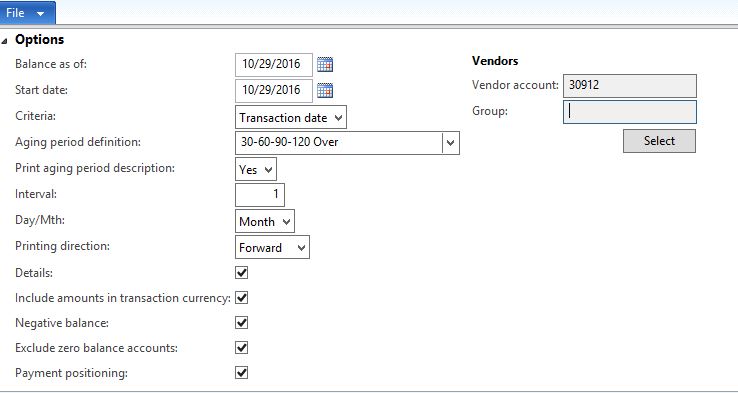
30912-Aging-_2D00_-NOV28-_2D00_-Criteria.JPG

.2 Run date is OCT31, 2016, 3 invoices are outstanding
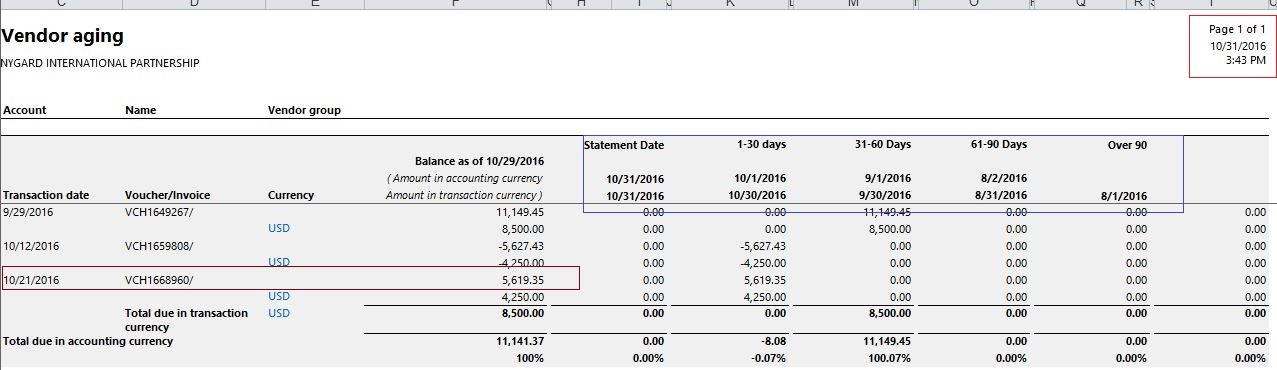
30912-Aging-_2D00_-OCT31.JPG

.3 Run date is NOV28, 2016, 1 invoice outstanding, Invoice amount from above report not the same and aging period not the same
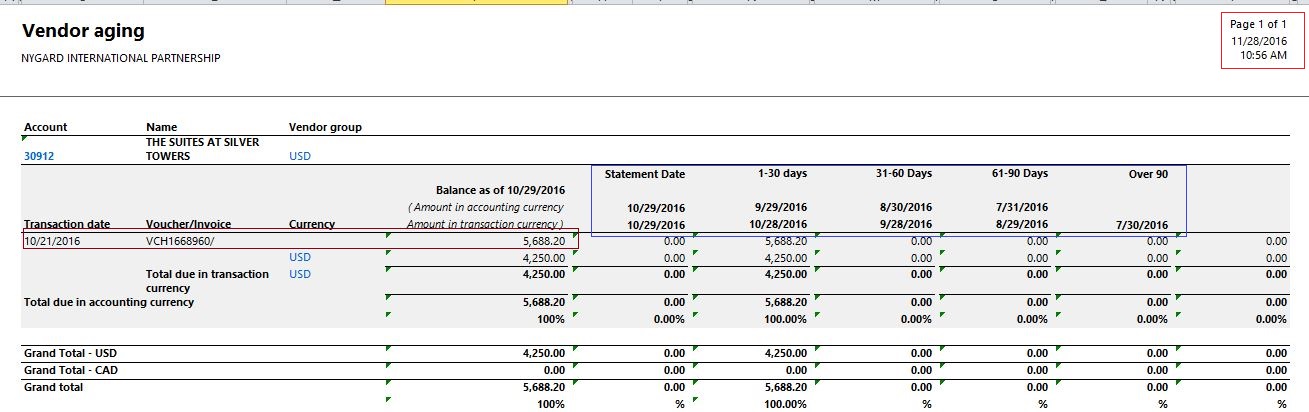
30912-Aging-_2D00_-NOV28.JPG

Anyone can help me achieve the amounts from previous report?

Thanks,

Jesa

*This post is locked for comments

I have the same question (0)
  • Community Member Profile Picture
    on at

    Hi All,

    Can anyone help me with the above. I am reconciling AP subledger and GL, the discrepancy is from the above transactions.

    Thanks,

    Jesa

  • Ludwig Reinhard Profile Picture
    Microsoft Employee on at

    Hi Jesa,

    Can this issue be caused by the fact that you entered the same date in the start and balance date fields?

    Please also have a look at the following site

    technet.microsoft.com/.../aa620148.aspx

    Best regards

    Ludwig

  • Community Member Profile Picture
    on at

    Hi Ludwig,

    I was able to fix the aging periods but was not able to run the same amount. Tried two criteria:

    .1 Printing direction - Forward

    30912-Aging-_2D00_-NOV30-_2D00_-Criteria-backward.jpg

    .2 Printing direction - backward

    30912-Aging-_2D00_-NOV30-_2D00_-Criteria-backward.jpg

    Both report are the same. Is there another way to check/reconcile GL and AP sub ledger? I have to run a report by transaction currency, the rest of the reports in AP module run by accounting currency.

    Thank You,

    Jesa

  • Ludwig Reinhard Profile Picture
    Microsoft Employee on at

    Hi Jesa,

    Is this a foreign currency related transaction?

    Can you try to uncheck the parameter 'show amounts in transaction currency' and does this change anything?

    Can you also try to uncheck the parameter 'payment positioning' and check whether this makes a difference?

    Other Options to reconcile GL and AP are for example:

    * The GL reconciliation reports (GL/reports/reconciliation/vendor)

    * Using the total of the vendor Balance list and compare it with what has been posted on the vendor summary accounts that are Setup in the vendor posting profiles (This is probably more a manual way of doing the reconciliation).

    Hope this helps,

    Ludwig

  • Community Member Profile Picture
    on at

    Hi Ludwig,

    The transactions are in USD. I have tried all the options in the Vendor aging it did not make any difference I still get the same report.

    Is there a way to run the Vendor Balance list by transaction currency?

    Does vendor aging has to do with the revaluation? The 1st report (OCT31) was ran before the revaluation and the 2nd report was after.

    Thanks,

    Jesa

  • Ludwig Reinhard Profile Picture
    Microsoft Employee on at

    Hi Jesa,

    So USD is a foreign currency or is it the accounting currency in your system?

    The vendor balance list shows you the amounts in accounting currency. This report does not have an option to show the amounts in transaction curreny. Yet, why do you need the transaction currency for reconciliation purposes?

    Regarding your last question, the answer is Yes, the vendor aging report balances are influenced by foreign currency revaluations that you run.

    Best regards,

    Ludwig

  • Community Member Profile Picture
    on at

    Hi Ludwig,

    Yes USD is a foreign currency. The accounting currency is in CAD.

    We have different main account for AP (for every currency). I have to balance the sub ledger and GL by currency.

    Regarding your last question, the answer is Yes, the vendor aging report balances are influenced by foreign currency revaluations that you run.

    ** Does this mean that my sub ledger and GL from prior periods will no longer balance? Coz this is the scenario:

    .1 OCT31 run the vendor aging BAL as of OCT29 - $2,593,007.31 USD

    .2 NOV18 run the vendor aging BAL as of OCT29 - $2,597,257.31 USD

    .3 Trial balance from JAN31 to OCT29 - 2,593,007.31 USD

    How did it happen that my amounts differ when I am running a balance of the same date? Is this because of the revaluation? When I traced the difference it is because of the above screenshots.

    Is there any way that I can make the amounts the same as of what was being ran before? I have to balance my GL for the last 25 months and some are balance and some has difference.

    Thanks,

    Jesa

  • Suggested answer
    Ludwig Reinhard Profile Picture
    Microsoft Employee on at

    Hi Jesa,

    If you open the periodic foreign currency revaluation form that you can identify in AP and analyze the voucher. Does the total of this voucher than add up to the difference that you showed above?

    Another question about your periods. Once you created your October financial reports, didn't you close ('lock') the October for postings? If you are doing this regularly you can prevent that postings in prior periods will be created.

    Regarding the 'correction':

    This is not that easy as there is no automatic reversal functionality available. You cannot really do something except wait until the unrealized foreign currency gains/losses are corrected when they are finally settled e.g. through a payment.

    What I could imagine as a kind of workaround would be to enter two offsetting USD lines in a GL journal that are recorded with different FX rates that make up the total difference. So, you post line 1 with lets say 100 USD = 90 CAD and line 2 with -105USD = -90CAD. The 5 USD difference should then be identical to your foreign currency difference. Yet applying this workaround requires some detailed previous analysis of the difference that you identified and you have to ensure that you reverse the two posting lines at the time the original vendor invoices are finally paid. That is, when the exchange rate gains/losses are realized. ... and not to forget, please test this throughly in a demo/test environment before.

    Hope this helps,

    Ludwig

Under review

Thank you for your reply! To ensure a great experience for everyone, your content is awaiting approval by our Community Managers. Please check back later.

Helpful resources

Quick Links

Responsible AI policies

As AI tools become more common, we’re introducing a Responsible AI Use…

Neeraj Kumar – Community Spotlight

We are honored to recognize Neeraj Kumar as our Community Spotlight honoree for…

Leaderboard > 🔒一 Microsoft Dynamics AX (Archived)

#1
Martin Dráb Profile Picture

Martin Dráb 4 Most Valuable Professional

#1
Priya_K Profile Picture

Priya_K 4

#3
MyDynamicsNAV Profile Picture

MyDynamicsNAV 2

Last 30 days Overall leaderboard

Featured topics

Product updates

Dynamics 365 release plans



