web
You’re offline. This is a read only version of the page.
close
Skip to main content

Notifications

Announcements

No record found.

Community site session details

Community site session details

Session Id :
Microsoft Dynamics NAV (Archived)

Dynamics CRM Connector issue with custom NAV tables

(0) ShareShare
ReportReport
Posted on by 351

We are facing a peculiar problem with the Dynamics Connector for CRM. We are using the connector for integration between NAV 2015 and CRM 2015 On-Premise. There is a custom table called Work Order created in both NAV and CRM. While configuring the CRM adapter I am able to see all custom entities.
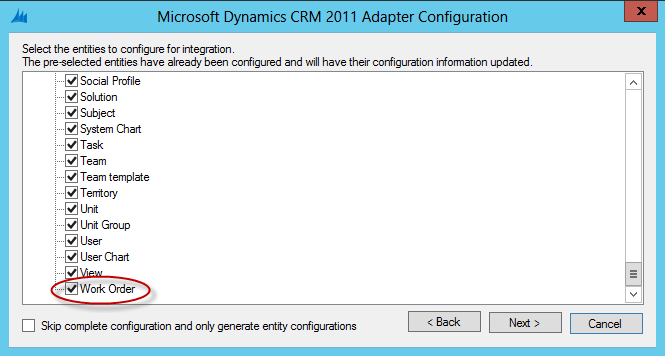
5468.CRM-Adapter-Config.png

Even though the NAV side has been updated i.e. the functions of CreateIntegrationPageList and IsIntegrationRecord under CodeUnit 5150 of Dynamics for the Work Order table, and having disabled and enabled the Enable Connector in the Marketing Setup area, the custom table still does not reflect in the NAV adapter configuration area. It still shows only the standard ones.
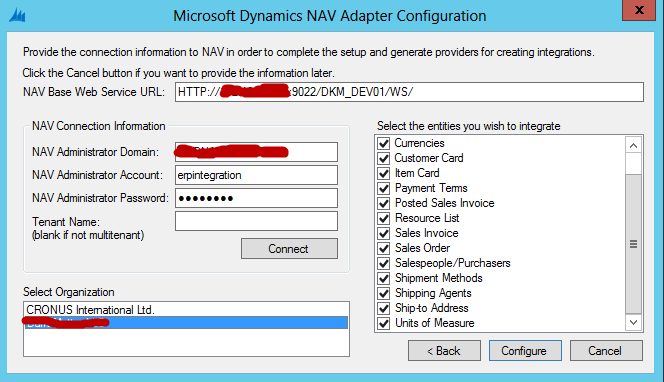
8182.NAV-Adapter-Config.png

There are no special characters in the company name which may hinder creation of the map folder. The WSDL of the new table is also rendering fine.
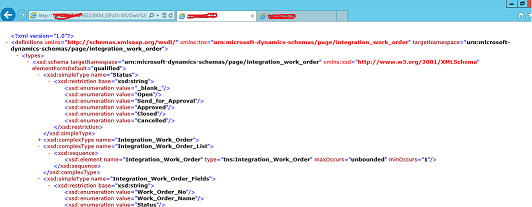
WSDL-rendering.png


Is there something we have missed?

*This post is locked for comments

I have the same question (0)
  • Suggested answer
    Saurabh Shah Profile Picture
    4,560 on at

    Hi,

    Please refer below link for your reference. It might help in your case to solve it.

    crmbusiness.wordpress.com/.../crmnav-connector-how-to-map-a-custom-table-not-included-in-the-standard-maps

    Regards,

    Saurabh Shah

  • Austin Saldanha Profile Picture
    351 on at

    Hi Saurabh

    Thank you for your response.

    We have followed every step that these blogs are talking about. Unless there is an issue with the version of the connector that we are using which is last updated version 304.1. In fact most of these blogs are talking about changes in the NAV 2009 version of the codeunit 5150 whereas in NAV 2015 there are only two functions where changes are to be made. 

    We are talking about NAV 2015 here so I really do not know whether custom NAV tables have been tested with this version or whether these blogs are applicable to this NAV version.

    What I may need to check out now is try to create a custom table in NAV 2009 and see whether the connector works.

    However, if you can think of any thing that is required please do let me know.

    Thanks again!!!

    Austin

  • Austin Saldanha Profile Picture
    351 on at

    I tested the same connector with NAV 2009 and the custom table was visible. This means that there must be some functions in NAV 2015 which affect integration. Our developers informed me that in NAV 2015 under codeunit 5150 Integration Management there are only two functions as against three functions in NAV 2009.

    If any one is aware of any other function than the one I have mentioned above please do let me know.

  • Verified answer
    Austin Saldanha Profile Picture
    351 on at

    Our tech team has resolved the issue with the connector.

    Basically, the web services of NAV 2015 were rendering the XML correctly since all data is taken from the Web Services table. However, when the connector is used for configuring the NAV adpater it uses data from the Integration Pages table. If this table is already setup the first time with the standard pages then the NAV code written for setting up pages again with custom tables does not run the code. Our tech head just disabled the conditional code for the same and now I am able to see the custom table in the configuration also. Works like a charm!!

    The integration code to fix in CU 5150 are as follows:

    Look for this code under Enable Connector function and comment it.

    IF NOT IntegrationPage.FINDFIRST THEN

    Look for this code under SetupIntegrationPages function and comment both lines

    IF NOT IntegrationPage.INSERT THEN

       ERROR(AlreadyExistsErr,IntegrationPage.TABLECAPTION,Webservice."Service Name");

  • Suggested answer
    Community Member Profile Picture
    on at

    Hi Austin,

    Thanks a lot for your post.

    I have created a map with Account --> NAV Vendor Card (Similar to Account --NAV Customer Card)and try to replicate the Account into NAV Vendor but have an issue that Account data is not getting integrated in NAV. Is there anything i am missing or need to setup. Connector Log does not show anything.

  • Community Member Profile Picture
    on at

    In Addtion to above i am getting following error:

    Table Id 18 of a supplied key does not match Table Id 23 of the page 26  source table. in the connector log.

  • Austin Saldanha Profile Picture
    351 on at

    Hi Rajesh, please share details of your setup so I can make suggestions accordingly.

  • Community Member Profile Picture
    on at

    Hi Austin, can you please share more details of how you enabled other tables in NAV on the connector. I'm currently facing a challenge where I need to expose the Customer Ledger Entries table on NAV 2015.

Under review

Thank you for your reply! To ensure a great experience for everyone, your content is awaiting approval by our Community Managers. Please check back later.

Helpful resources

Quick Links

Responsible AI policies

As AI tools become more common, we’re introducing a Responsible AI Use…

Neeraj Kumar – Community Spotlight

We are honored to recognize Neeraj Kumar as our Community Spotlight honoree for…

Leaderboard > 🔒一 Microsoft Dynamics NAV (Archived)

Last 30 days Overall leaderboard

Featured topics

Product updates

Dynamics 365 release plans
