web
You’re offline. This is a read only version of the page.
close
Skip to main content

Notifications

Announcements

No record found.

Community site session details

Community site session details

Session Id :
Microsoft Dynamics AX (Archived)

CheckBox for Filter on Form

(0) ShareShare
ReportReport
Posted on by 4,624

Hi ,

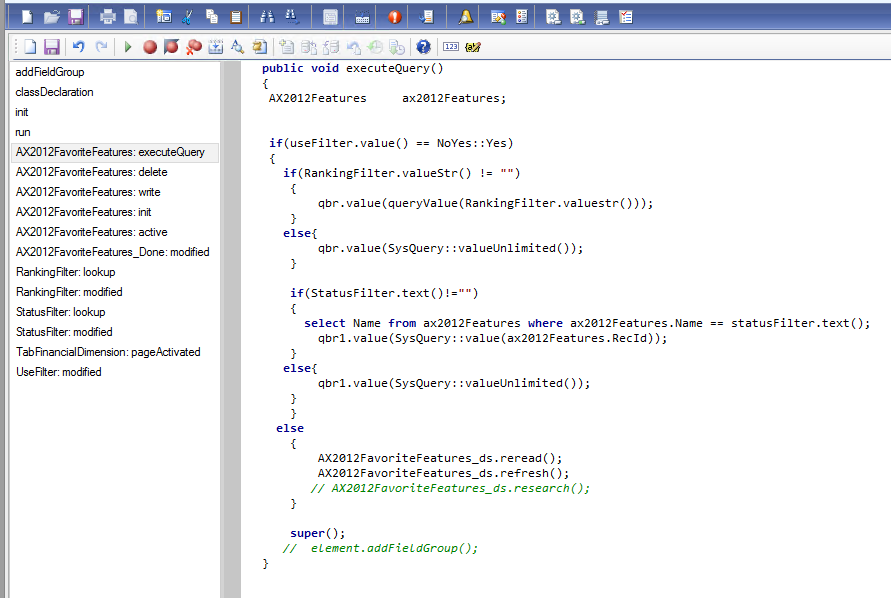
I have used one check box control(unbound control) on form and there is two filter on form . I want if this check box control is enabled then both filter work . 

I have written below code to enable filter if thischeck box is enabled :
4834.Capture.PNG

this work fine when i select check box ,filter would work correctly but when i changed back this check box to disable ,i want all records should visible again on form?

Note: I have called this method in Modifed() of check box control.

please suggest?

*This post is locked for comments

I have the same question (0)
  • Suggested answer
    Vilmos Kintera Profile Picture
    46,149 on at

    You could do QueryBuildRange.enable(false); or true in the modified method of your unbound checkbox after the super() call, to entirely take off your range, this way you could eliminate checking the values of the checkboxes in the executeQuery.

    Also make sure you do not have the same range added multiple times, to ensure that, when you assign it to the variable, use SysQuery::findOrCreateRange().

    Doing a reread/refresh for the same datasource where you are in the executeQuery method also does not seem correct to me. You are not following the indentations correctly as well, which makes your code very hard to interpret and read.

  • Rohin Profile Picture
    4,624 on at

    If i am understanding you correctly , i have called QueryBuildRange.enabled(false) in Else loop , like below:

    7536.Capture1.PNG

    Not working even now filter is also not working (if check box is enabled).

    looking forward your suggestion

  • Suggested answer
    Vilmos Kintera Profile Picture
    46,149 on at

    No, I said to enable/disable your range in the modified method of your checkbox, and remove the incorrect logic that does not work in your executeQuery method. Try that.

  • Rohin Profile Picture
    4,624 on at

    Okay , i saw later your edited 1st comment. Now my modified method looks like:

    public boolean modified()

    {

       boolean ret;

      ret = super();

      if(ret)

       {

        AX2012FavoriteFeatures_ds.executeQuery();

       }

       else{

           qbr.enabled(false);

           qbr1.enabled(false);

       }

       return ret;

    }

    but its not working , can you please correct this ?

  • Suggested answer
    Vilmos Kintera Profile Picture
    46,149 on at

    Try this:

    public boolean modified()
    { boolean ret; ret = super(); qbr.enabled(!this.checked()); // or maybe the other way around depending on you want to do it on checked or unchecked qbr1.enabled(!this.checked()); AX2012FavoriteFeatures_ds.research(true); return ret; }

Under review

Thank you for your reply! To ensure a great experience for everyone, your content is awaiting approval by our Community Managers. Please check back later.

Helpful resources

Quick Links

Responsible AI policies

As AI tools become more common, we’re introducing a Responsible AI Use…

Neeraj Kumar – Community Spotlight

We are honored to recognize Neeraj Kumar as our Community Spotlight honoree for…

Leaderboard > 🔒一 Microsoft Dynamics AX (Archived)

#1
Martin Dráb Profile Picture

Martin Dráb 4 Most Valuable Professional

#1
Priya_K Profile Picture

Priya_K 4

#3
MyDynamicsNAV Profile Picture

MyDynamicsNAV 2

Last 30 days Overall leaderboard

Featured topics

Product updates

Dynamics 365 release plans



