web
You’re offline. This is a read only version of the page.
close
Skip to main content

Notifications

Announcements

No record found.

Community site session details

Community site session details

Session Id :
Microsoft Dynamics NAV (Archived)

"Run in User Session" field in Job Queue Entry in case of error

(0) ShareShare
ReportReport
Posted on by

Hi Everyone,

I'd like to understand if I'm facing with a BUG/Unmanaged error or if it's a design issue.

I'm creating by code a Job Queue Entry and with the 

"Run in User Session" := TRUE;

than passing this record to the Job Queue -Enqueue codeunit.

Looking the Job Queue Entry record before has been executed it has the following fields populated:

  • User Service Instance ID (40)
  • User Session ID (32)
  • User Session Started (41)

The issue is that in case of error the same fields will became empty and if I try to use the action button "Set Status to Ready" this Job Queue Entry will fail with the following generic error message:
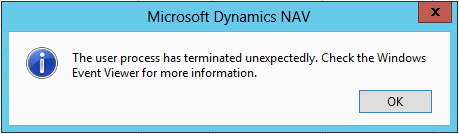
Obviously searching on the Event Viewer you will not find anything.

My questions are:

  1. how to manage this Job Queue Entry? The only solution seems delete it and recreate it.
  2. Is this a bug?

Thank you in advance for your replies

Best Regards
  Sergio Castelluccio

*This post is locked for comments

I have the same question (0)

Under review

Thank you for your reply! To ensure a great experience for everyone, your content is awaiting approval by our Community Managers. Please check back later.

Helpful resources

Quick Links

Responsible AI policies

As AI tools become more common, we’re introducing a Responsible AI Use…

Neeraj Kumar – Community Spotlight

We are honored to recognize Neeraj Kumar as our Community Spotlight honoree for…

Leaderboard > 🔒一 Microsoft Dynamics NAV (Archived)

Last 30 days Overall leaderboard

Featured topics

Product updates

Dynamics 365 release plans




