web
You’re offline. This is a read only version of the page.
close
Skip to main content

Notifications

Announcements

No record found.

Community site session details

Community site session details

Session Id :
Finance | Project Operations, Human Resources, ...
Answered

How do i convert this CSV custom format to ValidTo date format in X++

(0) ShareShare
ReportReport
Posted on by

Hi expert,

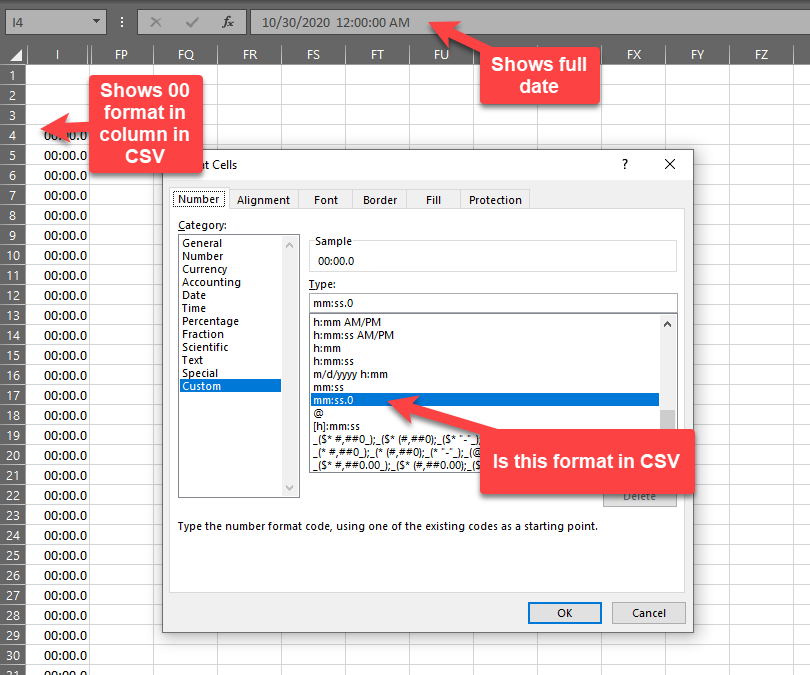
I have csv file which will send date as below format only,i.e. cannot ask user to make any changes in this format .

I also have code to convert date to Ax acceptable date which works when the format of date is as date in CSV but not for below scenario.

Please suggest how do i fix this in way that the below CSV format is converted into Ax date format currently it keeps throwing the error from dateNull() code block


CSV format
pastedimage1605205519088v1.png

AX code for converting to Ax acceptable date format. (Validto Date.)

Please note mytable.myDate EDT is Validto Date.

My Main class
{
               myTable.myDate   = this.ConvertDates(conPeek(_record,9));

                if (myTable.myDate == dateNull())
                {
                    throw error(strFmt('%1 Error Invalid Date',DateTimeUtil::getSystemDateTime()));
                }
}   

protected date convertDates(str dateTime)
{
    try
    {
        if (strLen(datetime) > 10)
        {
            return DateTimeUtil::date(str2DateTime(datetime,321));
        }
        else
        {
            return str2date(datetime,213);
        }
    }

    catch (Exception::Error)
    {
        throw error (strfmt("@SYS63093",funcName()));
    }
}

I have the same question (0)
  • Gunjan Bhattachayya Profile Picture
    35,423 on at

    Hi Mav,

    Is it not working for the scenario where the date is "10/30/2020 12:00:00:AM"?

  • André Arnaud de Calavon Profile Picture
    301,014 Super User 2025 Season 2 on at

    Hi Mav,

    You have opened the CSV file in Excel. Can you open the CSV file in e.g. Notepad and share the format as shown there?

  • Martin Dráb Profile Picture
    237,874 Most Valuable Professional on at

    What value do you have in dateTime variable in convertDates() method? And what does it return? Debugging your code should have been your first thing to do.

    It would also help if you told us more about your problem than just that it doesn't work.

    Your code will fail if dateTime isn't in the precise format expected by str2DateTime(). I suspect that's the case. You may need a better way of parsing, such as using System.DateTime::ParseExact().

  • Mav Profile Picture
    on at

    HI all ,

    Thanks for your responses.

    @Gunjan I cannot try that format as the user receives this format from a system & they cannot change anything at their end,  

    @Andre while opening it in notepad it shows like  "2020-10-30 00:00:00.000"

    @Martin tried below code, unable to debug as job wont run & there are no errors.

    Please advise 

    static void dateCOnvert (Args _args)
    {
        str myDateStrFormat = '2020-10-30 00:00:00.000';
        ValidToDate myTargetDateFormat;
       
        System.Globalization.CultureInfo culture = System.Globalization.CultureInfo::get_InvariantCulture();
        myTargetDateFormat = System.DateTime::ParseExact(myDateStrFormat,'MM/dd/yyyy H:mm',culture);
        info(strFmt("%1",myTargetDateFormat));
     
        pause;
        
    }

  • Verified answer
    Gunjan Bhattachayya Profile Picture
    35,423 on at

    Hi Mav,

    Since you don't need the time, can you not try dealing with the date part only by splitting the dateTime value?

    str dateStr = "2020-10-30 00:00:00.000";
        
    info(strFmt("%1", str2Date(subStr(dateStr, 0, 10), 321)));
    

  • Verified answer
    Martin Dráb Profile Picture
    237,874 Most Valuable Professional on at

    If your dateConvert() doesn't run, debug the code that should be calling it and fix the bug.

    Nevertheless the method is wrong too. '2020-10-30 00:00:00.000' obviously doens't match the format 'MM/dd/yyyy H:mm'. You would need something like 'yyyy-MM-dd HH:mm:ss.fff'. Your current implementation would throw an exception, which you forgot to catch, therefore you won't see it in the infolog. Tha's another bug you must fix.

  • Mav Profile Picture
    on at

    Hi Martin

    Could you please share where do i get this information like year is small case yyyy Month is upper case M, ff is i presume fraction and lower case.

    Also when using try catch it just gives

    Thanks

    Mav

  • Verified answer
    Martin Dráb Profile Picture
    237,874 Most Valuable Professional on at

    You can find these format definitions in documentation: Custom date and time format strings.

    Unfortunately I don't understand what you mean by "Also when using try catch it just gives".

  • Mav Profile Picture
    on at

    My bad for that incomplete sentence which i was about to delete.

    Could you suggest how do i make this dynamic for instance instead of specifying   'yyyy-MM-dd HH:mm:ss.fff' in  System.DateTime::ParseExact(myDateStrFormat,'yyyy-MM-dd HH:mm:ss',culture); line to something which could detect the format being sent & then change  'yyyy-MM-dd HH:mm:ss.fff' accordingly to M/dd/yyyy H:mm if the format being sent is that.

    I could try adding condition using switch case or if else but there can be so many combination hence wondering if there is way we could detect what is being sent & then change it dynamically.i.e.  detect what format is being sent & then put that format in System.DateTime::ParseExact(myDateStrFormat,'format sent',culture) line

    Also i have looked at this overload of formats for parse exact where we would need to specify the expected formats vs it could detect the format being sent & then fill it in format parameter itself.

  • Verified answer
    Martin Dráb Profile Picture
    237,874 Most Valuable Professional on at

    If a universal solution was possible, we wouldn't need ParseExact() at all. Unfortunately it can't be done. Here is a proof:

    Let's say you have this string: 01/02/2020. Does it mean 1st February or 2nd January? It's not possible to say without context.

    The right solution may be ensuring that the CSV files are generated with consistent formats.

Under review

Thank you for your reply! To ensure a great experience for everyone, your content is awaiting approval by our Community Managers. Please check back later.

Helpful resources

Quick Links

Responsible AI policies

As AI tools become more common, we’re introducing a Responsible AI Use…

Neeraj Kumar – Community Spotlight

We are honored to recognize Neeraj Kumar as our Community Spotlight honoree for…

Leaderboard > Finance | Project Operations, Human Resources, AX, GP, SL

#1
Martin Dráb Profile Picture

Martin Dráb 659 Most Valuable Professional

#2
André Arnaud de Calavon Profile Picture

André Arnaud de Cal... 533 Super User 2025 Season 2

#3
Sohaib Cheema Profile Picture

Sohaib Cheema 289 User Group Leader

Last 30 days Overall leaderboard

Product updates

Dynamics 365 release plans
