web
You’re offline. This is a read only version of the page.
close
Skip to main content

Notifications

Announcements

No record found.

Community site session details

Community site session details

Session Id :
Finance | Project Operations, Human Resources, ...
Suggested Answer

Pagination in Electronic Reports

(0) ShareShare
ReportReport
Posted on by 49

Hello,

I have a electronic report that has initially worked fine.
After a customer request I am now trying to implement an ID as a page header on all pages but the first and Table column headers everywhere where lines are printed.
To achieve that I am following this guide:
https://learn.microsoft.com/en-us/dynamics365/fin-ops-core/dev-itpro/analytics/er-paginate-excel-reports

My Format looks currently like this:
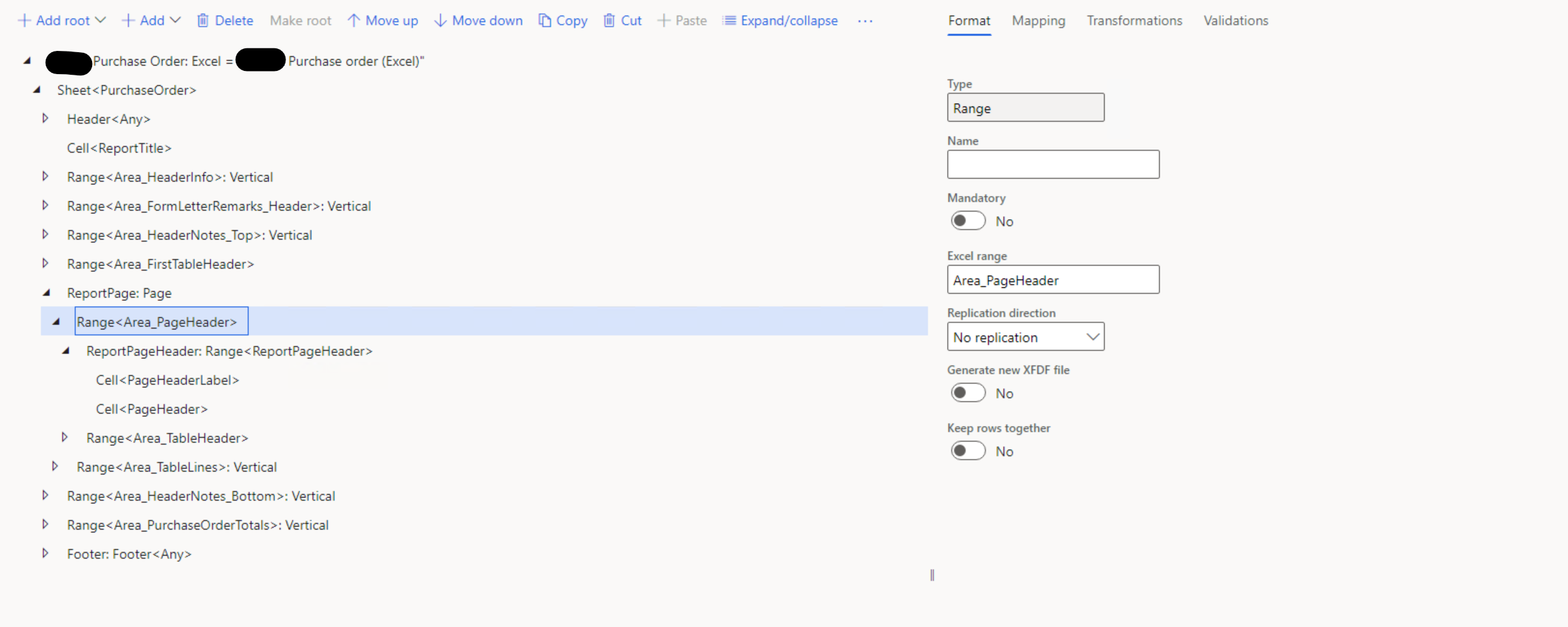
8206.pastedimage1678451709450v2.png

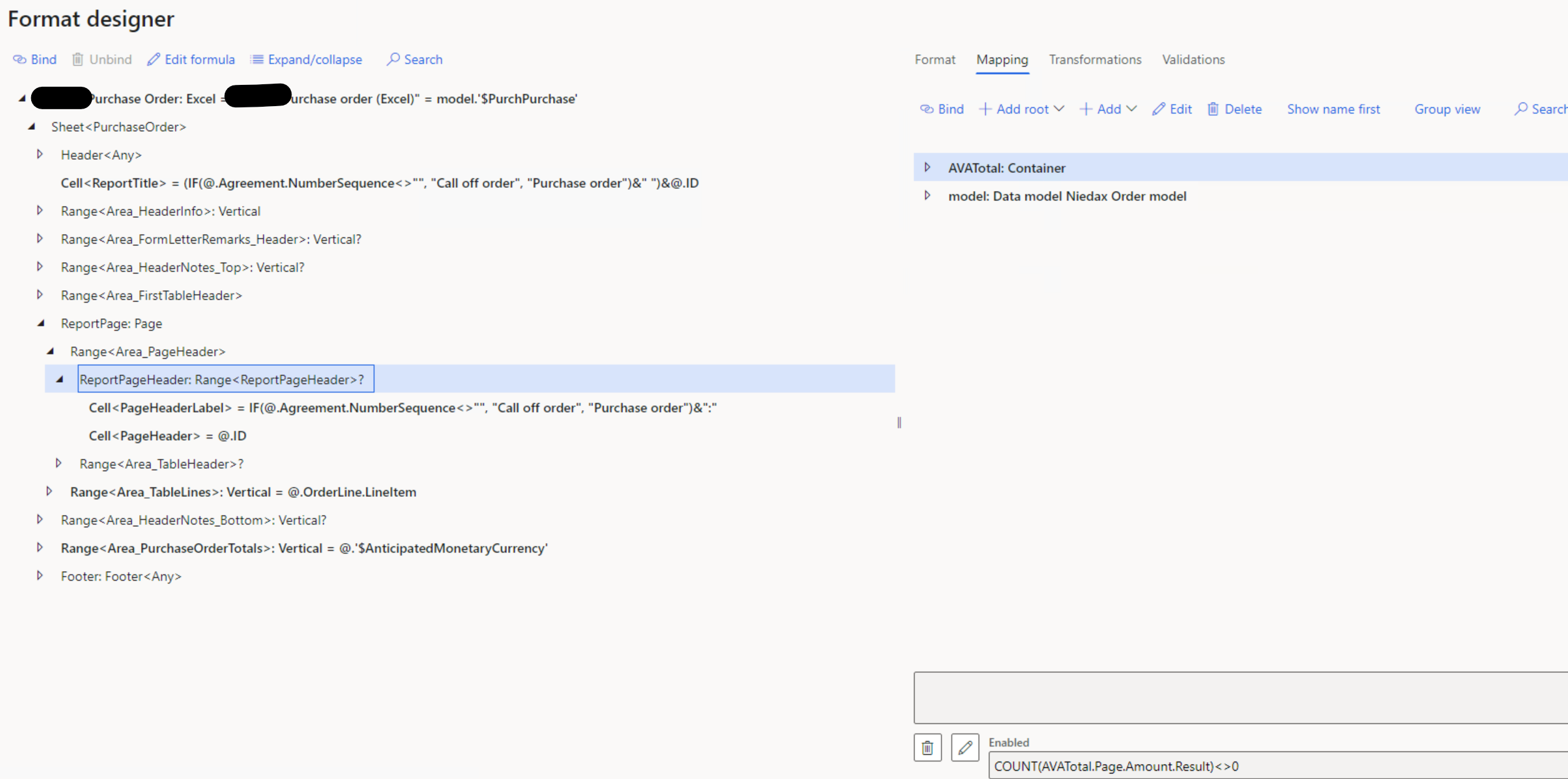
Mapping:

2821.pastedimage1678451758345v3.png

Validation returns now error or warnings.

But when I try to print a report I now always receive the following errors and the printing fails (Black spots contain customer name so I hid them):
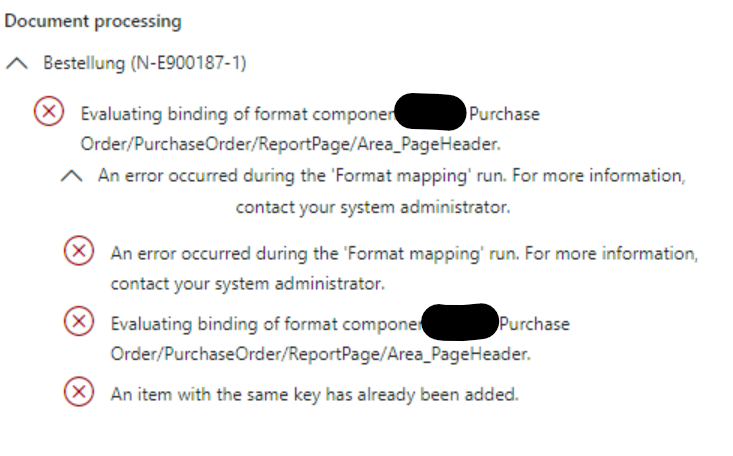
1817.pastedimage1678451890272v4.png

I assume it has to do with the fact, that Area_PageHeader has NoReplication, but pops up on several Excel pages.
I am unsure why that happens, since the walkthrough (link above) explicitly says to turn replication off.

Hope somebody knows the issue and can help me fix it.

Best regards

T. Findeisen

I have the same question (0)
  • Suggested answer
    Alireza Eshaghzadeh Profile Picture
    14,679 Super User 2025 Season 2 on at

    Hi Thimo,

    The error message means that there is not binding on your data model mapping for .Agreement.NumberSequence.

    Please check your mapping model and ensure that the mapping that use on your format designer has binding in model mapping.

  • Thimo F. Profile Picture
    49 on at

    Hello Alireza,

    the Number Sequence has been mapped in the Model mapping already and has thrown no issues in the cell "ReportTitle" before adding the Page changes.

    Wouldn't also throw a validation warning when binding an unmapped field?

  • Suggested answer
    Alireza Eshaghzadeh Profile Picture
    14,679 Super User 2025 Season 2 on at

    Hi Thimo,

    Then please check if you use recent model mapping format on your format designer.

    You need to ensure that the format designer uses the format version of model mapping that has mapping/binding.

  • Thimo F. Profile Picture
    49 on at

    Hello,

    I haven't made any changes in model mapping when I added the pagination and the same logic works in the Cell Report TItle.

    I also don't understand why the mapping is the issue when the mention field 'Area_PageHeader' doesn't have any bindings.

    But I tested it again after removing the format mapping for ReportPageHeader and PageHeaderLabel Cells/Range.

    Still receiving the same error.

    I also debugged a run to check the Format Mapping content:
    NumberSequence is an empty string -> Logic should pick second label
    ID has also a string associated

    pastedimage1678703182567v1.png

  • Suggested answer
    Alireza Eshaghzadeh Profile Picture
    14,679 Super User 2025 Season 2 on at

    Hi,

    That can be the root cause, since error message directed to a field that has not binding on your model mapping.

    It means t have you have binded a field to your component in format designer that it has not binding in model mapping:

    Example: Following screenshot clarifies about the binding:

    Format designer:

    pastedimage1678702904756v1.png

    Model mapping:

    pastedimage1678703111712v2.png

    If your model mapping Fields does not have binding, you will get an error message if you binded them to your designer format. 

  • Thimo F. Profile Picture
    49 on at

    Hello,

    pastedimage1678706048082v2.png

    This is the model mapping that I am using. I marked the two fields that I am using for the pagination. I assume I don't need to do further model mapping?

    But also as mentioned, even If I remove them from the format mapping, the error persists.

  • Suggested answer
    Alireza Eshaghzadeh Profile Picture
    14,679 Super User 2025 Season 2 on at

    Hi Thimo,

    It seems correct on your mapping model.

    Please check the format designer and node "Area_PageHeader", please try to add a binding for this node in a case that it returns an empty value.

  • Thimo F. Profile Picture
    49 on at

    Hello Alireza,

    the Node "Area_PageHeader" is a Region, that contains 2 Cells. The region itself doesn't have a binding, since the content is bound to the 2 cells.

    In the first cell we have 1 of 2 labels depending on if the field NumberSequence is empty or not.

    The second cell is always filled with the ID which is always filled as far as I know.

    So neither bound cell should return an empty value and I am not sure what content I should bind to the region itself.

    In the walkthrough I mentioned above the region is not bound either.

Under review

Thank you for your reply! To ensure a great experience for everyone, your content is awaiting approval by our Community Managers. Please check back later.

Helpful resources

Quick Links

Responsible AI policies

As AI tools become more common, we’re introducing a Responsible AI Use…

Neeraj Kumar – Community Spotlight

We are honored to recognize Neeraj Kumar as our Community Spotlight honoree for…

Leaderboard > Finance | Project Operations, Human Resources, AX, GP, SL

#1
Martin Dráb Profile Picture

Martin Dráb 611 Most Valuable Professional

#2
André Arnaud de Calavon Profile Picture

André Arnaud de Cal... 529 Super User 2025 Season 2

#3
Sohaib Cheema Profile Picture

Sohaib Cheema 285 User Group Leader

Last 30 days Overall leaderboard

Product updates

Dynamics 365 release plans