web
You’re offline. This is a read only version of the page.
close
Skip to main content

Notifications

Announcements

No record found.

Community site session details

Community site session details

Session Id :
Finance | Project Operations, Human Resources, ...
Answered

Purchase and Sale of consignment goods

(0) ShareShare
ReportReport
Posted on by 215

Hi all

Imagine a scenario where a vendor sends a certain amount of goods by consignment. For this I am creating a PO and posting the product receipt. Because of the configuration made on the Item Model Group, no accounting entries are made with the product receipt. For now, the behavior is as expected. 

At this point the received consignment goods can be sold to a customer. The desired flow is:

1) Receive consignment goods from vendor (post product receipt);

2) Sold items to the costumer (post packing slip and invoice);

3) Vendor sends the invoice for the items we have sold to the customer,

4) Post the vendor invoice. 

I can replicate this process in D365 but I am struggling to understand how the COGS work in this situation. In the example that I did, I get the expected accounting entries for the Purchase side but on the Sales side I am not having accounting entries for the COGS (only Dr the customer and Cr the Revenue\VAT). 

Does anyone know how can I get COGS to work in a scenario like this? I'm imagining that is some sort of definition that we must set on the Item Model Group. I never want to value this inventory in the middle of this process but I do need to recognize COGS at the end. At the moment, my Item Model Group is as follows:
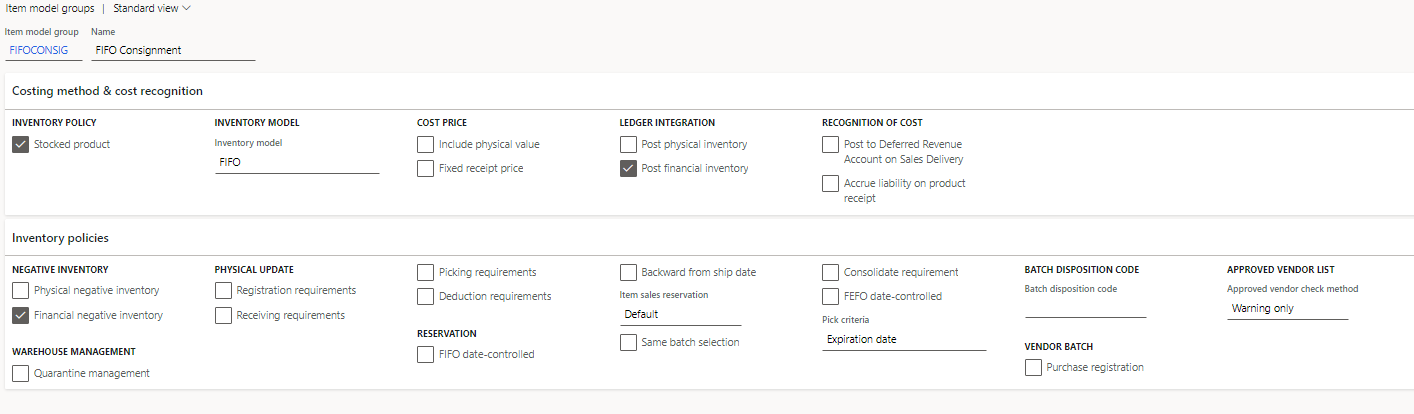
pastedimage1625047322431v1.png

I have the same question (0)
  • Suggested answer
    saurabh bharti Profile Picture
    15,039 Moderator on at

    Hi,

    Hope this helps :

    exploredynamics365.home.blog/.../

  • Afonso Rodrigues Profile Picture
    215 on at

    Hi Saurabh

    Thanks for your reply. However, the process described in that link does not fit the flow that I described as required.

    Basically I want to not value inventory in its entry but I want to recognize its COGS when the inventory its sold, having in mind that the purchase invoice will only occur after the sales invoice.

  • Suggested answer
    Gaurangkumar Jani Profile Picture
    4,534 User Group Leader on at

    Hi Afonso Rodrigues,

    This is a standard design in Dynamics 365 Finance & Operation.

    As you have not posted physical cost while receipt it is not transferring to COGS.

    As you are using FIFO, just run Recalculation after posting Vendor Invoice and you will find adjustment on Sales Transaction in Inventory Transaction.

    Net Entry will be:

    COGS  Dr XXX

    to FG Cr    XXXX

    Let us know if this helps you.

    MS Docs: https://docs.microsoft.com/en-us/dynamics365/supply-chain/cost-management/fifo-physical-value-marking

  • Afonso Rodrigues Profile Picture
    215 on at

    Hello CA Gaurangkumar Jani

    Thank you for your answer. How\where can i run the recalculation that you have mentioned?

  • Suggested answer
    Gaurangkumar Jani Profile Picture
    4,534 User Group Leader on at

    Hi Afonso Rodrigues,

    You can run recalculation from Inventory Management > Periodic Task > Closing and Adjustment and Run Re Calculation.

    pastedimage1625064452607v1.png

    Thanks,

  • Afonso Rodrigues Profile Picture
    215 on at

    Thanks.

    The following message pops-up. Any ideia of what I need to do?

    pastedimage1625064921953v1.png

  • Gaurangkumar Jani Profile Picture
    4,534 User Group Leader on at

    Hi Afonso,

    Please update your posting profile in Inventory Managtement > Setup > Posting > Posting.

    pastedimage1625065011447v1.png 

    Let us know if this helps you.

    Thanks,

  • Afonso Rodrigues Profile Picture
    215 on at

    I have successfully done the recalculation but no changes were done in the voucher, so I still do not have any COGS calculated.

  • Verified answer
    Gaurangkumar Jani Profile Picture
    4,534 User Group Leader on at

    Hi Afonso,

    Please go to Inventory transaction and select your Sales Transaction and check is there and adjustment?

    If yes, follow the following steps:

    pastedimage1625066099645v1.png

    Let me know if it helps,

    Thanks,

  • Afonso Rodrigues Profile Picture
    215 on at

    Hi CA Gaurangkumar Jani

    I do not have any adjustment there.

Under review

Thank you for your reply! To ensure a great experience for everyone, your content is awaiting approval by our Community Managers. Please check back later.

Helpful resources

Quick Links

Responsible AI policies

As AI tools become more common, we’re introducing a Responsible AI Use…

Neeraj Kumar – Community Spotlight

We are honored to recognize Neeraj Kumar as our Community Spotlight honoree for…

Leaderboard > Finance | Project Operations, Human Resources, AX, GP, SL

#1
Martin Dráb Profile Picture

Martin Dráb 664 Most Valuable Professional

#2
André Arnaud de Calavon Profile Picture

André Arnaud de Cal... 522 Super User 2025 Season 2

#3
Sohaib Cheema Profile Picture

Sohaib Cheema 303 User Group Leader

Last 30 days Overall leaderboard

Product updates

Dynamics 365 release plans
