web
You’re offline. This is a read only version of the page.
close
Skip to main content

Announcements

No record found.

News and Announcements icon
Community site session details

Community site session details

Session Id :
Customer experience | Sales, Customer Insights,...
Suggested Answer

How to create Add to Calendar Link dynamically for Real-Time Journey?

(0) ShareShare
ReportReport
Posted on by 127

Hi,

which parameters have to be set in the generated URL for the add to calendar functionality (because in Real-Time-Journey the Add-to-calendar-button is not here)

https://personalenvironmentid.svc.dynamics.com/EvtMgmt/api/v2.0/calendar/personal/ics?data=[{"eId":"Data_AI_Virtual_Conference3811936025","d":{"er":"{{this.msevtmgt_name}}","type":"1"}}]

I tryed several things but unfortunately I have not found the correct URLs, can somebody help me there?

Thanks in advance, kind regards, Carolin

I have the same question (0)
  • Suggested answer
    Nya Profile Picture
    29,064 on at

    Hi Carolin,

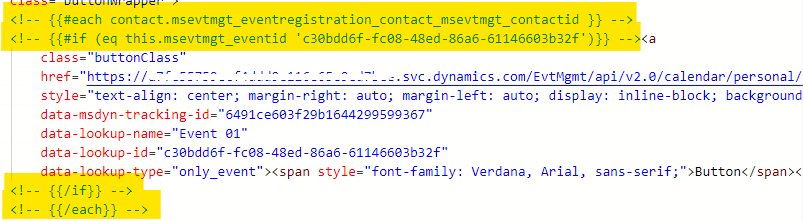
    In addition to the links you mentioned, you can also see these highlighted sections in the image below, which only work in Marketing Emails.
    pastedimage1644299749107v1.png

    Marketing Email and email in real time marketing are actually two different entities, as can be seen from their entity names.

    Marketing Email: msdyncrm_marketingemail

    Email in Real Time Marketing: msdynmkt_email

    So if you'd like to insert the calendar into the latter one, you need to adjust the link into a fixed one.

    It is recommended to send the calendar with marketing email first and copy the link from the received email.

    pastedimage1644301105487v2.png

  • Carolin Profile Picture
    127 on at

    Hi Nya,

    thank you for your fast support.

    But then it is not a personalized link inside the calendar-entry for the registered contact, that the check-in is done automatically, or?

  • Suggested answer
    Nya Profile Picture
    29,064 on at

    Hi,

    It cannot be a personalized link inside the calendar-entry for the registered contact since the relationship expressions can only work in Marketing emails.

    So check-in cannot be done automatically either.

    You can post your proposal in Ideas forum to drive it to be improved.

  • Carolin Profile Picture
    127 on at

    Hi Nya,

    thank you for your check, I've created an Idea for it in the Ideas forum: experience.dynamics.com/.../

    Best Regards, Carolin

Under review

Thank you for your reply! To ensure a great experience for everyone, your content is awaiting approval by our Community Managers. Please check back later.

Helpful resources

Quick Links

Introducing the 2026 Season 1 community Super Users

Congratulations to our 2026 Super Stars!

Meet the Microsoft Dynamics 365 Contact Center Champions

We are thrilled to have these Champions in our Community!

Congratulations to the March Top 10 Community Leaders

These are the community rock stars!

Leaderboard > Customer experience | Sales, Customer Insights, CRM

#1
ManoVerse Profile Picture

ManoVerse 196 Super User 2026 Season 1

#2
11manish Profile Picture

11manish 129

#3
CU11031447-0 Profile Picture

CU11031447-0 100

Last 30 days Overall leaderboard

Product updates

Dynamics 365 release plans
