web
You’re offline. This is a read only version of the page.
close
Skip to main content

Notifications

Announcements

No record found.

Community site session details

Community site session details

Session Id :
Microsoft Dynamics AX (Archived)

How to: Get FromDate, ToDate in Query range AX 2012 R3

(0) ShareShare
ReportReport
Posted on by

Hi experts,

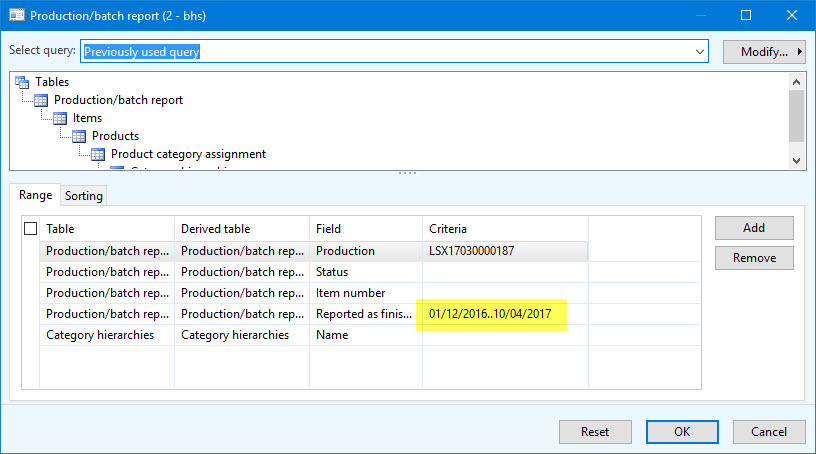
I want to get FromDate, ToDate like pic below:
10_2D00_04_2D00_2017-14_2D00_54_2D00_02.jpg

I try to use this code:

_QueryBuildDataSource = _QueryRun.query().dataSourceTable(tableNum(ProdTable));
_QueryBuildRange = _QueryBuildDataSource.findRange(fieldNum(ProdTable, FinishedDate));

if(_QueryBuildRange)
info(strFmt("%1", _QueryBuildRange.value()));

--> the result: 01/12/2016..10/04/2017

Anyone has simple solution to help me convert _QueryBuildRange.value() to FromDate, ToDate?

Tks all.

*This post is locked for comments

I have the same question (0)
  • Suggested answer
    Community Member Profile Picture
    on at

    Hi,


           Simply you can add date ranges in query range as below shown.

          Date.JPG

    Thanks

    Suresh

  • Suggested answer
    Community Member Profile Picture
    on at

    Hi,

      Please look into below links which is solved earlier.

      community.dynamics.com/.../199073

      Also look into the link, which is related to your solution.

      stackoverflow.com/.../advanced-query-range  

    Thanks

    Suresh

  • Suggested answer
    Vilmos Kintera Profile Picture
    46,149 on at

    Try this in the init() of your formDataSource on the ProdTable table if you want to apply the range:

    SysQuery::findOrCreateRange(this.queryBuildDataSource(),
    fieldNum(ProdTable, FinishedDate)).value(SysQuery::range(12\01\2016, 04\10\2017);

    If you want to convert it from a string back to dates, then you need to use subStr() and str2date() methods.

    https://msdn.microsoft.com/en-us/library/aa554244.aspx

  • Suggested answer
    Mea_ Profile Picture
    60,284 on at

    Hi Thiennd,

    It's a strange requirement, however, you can use subStr() or strSplit() to get first part of the string 01/12/2016 and second part of the string 10/04/2017, then you can convert string to date using str2Date() function.

  • Community Member Profile Picture
    on at

    Hi Suresh potlakayalaVilmos Kintera and ievgen Miroshnikov

    Thanks for your replies.

    But I found out some problems in this topic may be the same as my issue:

    https://community.dynamics.com/ax/f/33/t/40866

Under review

Thank you for your reply! To ensure a great experience for everyone, your content is awaiting approval by our Community Managers. Please check back later.

Helpful resources

Quick Links

Responsible AI policies

As AI tools become more common, we’re introducing a Responsible AI Use…

Neeraj Kumar – Community Spotlight

We are honored to recognize Neeraj Kumar as our Community Spotlight honoree for…

Leaderboard > 🔒一 Microsoft Dynamics AX (Archived)

#1
Martin Dráb Profile Picture

Martin Dráb 4 Most Valuable Professional

#1
Priya_K Profile Picture

Priya_K 4

#3
MyDynamicsNAV Profile Picture

MyDynamicsNAV 2

Last 30 days Overall leaderboard

Featured topics

Product updates

Dynamics 365 release plans
