web
You’re offline. This is a read only version of the page.
close
Skip to main content

Notifications

Announcements

No record found.

Community site session details

Community site session details

Session Id :
Finance | Project Operations, Human Resources, ...
Suggested Answer

Default description on transactions: works properly for some countries but not for others

(0) ShareShare
ReportReport
Posted on by

Hello All, 

I have a question regarding the default description. 

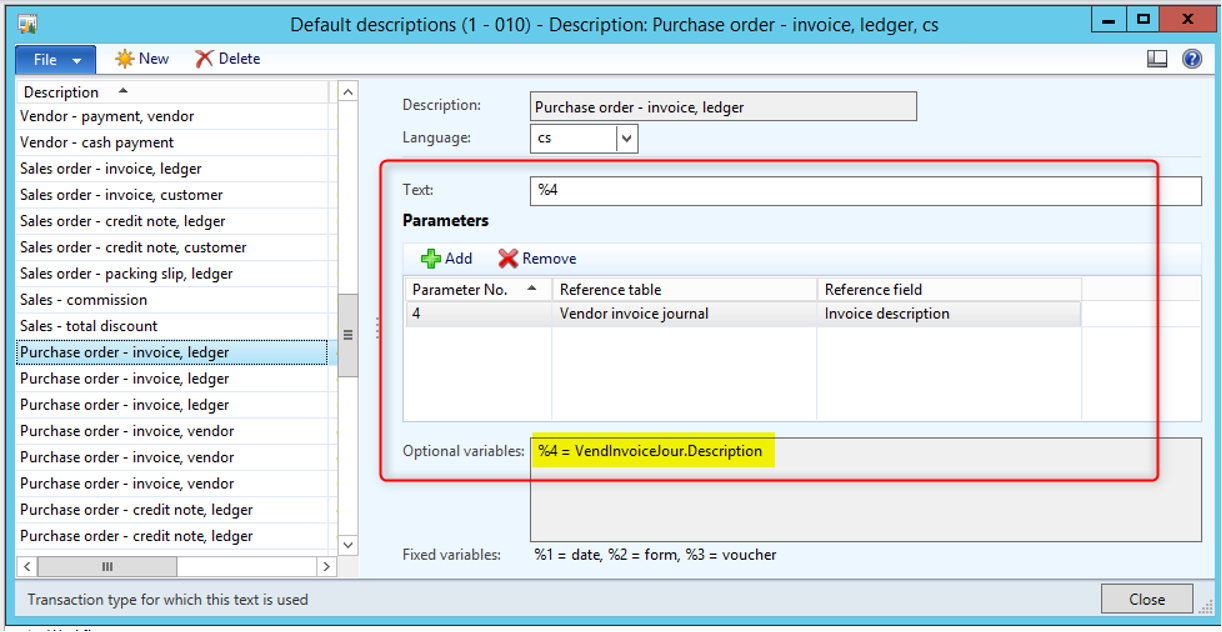
For Czech republic, we set up below description:
pastedimage1634225391122v1.png

And the description is sorted correctly on the transactions. 

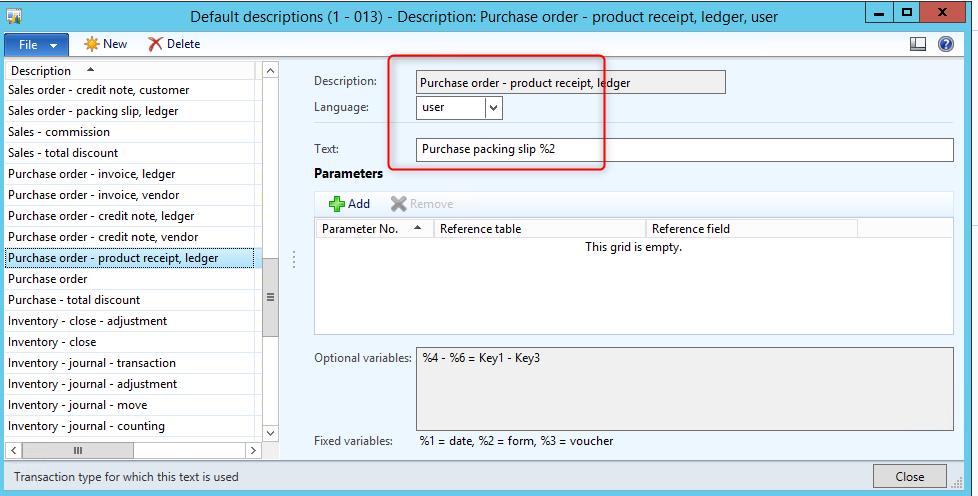
However when i do the same for another country (Brazil) with the set up below:
pastedimage1634225585595v2.png

On the product receipt posting i have this:

pastedimage1634225694983v3.png

recebimento de produtos de fornecedores => means Vendor product receipt (in Portuguese)

The translation is not exactly right and I don't have the number of PR while i put in the default text %2 

is is the language which is set to "user" cause this behavior ? 

Thank you in advance for your help.

Chau

I have the same question (0)
  • Suggested answer
    Ludwig Reinhard Profile Picture
    Microsoft Employee on at

    Hi Chau,

    The first screenprint seems to apply for purchase order invoice postings.

    The second screenprint shows a setup for purchase order product receipt postings.

    These are different types.

    Have you tried making an exact 1:1 comparison between what is set up for the company in CZ and BR?

    Best regards,

    Ludwig

  • Community Member Profile Picture
    on at

    Hello Ludwig, thank you for your reply. 

    For example, in another company I have below set up:

    pastedimage1634304442341v1.png

    And this is what i have on voucher transactions:

    pastedimage1634304471568v2.png

    I don't understand why it works correctly for some companies and not for others. I wonder do we have any other places to set up the description for automatic posting ? 

    Thank you in advance for your reply.

    Best regards, 

    Chau

  • Suggested answer
    Ludwig Reinhard Profile Picture
    Microsoft Employee on at

    Hello Chau,

    Many thanks for this update.

    The %2 key should give you the form name.

    Have you checked the other lines in your voucher (screenshot) whether they include that information you entered?

    Also please check out the language settings of your user and the system to ensure that the problem is not related to a missing or incorrect language configuration.

    Best regards,

    Ludwig

Under review

Thank you for your reply! To ensure a great experience for everyone, your content is awaiting approval by our Community Managers. Please check back later.

Helpful resources

Quick Links

Responsible AI policies

As AI tools become more common, we’re introducing a Responsible AI Use…

Neeraj Kumar – Community Spotlight

We are honored to recognize Neeraj Kumar as our Community Spotlight honoree for…

Leaderboard > Finance | Project Operations, Human Resources, AX, GP, SL

#1
André Arnaud de Calavon Profile Picture

André Arnaud de Cal... 467 Super User 2025 Season 2

#2
Martin Dráb Profile Picture

Martin Dráb 420 Most Valuable Professional

#3
BillurSamdancioglu Profile Picture

BillurSamdancioglu 241 Most Valuable Professional

Last 30 days Overall leaderboard

Product updates

Dynamics 365 release plans



