web
You’re offline. This is a read only version of the page.
close
Skip to main content

Announcements

News and Announcements icon
Community site session details

Community site session details

Session Id :
Customer Service forum

Dynamics 365 for Outlook 2016 prompts to reconfigure and enter credentials everytime after a restart

(0) ShareShare
ReportReport
Posted on by

Hi All,

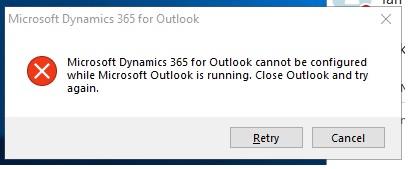
We have deployed Microsoft Dynamics CRM across our enterprise with Office 2016 and now are facing strange authentication issue. User is able to configure and sign in into Dynamics 365 portal but once user restarts his machine, the Dynamics 365 plugin is trying to re run the configuration wizard, image below. Once you close Outlook and click on retry you need to go through the authentication process again and wait for the addon to configure. This happens everytime you restart and is quite annoying> Need some help to resolve the configuration issue. 

Error Image is attached.
DynamicCRM.jpg

Suggestions really help.

Thanks,

DynaCrev

I have the same question (0)
  • LuHao Profile Picture
    40,892 on at

    Hi DynCrk,

    • First of all, I recommend that you do the following:

    1.Close outlook

    2.Clean Internet Explorer Cache

    3.Delete files from %temp% folder

    4.Got to start -> run "control keymgr.dll "

     and delete saved credentials for CRM online.

    5.Reconfigure Dynamics Crm client again.

    • Then, try to resolve Outlook for Windows issues with automated troubleshooting tools:

    https://support.office.com/en-us/article/resolve-outlook-for-windows-issues-with-automated-troubleshooting-tools-38e2342d-3527-4190-8754-a82d8b970fe2

    • Also, try the solution in this article: (Third party blog)

    https://www.catapulterp.com/dynamics-crm-for-outlook-not-working/

    • Finally, I recommend you use Dynamics 365 APP for Outlook. It is more optimized than Dynamics 365 for Outlook and is a plugin recommended by Microsoft.

    You could know Dynamics 365 APP for Outlook from here:

    https://docs.microsoft.com/en-us/dynamics365/customer-engagement/outlook-app/v8/dynamics-365-app-outlook-user-s-guide-v8

    Hope this helps.

    Best Regards,

    Lu Hao

  • Community Member Profile Picture
    on at

    Hi Hao,

    Thanks for the reply. We have tried the above mentioned steps couple of times on different machines and the problem still exists. Unable to isolate the issue. The issue comes back once the user restarts the machine. We are unable to isolate the issue as this happens with multiple users and they want the integration to work as expected. Moving to Dynamics App for Outlook would be an issue as we do not have access to microsoft store and is not allowed.

    Thanks,

    DynCrk

Under review

Thank you for your reply! To ensure a great experience for everyone, your content is awaiting approval by our Community Managers. Please check back later.

Helpful resources

Quick Links

November Spotlight Star - Khushbu Rajvi

Congratulations to a top community star!

Forum Structure Changes Coming on 11/8!

In our never-ending quest to help the Dynamics 365 Community members get answers faster …

Dynamics 365 Community Platform update – Oct 28

Welcome to the next edition of the Community Platform Update. This is a status …

Leaderboard > Customer Service

Last 30 days Overall leaderboard

Featured topics

Product updates

Dynamics 365 release plans
