web
You’re offline. This is a read only version of the page.
close
Skip to main content

Notifications

Announcements

No record found.

Community site session details

Community site session details

Session Id :
Customer experience | Sales, Customer Insights,...
Answered

How to get Selected View Id using javscript in List Page of any entity in UCI

(0) ShareShare
ReportReport
Posted on by 10

Hi All,

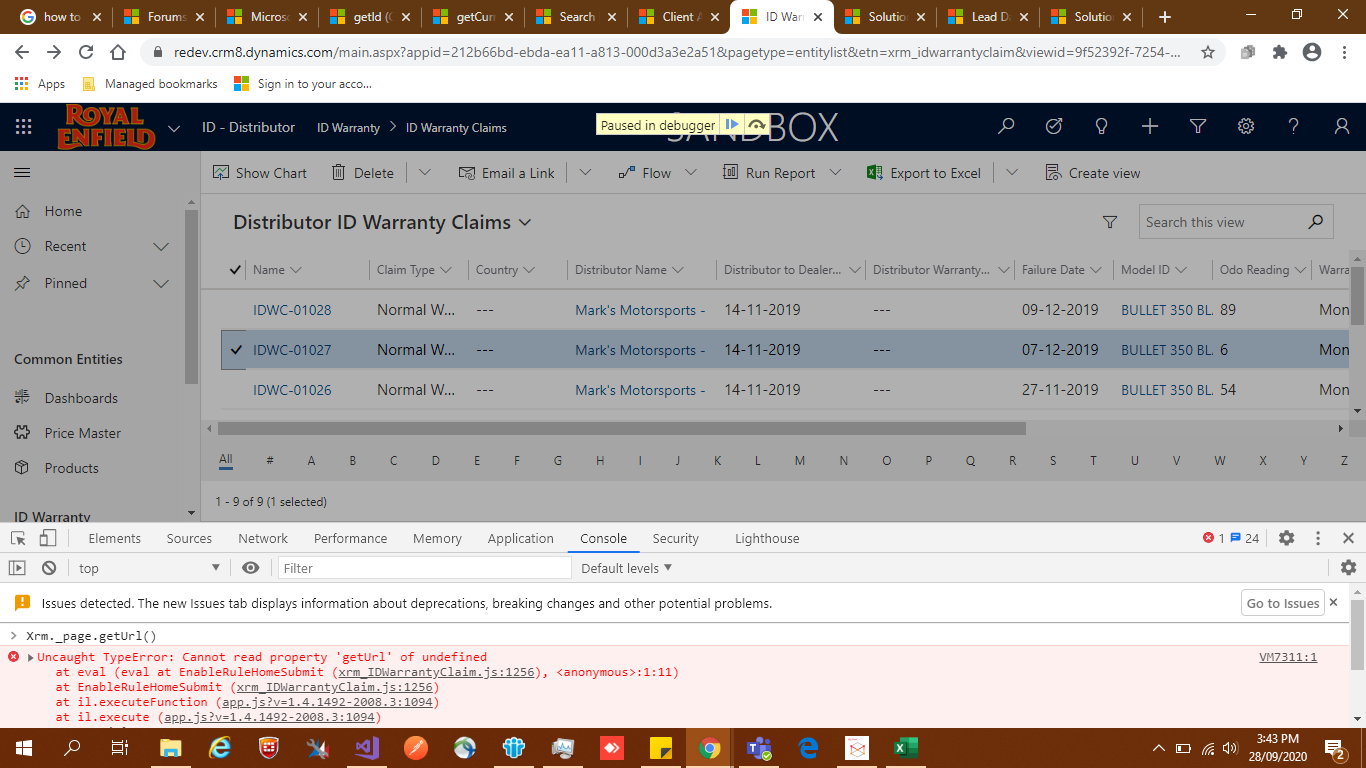
currently i am using "Xrm._page.getUrl()" for get viewID but i am getting error. please see given below error.

For get selected view id i am using this code.

var urlParams = new URLSearchParams(Xrm._page.getUrl());
var viewId = urlParams.get("viewid").replace("{", "").replace("}", "");

but it's not working well.

please suggest best solution.
pastedimage1601288040049v1.png


I have the same question (0)
  • Altaf Taqvi Profile Picture
    10 on at

    anyone can suggest best solution for this error as it's necessary for me

  • Suggested answer
    cloflyMao Profile Picture
    25,210 on at

    Hi Altaf,

    Xrm.Page is deprecated, we should use the replacement function to get organization URL.

    https://pradipwebmaster.wordpress.com/2018/11/20/how-to-replace-xrm-page-context-getclienturl-in-dynamics-365-version-9/

    However, currently client API only provides function that return the organization URL, like company.crm.dynamics.com.

    To access to parameters of URL, we need to use location object directly.

    var urlParams = new URLSearchParams(location.href);
    var viewId = urlParams.get("viewid").replace("{", "").replace("}", "");
    console.log(viewId);


    8688.JPG

    Regards,

    Clofly

  • Altaf Taqvi Profile Picture
    10 on at

    it's also not working.

    2262.Untitled2.png

  • Altaf Taqvi Profile Picture
    10 on at

    Can someone help me fixing this issue in Unified interface?

  • Verified answer
    cloflyMao Profile Picture
    25,210 on at

    Hi Altaf,

    Have you checked whether "viewid" parameter exists in URL?

    Or did you run the code in console directly? For example, if we run it in a web resource, such as performing the function in a ribbon button, then location.href might be different.

    If you are running it in ribbon button, try to use parent.window.location.href instead to check whether it is able to get real full URL.

    In a word, please check the actual value of location.href.

    In addition, you could also try capturing the viewid with pure javascript function.

    var viewid = getParameterByName("viewid");
    
    console.log(viewId);
    
    function getParameterByName(name, url) {
        if (!url) url = window.location.href;
        name = name.replace(/[\[\]]/g, '\\$&');
        var regex = new RegExp('[?&]'   name   '(=([^]*)|&|#|$)'),
            results = regex.exec(url);
        if (!results) return null;
        if (!results[2]) return '';
        return decodeURIComponent(results[2].replace(/\ /g, ' '));
    }
     

    pastedimage1601351501505v1.png

    Regards,

    Clofly

  • cloflyMao Profile Picture
    25,210 on at

    Hi Altaf,

    Have you checked URL when executing the code?

    Make sure you can get the full URL with parameters.

    company.crm.dynamics.com/main.aspx?appid=0cf394ae-3dcb-ea11-a812-000d3aa08b45&pagetype=entitylist&etn=contact&viewid=b28063f8-a032-40ce-9f9b-d8912372c534&viewType=1039

    Regards,

    Clofly

  • Suggested answer
    Bipin D365 Profile Picture
    28,983 Moderator on at

    Hi,

    I have tried my CRM UCI instance and it works. See below image.

    4478.CQ18.PNG

    I have tried in Chrome and IE and it works.

    Please mark my answer verified if i were helpful

  • Altaf Taqvi Profile Picture
    10 on at

    Yes, parent.window.location.href is working well, thanks for support

  • Verified answer
    cloflyMao Profile Picture
    25,210 on at

    Hi Altaf,

    It is very glad that your problem has been solved.

    If you had found any answer helped, please kindly mark it as verified to close the thread, it would be really appreciated.

    Regards,

    Clofly

Under review

Thank you for your reply! To ensure a great experience for everyone, your content is awaiting approval by our Community Managers. Please check back later.

Helpful resources

Quick Links

Responsible AI policies

As AI tools become more common, we’re introducing a Responsible AI Use…

Neeraj Kumar – Community Spotlight

We are honored to recognize Neeraj Kumar as our Community Spotlight honoree for…

Leaderboard > Customer experience | Sales, Customer Insights, CRM

#1
Tom_Gioielli Profile Picture

Tom_Gioielli 70 Super User 2025 Season 2

#2
Gerardo Rentería García Profile Picture

Gerardo Rentería Ga... 33 Most Valuable Professional

#3
Daniyal Khaleel Profile Picture

Daniyal Khaleel 32 Most Valuable Professional

Last 30 days Overall leaderboard

Product updates

Dynamics 365 release plans
