web
You’re offline. This is a read only version of the page.
close
Skip to main content

Announcements

News and Announcements icon
Community site session details

Community site session details

Session Id :
Finance | Project Operations, Human Resources, ...
Suggested Answer

How to generate customer aging report only for 60+ days due customers.

(0) ShareShare
ReportReport
Posted on by 15

Hi team,

we are trying generate report only 60+ days due customers, how to exclude 1-60 days data in the report. the report should show only 60+,90+,120+.

1. Aging definition.
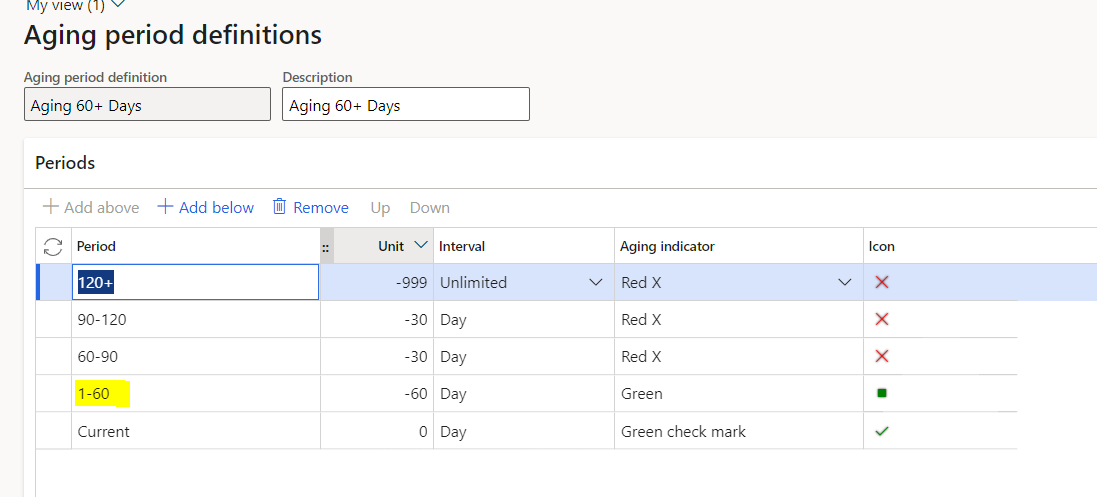
pastedimage1668098469571v1.png

2. with above aging definitions below report generation..

pastedimage1668098583896v2.png

3. Expecting report. should not print yellow marked (1-60) data in the report, please help here to achieve in standard customer aging report.

pastedimage1668098703143v3.png

I have the same question (0)
  • Suggested answer
    BillurSamdancioglu Profile Picture
    21,389 Most Valuable Professional on at

    Hi,

    You may delete that line on the definition.

  • Frank Hamelly | MVP, MCP, CSA Profile Picture
    46,633 Moderator on at

    You can create multiple Aging period definitions, configured the way different users need them and select the appropriate definition when entering report parameters.

  • Test529 Profile Picture
    15 on at

    Hi Billur,

    if i delete the Line (1-60) on the aging definition, report will shows due for all customers with they are fall under 1 day to till 90 days in one column rest shows based on aging bucket.

    how to achieve to generate report only for customers which due date are more than 60+ days, we dont want to print customers on the report which payment due date below 60+ days.

    Thank you.

  • Test529 Profile Picture
    15 on at

    Hello Community members,

    could any one provide solution on this.

    Thank you.

  • Frank Hamelly | MVP, MCP, CSA Profile Picture
    46,633 Moderator on at

    This might require a customization.  I tested in Contoso and couldn't get it to work either.  It always picked up newer invoices in the 60+ aging period.  You could run the report, export to Excel and delete the aging columns you don't want to see.

Under review

Thank you for your reply! To ensure a great experience for everyone, your content is awaiting approval by our Community Managers. Please check back later.

Helpful resources

Quick Links

Season of Sharing Community Challenge Winners!

Congratulations to our community stars!

Women in Power Builds Momentum

Expanding mentorship, skilling, and AI innovation

Congratulations to the July Top 10 Community Leaders

These are the community rock stars!

Leaderboard > Finance | Project Operations, Human Resources, AX, GP, SL

#1
André Arnaud de Calavon Profile Picture

André Arnaud de Cal... 288 Super User 2026 Season 2

#2
Martin Dráb Profile Picture

Martin Dráb 276 Most Valuable Professional

#3
Anton Venter Profile Picture

Anton Venter 225 Super User 2026 Season 2

Last 30 days Overall leaderboard

Product updates

Dynamics 365 release plans
