web
You’re offline. This is a read only version of the page.
close
Skip to main content

Notifications

Announcements

No record found.

Community site session details

Community site session details

Session Id :
Finance | Project Operations, Human Resources, ...
Suggested Answer

Changing status on PO marked as "Received" POLNESTA = 4

(0) ShareShare
ReportReport
Posted on by 5

Hello Team,


I hope to find you well, I have a PO in GP which we have duplicated the upload for with our WMS (this bug has been resolved ) However we are running into an issue on the damage control for the already uploaded receipts (PO). 

We have a PO that is considered received because its 3 containers worth and 2 were received physically with one duplicating the upload and GP thinks we received all 3, now the PO is Received status on the line and we already created a return for the duplicated quantity and posted it however we received an error when trying to change the PO line 
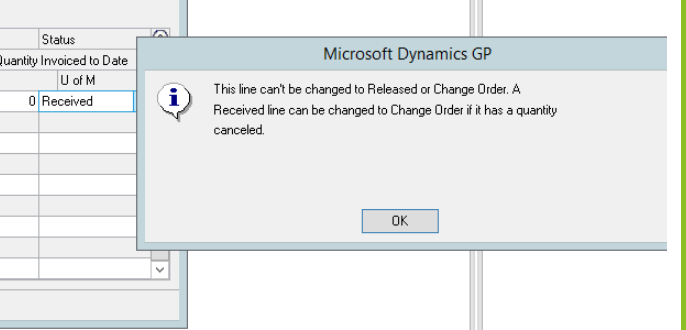
pastedimage1647285086076v1.png

any way we can revert the line status back to change order?

Categories:
I have the same question (0)
  • Suggested answer
    Marion P Profile Picture
    on at

    Hello David,

    Your return transaction have normalized and corrected what inventory you received in reality.

    Once PO lines are received, you may not be allowed to change the status back to change order as there might be invoices/return being processed for it.

    If those received lines were returned at the Returns Transaction Entry window with the correct PO Number and PO line, the status of the line would be CLOSED.

    For both instances, you cannot go back to PO line status: Change Order. You can only go CLOSED or CANCELLED respectively.

    You may need to re-enter/replace that PO with a new PO in it's place if you're still needing to receive against it.

    Hope this answers your inquiry. If you have additional questions, please send in your case with us at https://serviceshub.microsoft.com/supportforbusiness

  • Suggested answer
    Angela Eckman Ebensteiner Profile Picture
    1,216 on at

    Hi David,

    It sounds like you returned the line and didn't mark it to 'Replace Returned Goods' based on the fact that the line has a Received status.  If you had marked the 'Replace Returned Goods' option on the Return Transaction Entry window, the line would have went back to "Released" which would later allow you to re-receive it.  In this case the line didn't go back to a Released status and stayed at the Received status. As of now, you won't be able to change it to a change order.  The code won't let you.  If you need to re-receive the item at a later date, the only option you have is to make the ENTIRE PO a Change order status (Drop down in the header in the Edit PO window)  and add a new line to the PO for the quantity of 1. Then you can receive against that line moving forward. 

    There is a possibility to change the current line if you manipulate the data in the backend.  You would more than likely have to update the POP10500 table to indicate that you meant to tell GP that you wanted to mark the line to Replace the Returned Goods and then you would then have to update the line in the POP10110 table to a status of Released.  But this is something that would need to be reviewed and tested based on how the data looks at this time.  You could create a support request to dig into this and see if that is an option. 

    Thanks,

    Angela Ebensteiner

    Sr. Technical Advisor

    Microsoft Support 

Under review

Thank you for your reply! To ensure a great experience for everyone, your content is awaiting approval by our Community Managers. Please check back later.

Helpful resources

Quick Links

Responsible AI policies

As AI tools become more common, we’re introducing a Responsible AI Use…

Neeraj Kumar – Community Spotlight

We are honored to recognize Neeraj Kumar as our Community Spotlight honoree for…

Leaderboard > Finance | Project Operations, Human Resources, AX, GP, SL

#1
Martin Dráb Profile Picture

Martin Dráb 664 Most Valuable Professional

#2
André Arnaud de Calavon Profile Picture

André Arnaud de Cal... 522 Super User 2025 Season 2

#3
Sohaib Cheema Profile Picture

Sohaib Cheema 303 User Group Leader

Last 30 days Overall leaderboard

Product updates

Dynamics 365 release plans



