Hi all,
i write below query to return the MAX recid based on purch id from VendPurchOrderJour.
I have given From date = 7/10/2020 and to date = 7/10/2020
Report Output

Table - VendPurchOrderJour
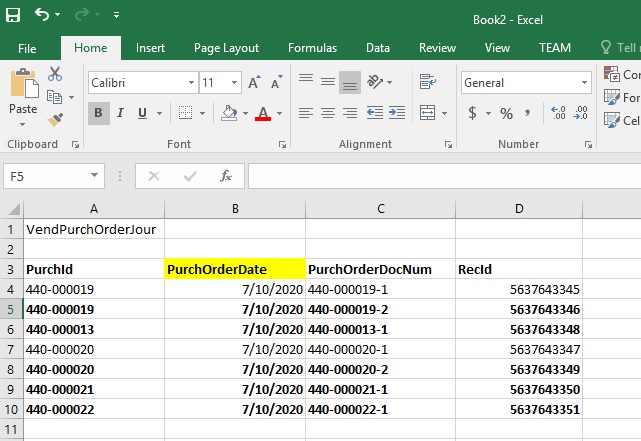
The BOLD line should come in my report.
In my report it's display number of lines correctly but Order date is BLANK.
The order date should be print MAX "PurchaseOrderDate" based on PURCH ID.
code
public void excelExecution()
{
    Query                   query;
    QueryRun                qrRun;

    TransDate               maxSalesConfrmDate;
    QueryBuildDatasource    qbds,qbds1;
    QueryBuildRange         qbr;

    RecId                   chkRecid;
    boolean                 headerPrint = true;

    i = 1;

    // initlize the SysExcelApplication instance
    sysExcelApplication  = SysExcelApplication::construct();

    //create excel workbook and excel worksheet
    excelWorkbookCollection  = sysExcelApplication.workbooks();
    excelWorkbook    = excelWorkbookCollection.add();
    excelWorksheetCollection = excelWorkbook.worksheets();
    excelWorksheet = excelWorksheetCollection.itemFromNum(1);

    // query ( GDJ_VendVendGroupQR )started ***

    query = new Query(queryRun.query());

    qbds = query.dataSourceNo(1).addDataSource(tablenum(VendPurchOrderJour));
    qbds.relations(true);

    // date range
    qbr = qbds.addRange(fieldNum(VendPurchOrderJour,PurchOrderDate));
    qbr.value(queryRange(fromDate, toDate));

    qbds.addGroupByField(fieldNum(VendPurchOrderJour, PurchId));

    qbds.addSelectionField(fieldNum(VendPurchOrderJour, RecId), SelectionField::Max);

    qbr = qbds.addRange(fieldNum(VendPurchOrderJour, PurchId));
    qbr.value("");

    qrRun = new QueryRun(query);

    try
    {
        while (qrRun.next())
        {
            vendPurchOrderJour = qrRun.get(TableNum(VendPurchOrderJour));
        }
    }
}
Kindly let me know what change is required in my above query?
please give me more shed on this.
thanks!


