web
You’re offline. This is a read only version of the page.
close
Skip to main content

Notifications

Announcements

No record found.

Community site session details

Community site session details

Session Id :
Customer experience | Sales, Customer Insights,...
Suggested Answer

Auto-close activities

(0) ShareShare
ReportReport
Posted on by 154

Hello

At some point, I think I saw a setting in Dynamics 365 Sales, a setting to auto-close activities. Is there one? if not - how can we auto-close activities? 

Thank you in advance.

I have the same question (0)
  • Suggested answer
    SS-01100907-0 Profile Picture
    on at

    Hi,

    There is no out of box functionality for this. But you can create workflow on the type of activity you are trying to auto close. Just check some condition as per your requirement and update the status to complete.

    Thanks,

    Soumen

  • Suggested answer
    LuHao Profile Picture
    40,892 on at

    Hi Mouda,

    There is no OOTB settings to auto-close activities. We can do some customizations such as workflow to achieve it.

    Workflow is not available for Actibity entity, but is available for specific activity type entities, like Email, Appointment, Phone Call.

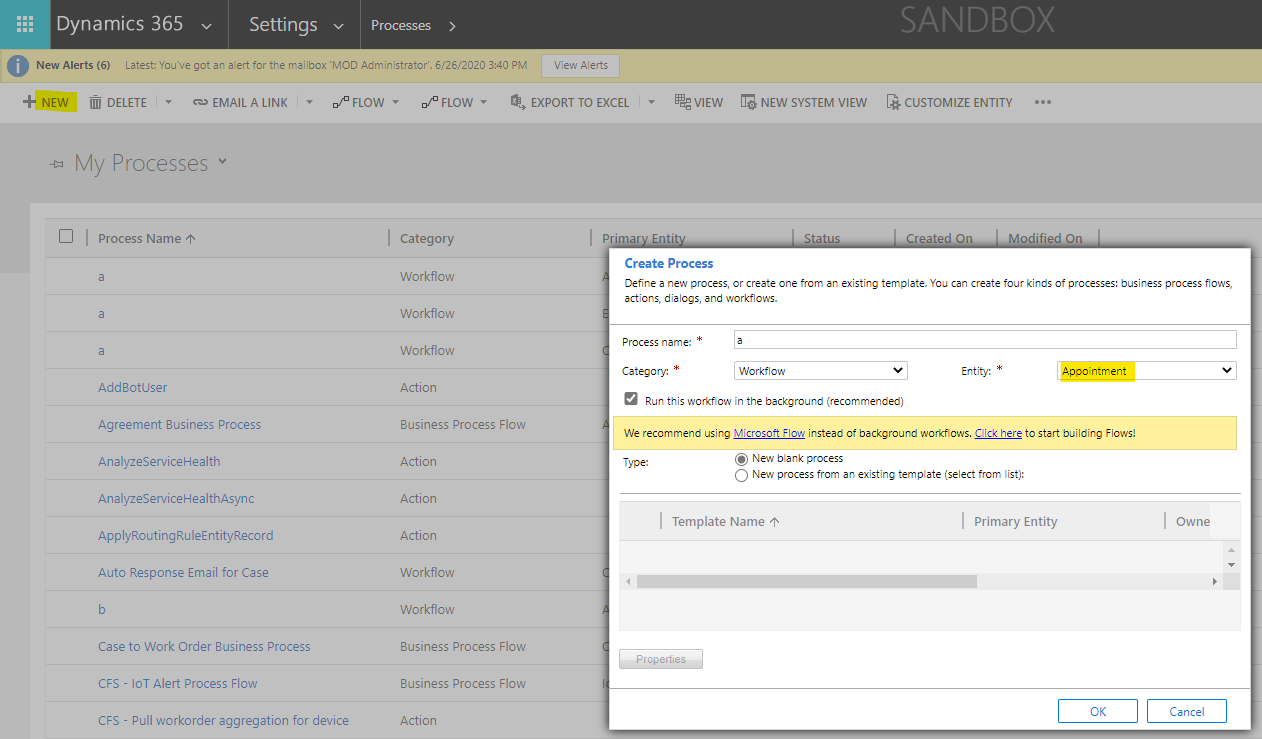
    Here take Appointment as an example.

    1. Go to Advacned Settings > Processes, new a workflow of Email.
    pastedimage1595992861440v1.png

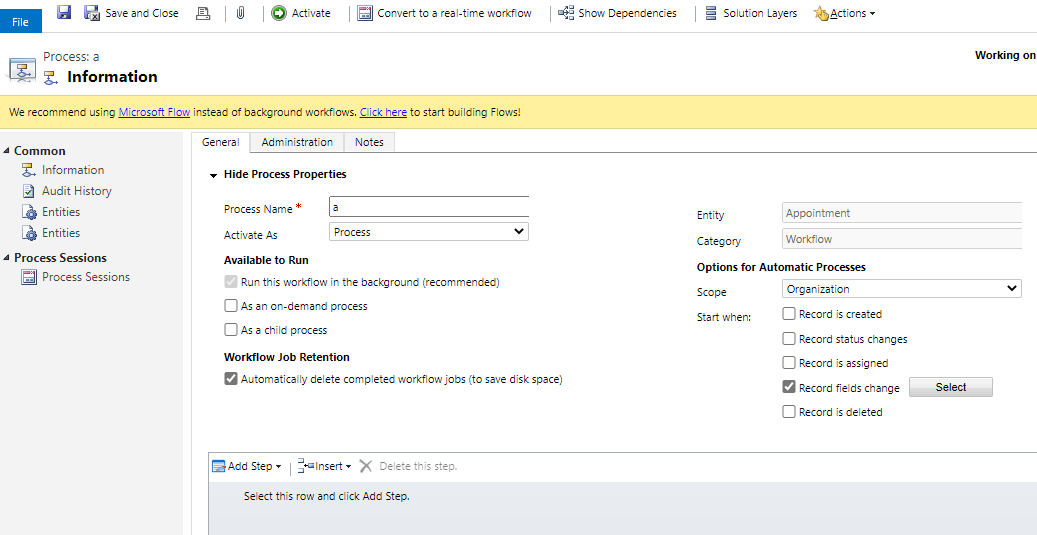
    2. Select Start When as trigger, if you would close the activity when some fields change, select Record fields change, and click select button to select fields that trigger the workflow if they are changed.
    pastedimage1595992882816v2.png

    3. Add step "Check Condition", set the condition that the activity will be closed.

    pastedimage1595992904443v3.png

    4. Add step "Change Status", select the closed status.

    pastedimage1595992943588v4.png

    5. Save and activate the workflow.

    For any other activity type, you can follow steps to achieve same results.

  • Suggested answer
    Mouda Profile Picture
    154 on at

    Thank you - I ended up creating custom flows for each entitiy and they worked great.

  • LuHao Profile Picture
    40,892 on at

    Please click Yes under "Did this answer your question?" to close this thread.

    pastedimage1596439513285v1.png

    Thanks.

  • Suggested answer
    Bipin D365 Profile Picture
    28,983 Moderator on at

    Hi,

    Glat that you found solution. Please mark this thread verified so that it will be helpful for other community members.

    If found helpful, Please mark my answer verified.

Under review

Thank you for your reply! To ensure a great experience for everyone, your content is awaiting approval by our Community Managers. Please check back later.

Helpful resources

Quick Links

Responsible AI policies

As AI tools become more common, we’re introducing a Responsible AI Use…

Neeraj Kumar – Community Spotlight

We are honored to recognize Neeraj Kumar as our Community Spotlight honoree for…

Leaderboard > Customer experience | Sales, Customer Insights, CRM

#1
Tom_Gioielli Profile Picture

Tom_Gioielli 108 Super User 2025 Season 2

#2
Jimmy Passeti Profile Picture

Jimmy Passeti 50 Most Valuable Professional

#3
Gerardo Rentería García Profile Picture

Gerardo Rentería Ga... 49 Most Valuable Professional

Last 30 days Overall leaderboard

Product updates

Dynamics 365 release plans



