web
You’re offline. This is a read only version of the page.
close
Skip to main content

Announcements

News and Announcements icon
Community site session details

Community site session details

Session Id :
Microsoft Dynamics AX (Archived)

Override lookup method in AX 2012

(0) ShareShare
ReportReport
Posted on by

Hi 

I am creating override lookup form method and am trying to show the second column field value in a lookup in AX 2012. This screenshot just to show u reference.

I need to get the second field value on selected record in the lookup .
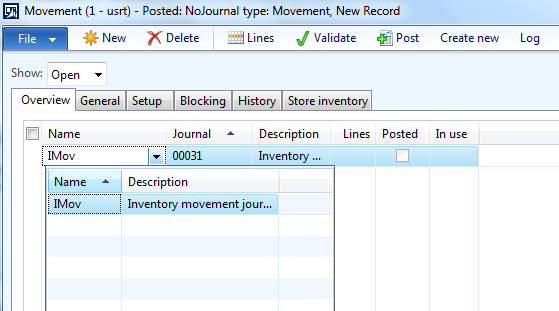
3034.lookup.png

*This post is locked for comments

I have the same question (0)
  • Mariano Gracia Profile Picture
    on at

    In InventJournalTable form, lookup method for the JournalNameId field is overwritten, you'll need to modify the designLookupJournalName method from the JournalFormTable class, ence you'll have to take a look at the JournalStatic class

    JournalName.JPG

  • Suggested answer
    Ammar Abbasi Profile Picture
    55 on at

    Hi Priyabrata,

    I am assuming you are using SysTableLookup class to implement your lookup.

    You can set the second parameter to "true" while adding columns to your lookup.

    Please refer to the below sample code:

    public void lookup()
            {
                //super();
    
                SysTableLookup  lookup = SysTableLookup::newParameters(tableNum(CustInvoiceJour), this);
    
                lookup.addLookupfield(fieldNum(CustInvoiceJour, InvoiceId));
                lookup.addLookupfield(fieldNum(CustInvoiceJour, InvoicingName), true);  //returns the Invoicing Name
    
                lookup.performFormLookup();
            }


    Hope that helps!
  • Community Member Profile Picture
    on at

    Hi Ammar

    I have tried this one it's  not working my code is:-

    But, I need save the invoice Id other than name, in text field i can fetch the name but in table, i need to fetch the id.

       Query                   query = new Query();

       QueryBuildDataSource    queryBuildDataSource;

       SysTableLookup  sysTableLookup = sysTableLookup::newParameters(tableNum(InventSite), this);

       ;

       sysTableLookup.addLookupfield(fieldNum(InventSite, SiteId));

        sysTableLookup.addLookupfield(fieldNum(InventSite, Name), true);

       queryBuildDataSource = query.addDataSource(tableNum(InventSite));

       queryBuildDataSource.addSortField(fieldnum(InventSite, SiteId));

       queryBuildDataSource.addOrderByField(fieldnum(InventSite, Name));

       queryBuildDataSource.orderMode(OrderMode::GroupBy);//Used to Group the Field Value

       sysTableLookup.parmQuery(query);

       SysTableLookup.parmUseLookupValue(false);

       sysTableLookup.performFormLookup();

    Please suggest the solution.

  • Suggested answer
    Ammar Abbasi Profile Picture
    55 on at

    Hi Priyabrata,

    Modify the code as follows:

    Your lookup method should be:

     Query                   query = new Query();
    
                QueryBuildDataSource    queryBuildDataSource;
    
                SysTableLookup  sysTableLookup = sysTableLookup::newParameters(tableNum(InventSite), this);
    
                ;
    
                sysTableLookup.addLookupfield(fieldNum(InventSite, SiteId), true);
    
                sysTableLookup.addLookupfield(fieldNum(InventSite, Name));
    
                queryBuildDataSource = query.addDataSource(tableNum(InventSite));
    
                queryBuildDataSource.addSortField(fieldnum(InventSite, SiteId));
    
                queryBuildDataSource.addOrderByField(fieldnum(InventSite, Name));
    
                queryBuildDataSource.orderMode(OrderMode::GroupBy);//Used to Group the Field Value
    
                sysTableLookup.parmQuery(query);
    
                sysTableLookup.performFormLookup();
    Create a new class with the following code:
    class LookupFormClass
    {
        public InventSiteName getInventSiteName(InventSiteId _inventSiteId)
        {
            return InventSite::find(_inventSiteId).Name;
        }
    
    }
    Now override the modified method in your field:
    public boolean modified()
            {
                boolean ret;
                LookupFormClass obj;
            
                ret = super();
    
                if (ret)
                {
                    obj = new LookupFormClass();
                    this.text(obj.getInventSiteName(this.text()));
                }
            
                return ret;
            }
    Hope that helps!
  • Suggested answer
    Hossein.K Profile Picture
    6,650 on at

    Hi,

    please check this link;

    https://msdn.microsoft.com/en-us/library/hh185372.aspx

  • Suggested answer
    startax Profile Picture
    1,845 on at

    Hi Priyabrata

    If I am right your are trying to display Description field to user and store Name in table ?

    For this requirement you have to use replacement group

    You can find more details on below link

    community.dynamics.com/.../replacement-groups-in-ax-2012

    dev.goshoom.net/.../ 

  • Community Member Profile Picture
    on at

    Hi,

    I know it is very old post, but I'm new in AX. I have solution sth like this to your problem:

    1. Find DS and field whose is ID on lookup and override modified() method

    <img src="imgur.com/.../hQSBhhN&quot; />

    2. Use Select to find your field (this is example for this screen)

    public void modified()

    {

       smmBusRelTable              sBRelTable;

       DirPartyTable               dPartyTable;

       super();

       select Party from sBRelTable //RecId

           where sBRelTable.BusRelAccount == GoExperience_GoCompanyCode.valueStr() // GoExperience_GoCompanyCode - value on design/grid

           join Name from dPartyTable

               where  dPartyTable.RecId == sBRelTable.Party; //Party is as RecId field

       GoExperience.GoCompanyName = dPartyTable.Name; //and now it's working

       GoParticipants_ds.refresh();

       GoParticipants_ds.research();

    }

    Regards

  • Community Member Profile Picture
    on at

    link to photo: https://imgur.com/a/hQSBhhN

Under review

Thank you for your reply! To ensure a great experience for everyone, your content is awaiting approval by our Community Managers. Please check back later.

Helpful resources

Quick Links

Season of Sharing Community Challenge Launch!

Jump in, show your community spirit, and win prizes!

Women in Power Builds Momentum

Expanding mentorship, skilling, and AI innovation

Congratulations to the May Top 10 Community Leaders

These are the community rock stars!

Leaderboard > 🔒一 Microsoft Dynamics AX (Archived)

#1
CP04-islander Profile Picture

CP04-islander 10

#2
Harisgillani Profile Picture

Harisgillani 4

#2
dserp Profile Picture

dserp 4

Last 30 days Overall leaderboard

Featured topics

Product updates

Dynamics 365 release plans



