web
You’re offline. This is a read only version of the page.
close
Skip to main content

Notifications

Announcements

No record found.

Community site session details

Community site session details

Session Id :
Finance | Project Operations, Human Resources, ...
Answered

Metadata name must be non-null and can not contain whitespace Error in D365FO VS Project

(0) ShareShare
ReportReport
Posted on by 336

Hello , 

Today i've tried to open my Visual Studio project, and suddenly got this surprise, my project not correctly loaded, i don't know from where this come from 

Any suggestions, options to check ? 

I did the following actions:

1.Build the solution / Rebuild

2.Clean the solution

3.Reload the project

4.Open the project directly from DevOps path, (the same error)

5.Trying to get last version of the solution (Get latest version) > always the same error

5.Open the project from VS > Projects > MyProject

6.Full build of my model done, with associated packages (No Errors, only warning about form pattern)

7.Reset IIS
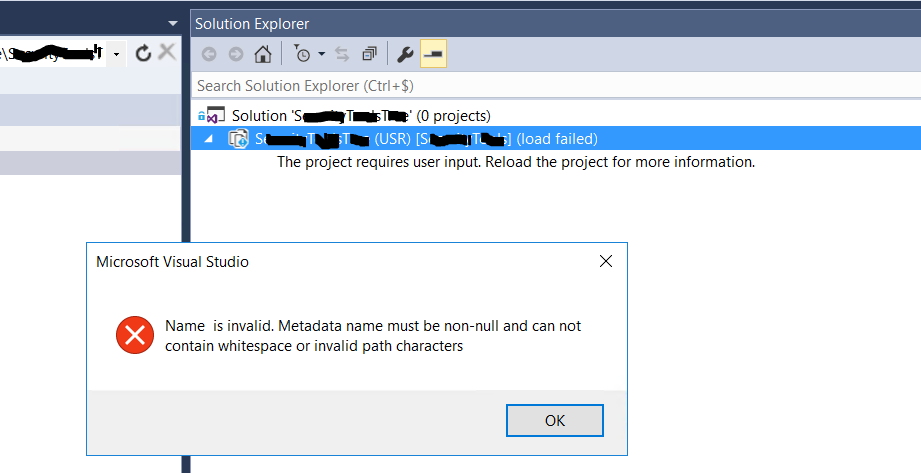
pastedimage1592396570135v1.png

Thanks in advance 

I have the same question (0)
  • Verified answer
    nmaenpaa Profile Picture
    101,162 Moderator on at

    Clearly there's something broken in the project definition. Since D365FO doesn't care about projects, your build is still succesful. I would just create a new project. Or fetch latest working version of the project from source control if you have it there.

  • Verified answer
    Sergei Minozhenko Profile Picture
    23,093 on at

    Hi Adax,

    You can also open VS project file in notepad and check that all objects from the project are available in Application Explorer. At least I've seen similar behavior when the a label file was added to a project and deleted from the application, but VS project was not updated and in this case, it can't be loaded correctly. Solution was to remove missing reference in notepad.

  • AdnDalhi Profile Picture
    336 on at

    Indeed buddy, i got the solution, found the missed object, Thanks

    I've just removed one of the references used in the project which caused loading probkem.

    My project use an old version of this reference (CSharp dll), i'm looking now to use lastest version of this reference (Added new methods), in my X++ i'm looking to use them, but always i got the error, (Those methods not found)

    pastedimage1592400645485v1.png

  • nmaenpaa Profile Picture
    101,162 Moderator on at

    If you have some problems with using DLLs, please post a new question.

    If your original problem is resolved, please mark the helpful answer(s) as verified. Thanks!

  • AdnDalhi Profile Picture
    336 on at

    Done, Thanks Nikolaos.

Under review

Thank you for your reply! To ensure a great experience for everyone, your content is awaiting approval by our Community Managers. Please check back later.

Helpful resources

Quick Links

Responsible AI policies

As AI tools become more common, we’re introducing a Responsible AI Use…

Neeraj Kumar – Community Spotlight

We are honored to recognize Neeraj Kumar as our Community Spotlight honoree for…

Leaderboard > Finance | Project Operations, Human Resources, AX, GP, SL

#1
André Arnaud de Calavon Profile Picture

André Arnaud de Cal... 449 Super User 2025 Season 2

#2
Martin Dráb Profile Picture

Martin Dráb 422 Most Valuable Professional

#3
BillurSamdancioglu Profile Picture

BillurSamdancioglu 239 Most Valuable Professional

Last 30 days Overall leaderboard

Product updates

Dynamics 365 release plans



