web
You’re offline. This is a read only version of the page.
close
Skip to main content

Notifications

Announcements

No record found.

Community site session details

Community site session details

Session Id :
Finance forum
Suggested Answer

Parameters table

(1) ShareShare
ReportReport
Posted on by 10
Hi

In each find method in parameters table, there is these three lines of code circled in grey
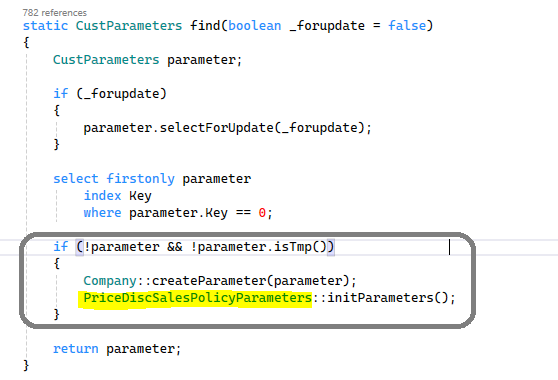

1. What do those three lines do? and why do we need them?

2. I noticed that the line highlighted in yellow might vary from parameter table to another
so it could be this:
PriceDiscPurchPolicyParameters::initParameters();
OR it could be 2 lines
PrintMgmt::createDefaultData(PrintMgmtHierarchyType::Project);
ProjStatusTypeRule::createDefaultData();
OR it could be three lines
 PurchSummaryParameters::initiateAll();
 PrintMgmt::createDefaultData(PrintMgmtHierarchyType::Purch);
 PurchTable2LineParameters::initiate();

what are those?

3. If i created a new module what shall i call after company::createParameter()?
I have the same question (0)
  • Suggested answer
    André Arnaud de Calavon Profile Picture
    301,146 Super User 2025 Season 2 on at
    Hi,
     
    This is a great question. Let me try to help you.
     
    1. For every parameter table, there should be one record per legal entity. The code in this method will ensure a record does exists in case the form is opened the first time.
     
    2. Depending on the module and settings required, it will create additional default records, depending on the functionality.
     
    3. In case you created a module yourself, it is not required to call logic after calling the Company::createParameter() method. This would only be required if you need more initialization of some default setup data required by your module.
  • André Arnaud de Calavon Profile Picture
    301,146 Super User 2025 Season 2 on at
    Hi,
     
    I usually take a smaller module as an example where it uses the minimum required objects for creating a new parameters form for a new module. You can have a look at the BankParameters. You will then find out that there is less coding and fewer objects available.
     
    1. The Parameters form will usually have a parameters table as a data source where it is not allowing to create new records. For that reason, the required single parameter record will be created using this X++ code.
     
    2. Have a look at the example BankParameters as mentioned before. 
     
    3. Also here, you can have a look at the BankParameters. I don't know if your solution should support groups for the number sequences. In the past, I never used the action buttons on the number sequences tab.
  • André Arnaud de Calavon Profile Picture
    301,146 Super User 2025 Season 2 on at
    Hi,
     
    1) As mentioned, you can indeed skip the number groups. In the standard application, you can set up e.g. invoice numbers per group. You can then set up a number sequence group on the customer details that drives what number series to use. If you don't need a similar feature, you can ignore the menu item buttons for the number groups.  
     
    2) I think the coding is used for having specific lookups and filter the number sequences with specific settings. For the standard bank fieds you mentioned, the best practice is having continuous number sequences. The lookup list with number sequences will then be restricted to choose from continuous number sequences only. Also here, if you don't need similar logic, you can skip the coding related to the switch-statement.

Under review

Thank you for your reply! To ensure a great experience for everyone, your content is awaiting approval by our Community Managers. Please check back later.

Helpful resources

Quick Links

November Spotlight Star - Khushbu Rajvi

Congratulations to a top community star!

Forum Structure Changes Coming on 11/8!

In our never-ending quest to help the Dynamics 365 Community members get answers faster …

Dynamics 365 Community Platform update – Oct 28

Welcome to the next edition of the Community Platform Update. This is a status …

Leaderboard > Finance

Last 30 days Overall leaderboard

Featured topics

Product updates

Dynamics 365 release plans
