web
You’re offline. This is a read only version of the page.
close
Skip to main content

Notifications

Announcements

No record found.

Community site session details

Community site session details

Session Id :
Microsoft Dynamics NAV (Archived)

File Path Error

(0) ShareShare
ReportReport
Posted on by

I'm trying to load an XML file to read through and I keep getting an errors. How should I write my path?
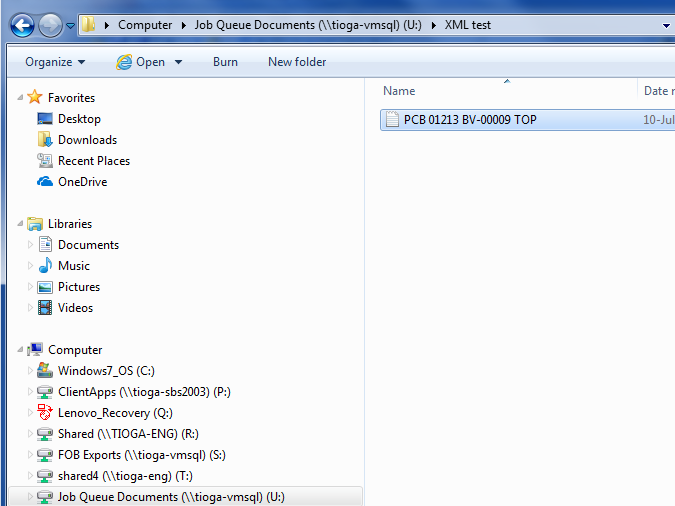
159.PNG

CLEAR(xmlDoc);
xmlDoc := xmlDoc.XmlDocument();
xmlDoc.Load('U:\Job Queue Documents\XML test\PCB 01213 BV-00009 TOP');
xmlRoot := xmlDoc.DocumentElement();

*This post is locked for comments

I have the same question (0)
  • Suggested answer
    Community Member Profile Picture
    on at

    Hi,

    You have to specify the path as 'U:\Job Queue Documents\XML test\PCB_01213_BV-00009_TOP.xml' with the .xml extension and remove or replace the spaces in the file name with underscores(_).

  • Verified answer
    Tina Menezes Profile Picture
    2,582 on at

    Hi,

    There should be no spaces in the path of the file. So you can rename your file for example 'Job Queue Documents' as 'JobQueueDocuments'. Likewise rename your xml file and remove all spaces. 'PCB_0123.xml'

  • Suggested answer
    Amol Salvi Profile Picture
    18,698 on at

    Can you paste screenshot of error  ?

  • Community Member Profile Picture
    on at

    Is the path visible from the server (were Service is running)?

    Try a simple EXIST(...)

Under review

Thank you for your reply! To ensure a great experience for everyone, your content is awaiting approval by our Community Managers. Please check back later.

Helpful resources

Quick Links

Responsible AI policies

As AI tools become more common, we’re introducing a Responsible AI Use…

Neeraj Kumar – Community Spotlight

We are honored to recognize Neeraj Kumar as our Community Spotlight honoree for…

Leaderboard > 🔒一 Microsoft Dynamics NAV (Archived)

#1
HoangNam Profile Picture

HoangNam 7

Last 30 days Overall leaderboard

Featured topics

Product updates

Dynamics 365 release plans



