web
You’re offline. This is a read only version of the page.
close
Skip to main content

Notifications

Announcements

No record found.

Community site session details

Community site session details

Session Id :
Finance | Project Operations, Human Resources, ...
Answered

In x++ dialog button

(0) ShareShare
ReportReport
Posted on by 1,215

Hi guys,

i want to add a button below image 
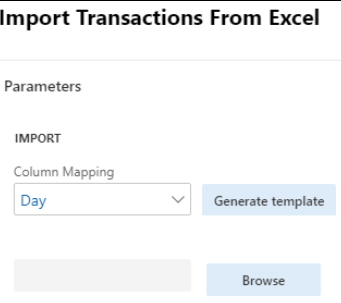
8132.Img.PNG

so that i wrote a code below and below my code after lookup side shows now i want to add in a Right side.

 public Object dialog()
    {
        FormBuildButtonControl buttonControl;

        DialogGroup            dlgGroup;

        FormBuildGroupControl  buttonGroup;
        dialog  = new Dialog("Import Transactions from Excel");
        dialog = super();

       
        dlgUploadGroup          = dialog.addGroup("@SYS54759");
        formBuildControl        = dialog.formBuildDesign().control(dlgUploadGroup.name());
        dialogCol = dialog.addFieldValue(extendedTypeStr(MPTransColMapping),colMapping);
        //dialogCol1 = dialog.addFieldValue(extendedTypeStr(MPTransColMapping),colMapping);
        buttonControl =  formBuildControl.addControl(FormControlType::Button,'Genarate template');
        buttonControl.text("@SYS339537");
        buttonControl.registerOverrideMethod(methodStr(FormButtonControl, clicked), methodStr(MPMassImportTransactions, clicked),this);
        dlgUploadGroup.columns(1);
        //dlgUploadGroup          = dialog.addGroup("@SYS54759");
       // formBuildControl        = dialog.formBuildDesign().control(dlgUploadGroup.name());
       fileUploadBuild         = formBuildControl.addControlEx(classstr(FileUpload), "Upload");
       fileUploadBuild.style(FileUploadStyle::MinimalWithFilename);
       fileUploadBuild.fileTypesAccepted(".xlsx");


        return dialog;

    }

what did i mistake please give us a solution.

Thanks.

I have the same question (0)
  • Gunjan Bhattachayya Profile Picture
    35,423 on at

    Riyas, Could you please explain your question?

    What do you want to add to the right side?

  • Riyas ahamed F Profile Picture
    1,215 on at

    Thanks for your reply Gunjan,

    I want to add in a button "Generate template' right side how to above my dialog class.

    Thanks.

  • Gunjan Bhattachayya Profile Picture
    35,423 on at

    I see that you already have added the button and it's on the right side.

    Are you looking to add this button to the right of another control?

  • Riyas ahamed F Profile Picture
    1,215 on at

    No, its came output design an a Right side and above my code output result below my image.

    logo.PNG

    Now, i want to show right side 'Generate button' how to change above my code i tried many way won't proper alignment please give us a solution.  

  • Suggested answer
    vinitgoyal2005 Profile Picture
    6,332 on at

    Hi,

    Try changing dlgUploadGroup.columns(1) to dlgUploadGroup.columns(2).

    Let is know if that works.

  • Suggested answer
    vinitgoyal2005 Profile Picture
    6,332 on at

    Hi,

    Try changing dlgUploadGroup.columns(1) to dlgUploadGroup.columns(2).

    Let us know if that works.

  • Riyas ahamed F Profile Picture
    1,215 on at

    Thanks for your replay Vinit Goyal ,

    i tried dlgUploadGroup.columns(2) but not working on it browser file alignment changed.

    what to be done ?

  • Suggested answer
    Gunjan Bhattachayya Profile Picture
    35,423 on at

    Please try this code -

    dlgUploadGroup.frameType(FormFrameType::None); 
    dlgUploadGroup.columns(2);

    I tried this and it's working fine for me.

  • Riyas ahamed F Profile Picture
    1,215 on at

    i tried in your code my output below image,

    logo1.PNG

    i want to only generate button only in Right side so that what should i do its possible ?

    Thanks for your time. 

  • Gunjan Bhattachayya Profile Picture
    35,423 on at

    Riyas,

    Can you try creating a new dialog group move the upload dialog field under it? I should help you in seperating the controls.

Under review

Thank you for your reply! To ensure a great experience for everyone, your content is awaiting approval by our Community Managers. Please check back later.

Helpful resources

Quick Links

Responsible AI policies

As AI tools become more common, we’re introducing a Responsible AI Use…

Neeraj Kumar – Community Spotlight

We are honored to recognize Neeraj Kumar as our Community Spotlight honoree for…

Leaderboard > Finance | Project Operations, Human Resources, AX, GP, SL

#1
Martin Dráb Profile Picture

Martin Dráb 544 Most Valuable Professional

#2
André Arnaud de Calavon Profile Picture

André Arnaud de Cal... 450 Super User 2025 Season 2

#3
Sohaib Cheema Profile Picture

Sohaib Cheema 250 User Group Leader

Last 30 days Overall leaderboard

Product updates

Dynamics 365 release plans



