web
You’re offline. This is a read only version of the page.
close
Skip to main content

Notifications

Announcements

No record found.

Community site session details

Community site session details

Session Id :
Customer experience | Sales, Customer Insights,...
Answered

Lookup field in Modern Advanced Find Filter Criteria

(0) ShareShare
ReportReport
Posted on by 110

When specifying criteria for a lookup field in classic advanced find, the "Lookup Records" pop up allowed the user to select which view to use and those views may contain columns that help choose the correct record. In Modern Advanced Find, it appears that when you are searching for a record in a lookup column, it only shows the name property of those records and you cannot get to a more advanced/useful search experience within that lookup field criteria. Anyone have an idea how to get more robust searching within lookup columns in Modern Advanced Find?

I have the same question (0)
  • AndyArndt Profile Picture
    110 on at

    When specifying criteria for a lookup field in classic advanced find, the "Lookup Records" pop up allowed the user to select which view to use and those views may contain columns that help choose the correct record. In Modern Advanced Find, it appears that when you are searching for a record in a lookup column, it only shows the name property of those records and you cannot get to a more advanced/useful search experience within that lookup field criteria. Anyone have an idea how to get more robust searching within lookup columns in Modern Advanced Find?

  • AndyArndt Profile Picture
    110 on at

    When specifying criteria for a lookup field in classic advanced find, the "Lookup Records" pop up allowed the user to select which view to use and those views may contain columns that help choose the correct record. In Modern Advanced Find, it appears that when you are searching for a record in a lookup column, it only shows the name property of those records and you cannot get to a more advanced/useful search experience within that lookup field criteria. Anyone have an idea how to get more robust searching within lookup columns in Modern Advanced Find?

  • Verified answer
    Leah Ju Profile Picture
    Microsoft Employee on at

    Hi AndyArndt,

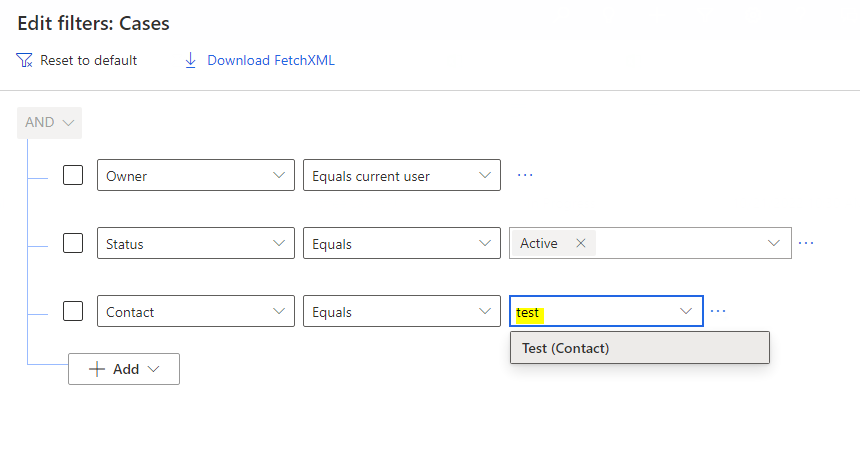
    Unfortunately, the lookup column filter in Modern Advanced Find can't switch to specific view, which is by-design.

    You can populate value and search, then it will be shown:
    3652.pastedimage1667356444910v2.png

    If you insist on getting the feature in the Modern Advanced Find, maybe you can create a new idea through the below URL, then ask your colleagues to raise up the votes.

    Ideas (dynamics.com

    Our product team has direct visibility of these ideas and they will implement it on the basis of the highest number of votes received.

    ===========

    Or you can use old Advanced Find if you must need to select views when filter lookup column:

    Go to Settings > Advanced Settings, then you click 'Advanced Find' button in current page, then you can get old Advanced Find window:

    0647.pastedimage1667355152812v1.png

  • AndyArndt Profile Picture
    110 on at

    Leah,

    Thank you for taking the time to respond, I marked your answer as verified. I suspected that this was a limitation, but wanted to confirm with other users and admins. I think this is a big step backward because the column displayed in the lookup is not always unique per row. We have many queries where I will need to continue using classic Advanced Find because of this limitation. I found a suggestion on the ideas site from June, 2022 that is describing the same issue, so I voted for that. Link is here: experience.dynamics.com/.../

    Thanks,

    Andy

Under review

Thank you for your reply! To ensure a great experience for everyone, your content is awaiting approval by our Community Managers. Please check back later.

Helpful resources

Quick Links

Responsible AI policies

As AI tools become more common, we’re introducing a Responsible AI Use…

Neeraj Kumar – Community Spotlight

We are honored to recognize Neeraj Kumar as our Community Spotlight honoree for…

Leaderboard > Customer experience | Sales, Customer Insights, CRM

#1
Tom_Gioielli Profile Picture

Tom_Gioielli 73 Super User 2025 Season 2

#2
Gerardo Rentería García Profile Picture

Gerardo Rentería Ga... 43 Most Valuable Professional

#3
Daniyal Khaleel Profile Picture

Daniyal Khaleel 32 Most Valuable Professional

Last 30 days Overall leaderboard

Product updates

Dynamics 365 release plans



