web
You’re offline. This is a read only version of the page.
close
Skip to main content

Notifications

Announcements

No record found.

Community site session details

Community site session details

Session Id :
Microsoft Dynamics AX (Archived)

Production order xxx could not be scheduled. No resource/resource group could be found that meets the requirements

(0) ShareShare
ReportReport
Posted on by

Hi All,

I try to create a planned order and I receive the message: 'Production order 003519 could not be scheduled. No resource/resource group could be found that meets the requirements'

errormps.png

By the way I have created a new working calendar template.
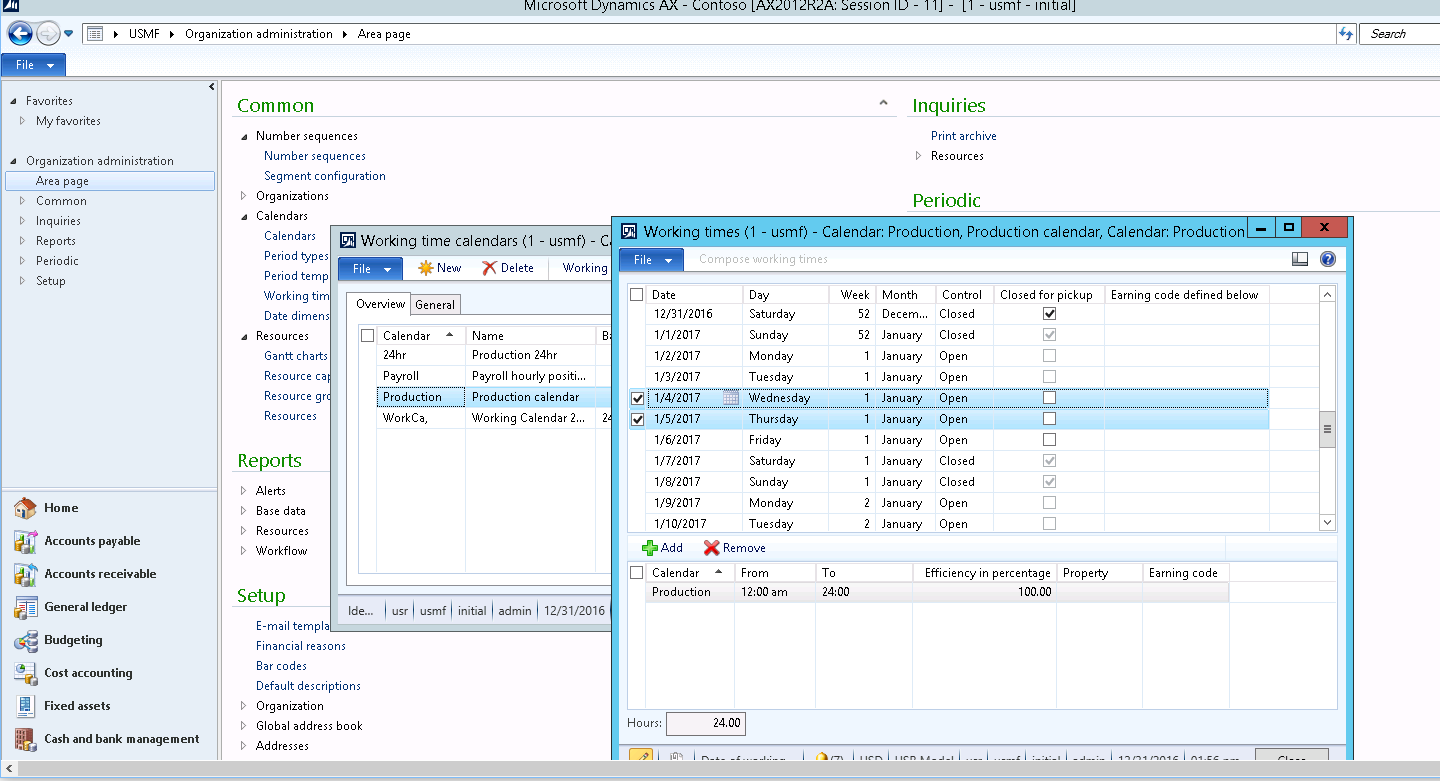
5672.calendar.png

I am working on USMF Company (VM), and the product I try to plan is D0004.

*This post is locked for comments

I have the same question (0)
  • Ludwig Reinhard Profile Picture
    Microsoft Employee on at

    Hi Michalis,

    What kind of scheduling has been applied in your case (based on individual resources or based on resource groups)?

    Can you check your resource setup whether they are setup with limited or unlimited capacity?

    If there is a limitation in the capacity scheduling might not be possible even if your working days are 'open' because the capacity might already be taken by other production orders.

    Best regards,

    Ludwig

  • Community Member Profile Picture
    on at

    Hi Ludwig,

    I did un-tick 'Finite Capacity' in resource groups and resources but I still receive the messages.

    errormps1.png

    BR,

    Michalis

  • Suggested answer
    Ludwig Reinhard Profile Picture
    Microsoft Employee on at

    Hi Michalis,

    Please open the resources/resource groups and then find the view 'capacity load' / 'capacity reservations' buttons.

    From there you should be able to identify what capacity has already been used and when and how much of it is still available.

    Best regards,

    Ludwig

  • Community Member Profile Picture
    on at

    Hi Ludwig,

    I checked and I do not see high load.

    7776.CAP2.png

    7776.CAP2.png

    BR,

    Michalis

  • Verified answer
    Ludwig Reinhard Profile Picture
    Microsoft Employee on at

    Hi Michalis,

    For which day did you try to schedule the production order?

    Is it Saturday 31 December - the closed day?

    Can you also check your route Setup?

    The message says that no resource/-group could be found that meets the requirements specified in the route.

    Probably there is something missing with the setup there?!

    Best regards,

    Ludwig

  • D365 Talent Profile Picture
    25 on at

    Hi Michalis,

    Can you please help me ?

    I am facing same error log.

    How did you resolved this issue ?

    pastedimage1635144188676v1.png

    Thanks

    Yash

Under review

Thank you for your reply! To ensure a great experience for everyone, your content is awaiting approval by our Community Managers. Please check back later.

Helpful resources

Quick Links

Responsible AI policies

As AI tools become more common, we’re introducing a Responsible AI Use…

Neeraj Kumar – Community Spotlight

We are honored to recognize Neeraj Kumar as our Community Spotlight honoree for…

Leaderboard > 🔒一 Microsoft Dynamics AX (Archived)

#1
Priya_K Profile Picture

Priya_K 4

#1
Martin Dráb Profile Picture

Martin Dráb 4 Most Valuable Professional

#3
MyDynamicsNAV Profile Picture

MyDynamicsNAV 2

Last 30 days Overall leaderboard

Featured topics

Product updates

Dynamics 365 release plans
