web
You’re offline. This is a read only version of the page.
close
Skip to main content

Notifications

Announcements

No record found.

Community site session details

Community site session details

Session Id :
Customer experience | Sales, Customer Insights,...
Answered

Multi-Select Option Set Javascript

(0) ShareShare
ReportReport
Posted on by 53

We have a requirement to show different sections on a form based on the options that are selected in a multiselect option set.  The code appears to be working correctly when we manually run it in the browser devtools but the events we have setup for onload and onchange dont seem to be triggering. Any suggestions would be greatly appreciated! 

var commodity = Xrm.Page.getAttribute("new_affectedcommodity").getValue();


function DoSomething(item){
    switch(item){
        case 287820000:
            Xrm.Page.ui.tabs.get("general").sections.get("affectedusers").setVisible(true);  //Shows affected users
        break;
        case 287820001:
            Xrm.Page.ui.tabs.get("general").sections.get("affectedassets").setVisible(true);  //Shows affected assets
        break;
        case 287820002:
            Xrm.Page.ui.tabs.get("general").sections.get("affectedappsandservices").setVisible(true);  //Shows affected service/app
        break;
            default:
            Xrm.Page.ui.tabs.get("general").sections.get("affectedusers").setVisible(false);  //Hides affected users
            Xrm.Page.ui.tabs.get("general").sections.get("affectedassets").setVisible(false);  //Shows affected assets
            Xrm.Page.ui.tabs.get("general").sections.get("affectedappsandservices").setVisible(false);  //Hides affected service/app
        break;
    }
}

commodity.forEach(item => DoSomething(item));
I have the same question (0)
  • XM-22040801-0 Profile Picture
    11 on at

    Hello,

    How do you setup onload and onchange ? What is the name of the function you are calling?

    Otherwise, I suggest you to use the execution context instead of Xrm.Page (deprecated). See learn.microsoft.com/.../important-changes-coming

  • Suggested answer
    Tamilarasu Arunachalam Profile Picture
    587 on at

    Hi AZWildcat1290 ,

    I have found that you used Xrm.Page in your code and it is deprecated. you can use executionContext instead.

    You have to call the function from both onload of the form and onchange of that multi-select optionset field

    Here is my working example

    I have set a field in the details tab(contact preferences section) of accounts form and use it to hide/show the sections

    Uncheck the visible by default in all sections you want to show/hide.
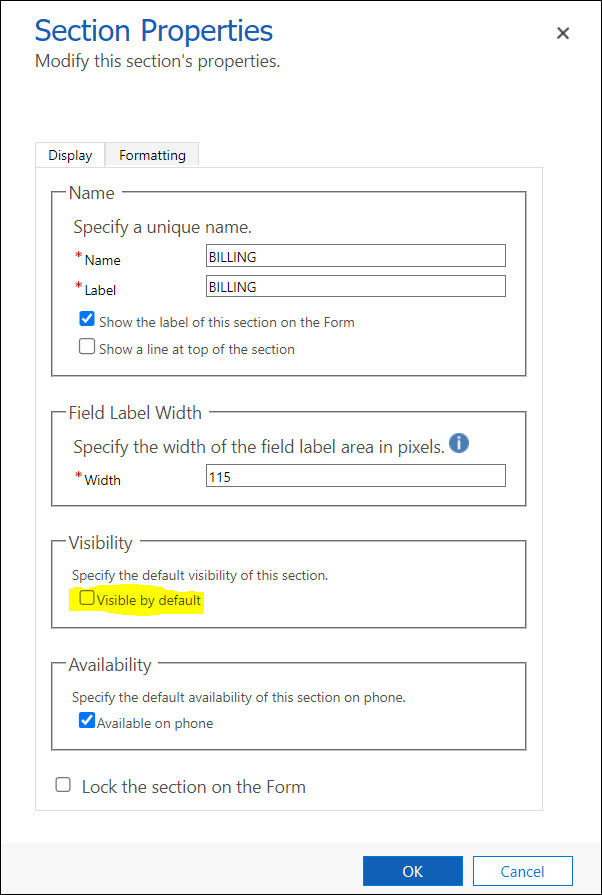
    pastedimage1681666534960v1.png

    I have used the below code to accomplish the task

    function showSections(executionContext) {
        var formContext = executionContext.getFormContext();
        var sections = formContext.getAttribute("new_sectionstoshow");
        var getSections = sections.getValue();
    
        let tabObj = formContext.ui.tabs.get("DETAILS_TAB");
    
        if (getSections !== null) {
            getSections.forEach(element => {
                if (getSections.includes(element) === true) {
                    switch (element) {
                        case 1:
                            tabObj.sections.get("COMPANY_PROFILE").setVisible(true);
                            break;
                        case 2:
                            tabObj.sections.get("DETAILS_TAB_section_6").setVisible(true);
                            break;
                        case 3:
                            tabObj.sections.get("BILLING").setVisible(true);
                            break;
                        case 4:
                            tabObj.sections.get("SHIPPING").setVisible(true);
                            break;
                        default:
                            tabObj.sections.get("COMPANY_PROFILE").setVisible(false);
                            tabObj.sections.get("DETAILS_TAB_section_6").setVisible(false);
                            tabObj.sections.get("BILLING").setVisible(false);
                            tabObj.sections.get("SHIPPING").setVisible(false);
                            break;
                    }
                }
            });
            if (getSections.includes(1) !== true) {
                tabObj.sections.get("COMPANY_PROFILE").setVisible(false);
            } else if (getSections.includes(2) !== true) {
                tabObj.sections.get("DETAILS_TAB_section_6").setVisible(false);
            } else if (getSections.includes(3) !== true) {
                tabObj.sections.get("BILLING").setVisible(false);
            } else if (getSections.includes(4) !== true) {
                tabObj.sections.get("SHIPPING").setVisible(false);
            }
        } else {
            tabObj.sections.get("COMPANY_PROFILE").setVisible(false);
            tabObj.sections.get("DETAILS_TAB_section_6").setVisible(false);
            tabObj.sections.get("BILLING").setVisible(false);
            tabObj.sections.get("SHIPPING").setVisible(false);
        }
    }

    And it worked as expected for me

    below is the gif
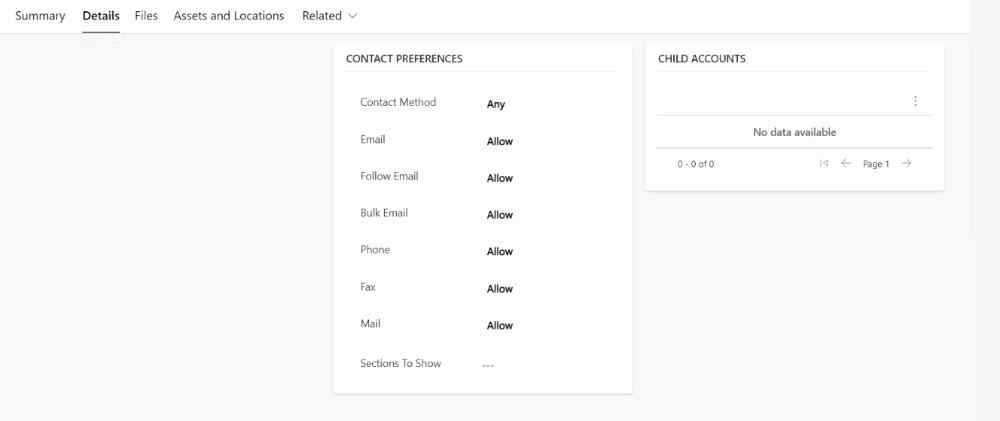
    chrome_2D00_capture_2D00_2023_2D00_3_2D00_16.gif

    If this answer helps you, like and verify my answer

  • AZWildcat1290 Profile Picture
    53 on at

    Hi Tamilarasu Arunachalam!

    Thank you so much for your response! You have definitely gotten me closer to my end goal.  I do have one issue that seems to be happening when I try to remove the options they arent all being removed as they should be until they are all removed... seems to mainly be happening with the Affected App/service option (see attached gif).  I have also included the updated code that I used that you had suggested.

    function showSections(executionContext) {
        var formContext = executionContext.getFormContext();
        var sections = formContext.getAttribute("new_affectedcommodity");
        var getSections = sections.getValue();
    
        let tabObj = formContext.ui.tabs.get("general");
    
        if (getSections !== null) {
            getSections.forEach(element => {
                if (getSections.includes(element) === true) {
                    switch (element) {
                            case 287820000:
                                Xrm.Page.ui.tabs.get("general").sections.get("affectedusers").setVisible(true);  //Shows affected users
                            break;
                            case 287820001:
                                Xrm.Page.ui.tabs.get("general").sections.get("affectedassets").setVisible(true);  //Shows affected assets
                            break;
                            case 287820002:
                                Xrm.Page.ui.tabs.get("general").sections.get("affectedappsandservices").setVisible(true);  //Shows affected service/app
                            break;
                                default:
                                Xrm.Page.ui.tabs.get("general").sections.get("affectedusers").setVisible(false);  //Hides affected users
                                Xrm.Page.ui.tabs.get("general").sections.get("affectedassets").setVisible(false);  //Shows affected assets
                                Xrm.Page.ui.tabs.get("general").sections.get("affectedappsandservices").setVisible(false);  //Hides affected service/app
                            break;
                        }
                }
            });
            if (getSections.includes(287820000) !== true) {
                tabObj.sections.get("affectedusers").setVisible(false);
            } else if (getSections.includes(287820001) !== true) {
                tabObj.sections.get("affectedassets").setVisible(false);
            } else if (getSections.includes(287820002) !== true) {
                tabObj.sections.get("affectedappsandservices").setVisible(false);
            }
        } 
        else {
            tabObj.sections.get("affectedusers").setVisible(false);
            tabObj.sections.get("affectedassets").setVisible(false);
            tabObj.sections.get("affectedappsandservices").setVisible(false);
    
        }
    }
    Affected-Commodity.gif

  • Suggested answer
    XM-22040801-0 Profile Picture
    11 on at

    Hi,

    You can simplify the code by assigning visibility based on the presence or absence of the value:

    function showSections(execCtx) {
        const formCtx = execCtx.getFormContext();
    
        const affectedCommodityAttr = formCtx.getAttribute("new_affectedcommodity");
        const affectedCommodity = affectedCommodityAttr.getValue() ?? [];
    
        const generalTab = formCtx.ui.tabs.get("general");
    
        const sectionByAffectedCommodity = [
            { id: 287820000, section: "affectedusers" },
            { id: 287820001, section: "affectedassets" },
            { id: 287820002, section: "affectedappsandservices" }
        ];
    
        sectionByAffectedCommodity.forEach(s => {
            const section = generalTab.sections.get(s.section);
            section.setVisible(affectedCommodity.includes(s.id));
        }
    }

    You can add or remove association from the multi select option set directly in the sectionByAffectedCommodity array.

  • AZWildcat1290 Profile Picture
    53 on at

    Thank you so much Xavier Monin!  That definitely simplified our code and worked like a charm!!

Under review

Thank you for your reply! To ensure a great experience for everyone, your content is awaiting approval by our Community Managers. Please check back later.

Helpful resources

Quick Links

Responsible AI policies

As AI tools become more common, we’re introducing a Responsible AI Use…

Neeraj Kumar – Community Spotlight

We are honored to recognize Neeraj Kumar as our Community Spotlight honoree for…

Leaderboard > Customer experience | Sales, Customer Insights, CRM

#1
Pallavi Phade Profile Picture

Pallavi Phade 98

#2
Tom_Gioielli Profile Picture

Tom_Gioielli 60 Super User 2025 Season 2

#3
Gerardo Rentería García Profile Picture

Gerardo Rentería Ga... 43 Most Valuable Professional

Last 30 days Overall leaderboard

Product updates

Dynamics 365 release plans



