web
You’re offline. This is a read only version of the page.
close
Skip to main content

Notifications

Announcements

No record found.

Community site session details

Community site session details

Session Id :
Finance | Project Operations, Human Resources, ...
Suggested Answer

Dynamic 365 Technical Log Error Problem

(2) ShareShare
ReportReport
Posted on by 25

I have provided case study i have build Properly but when i synchronize database it getting 50 Error and all are Log Error ..Please help me 

Case Study: Customization in D365 F&O – Vendor Payment Restriction for Specific Invoice


Business Scenario

USMF required a control mechanism in D365 F&O to prevent payment processing for specific vendor invoices under certain conditions. These conditions included:

  • Invoices under dispute
  • Invoices pending internal approval
  • Invoices flagged for audit or compliance review

The standard D365 F&O functionality did not support invoice-level payment blocking without manual intervention, which posed risks of accidental payment and compliance issues.

Standard Behaviour in D365 F&O

In standard D365 F&O, the Vendor Payment Proposal process includes all open invoices based on filters like due date, vendor group, and payment method. There is no out-of-the-box feature to automatically exclude specific invoices unless manually removed during proposal review.

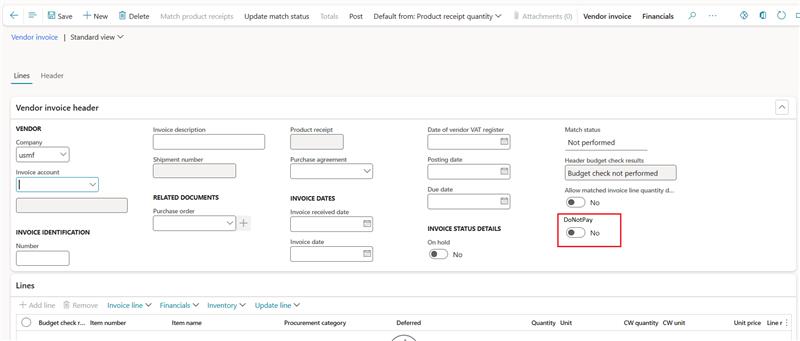
Accounts Payable 🡪 Invoices 🡪 Open Vendor Invoices
Customization Objective

Introduce a “DoNotPay” flag on vendor invoices.

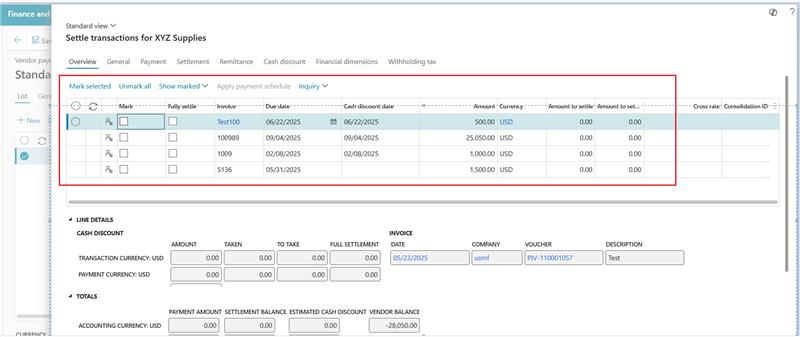
Ensure flagged invoices are excluded from:


  • Payment proposals

Vendor Payment Journal 🡪 Payment Proposal

  • Manual payment processing

Vendor Payment Journal -> Select Vendor 🡪 Settle transaction
Solution Design

1. Data Model Extension

  • Add a custom boolean field DoNotPay to the VendTrans table (Vendor Transactions).
  • Field exposed on the Vendor Invoice Journal and Open Vendor Invoices form.

2. UI Enhancements

  • Checkbox labeled “DoNotPay” added to invoice entry and inquiry screens.
  • Tooltip and validation to ensure users understand the impact.

3. Payment Proposal Logic

  • Modify the VendPaymProposalController class to filter out invoices where DoNotPay = true.
  • Ensure compatibility with batch jobs and recurring payment proposals.


Note: This Customisation should be applicable for Existing invoices also

Categories:
I have the same question (0)
  • Martin Dráb Profile Picture
    237,709 Most Valuable Professional on at
    Is it really related to your changes? In other words, does the database synchronize if you remove your DoNotPay field from VendTrans and recompile your model?
     
    The errors don't seem to be related to your field. For example, the first one is about SalesInvoiceLineV2Entity. Maybe you had a problem even before you started making your changes, you just weren't aware of it and now you're looking for the problem at a wrong place.
     
    Moved from Integration, Dataverse, and general topics forum to Finance | Project Operations, Human Resources, AX, GP, SL forum.
  • CU18110824-1 Profile Picture
    2 on at
    The failure to synchronize your D365 F&O database (Error 50 with Log Errors) after adding the custom `DoNotPay` boolean field to the **`VendTrans` table** is almost certainly due to a **field property configuration error**. Since `VendTrans` is a large base table, the synchronization engine e-zpassnj fails because the new column cannot be created as `NOT NULL` (Mandatory = Yes) while existing records have no value. To fix this, you must open your `VendTrans` table extension in Visual Studio and ensure the **Mandatory** property for the `DoNotPay` field is set to **No**, or if it must be mandatory, explicitly set the **Initial Value** property to **`No`** or **`false`**, and then perform a full build and synchronization.
  • Suggested answer
    CU21071422-0 Profile Picture
    25 on at
    Is it really related to your changes? In other words, does the database synchronize if you remove your DoNotPay field from VendTrans and recompile your model?
     
    The errors don't seem to be related to your field. For example, the first one is about SalesInvoiceLineV2Entity. Maybe you had a problem even before you started making your changes, you just weren't aware of it and now you're looking for the problem at a wrong place.
     
    Moved from Integration, Dataverse, and general topics forum to Finance | Project Operations, Human Resources, AX, GP, SL forum.     
     
    So where i have to post for getting solution
     
  • Martin Dráb Profile Picture
    237,709 Most Valuable Professional on at
    It's about F&O, so I've moved it to an F&O for you. It's done.
     
    But I see you have another thread about the same problem: Log Level Error. Discussing the same things twice in parallel would be confusing and wasteful, therefore please decide in which of your two threads you wish to continue.

Under review

Thank you for your reply! To ensure a great experience for everyone, your content is awaiting approval by our Community Managers. Please check back later.

Helpful resources

Quick Links

Responsible AI policies

As AI tools become more common, we’re introducing a Responsible AI Use…

Neeraj Kumar – Community Spotlight

We are honored to recognize Neeraj Kumar as our Community Spotlight honoree for…

Leaderboard > Finance | Project Operations, Human Resources, AX, GP, SL

#1
Martin Dráb Profile Picture

Martin Dráb 687 Most Valuable Professional

#2
André Arnaud de Calavon Profile Picture

André Arnaud de Cal... 535 Super User 2025 Season 2

#3
BillurSamdancioglu Profile Picture

BillurSamdancioglu 403 Most Valuable Professional

Last 30 days Overall leaderboard

Product updates

Dynamics 365 release plans
