web
You’re offline. This is a read only version of the page.
close
Skip to main content

Announcements

Community site session details

Community site session details

Session Id :
Microsoft Dynamics 365 | Integration, Dataverse...
Answered

Cannot save the personal view change

(0) ShareShare
ReportReport
Posted on by 2

Hi Expert,

Since last week, our Dynamics 365 CE can not save the Personal View change.

When I Edit Column or Edit Filter to make some change, the personal view will add a "*", see the screen below

view1.JPG

When I click "Save changes to current view" to save the change, it does not work, I cannot save the change.
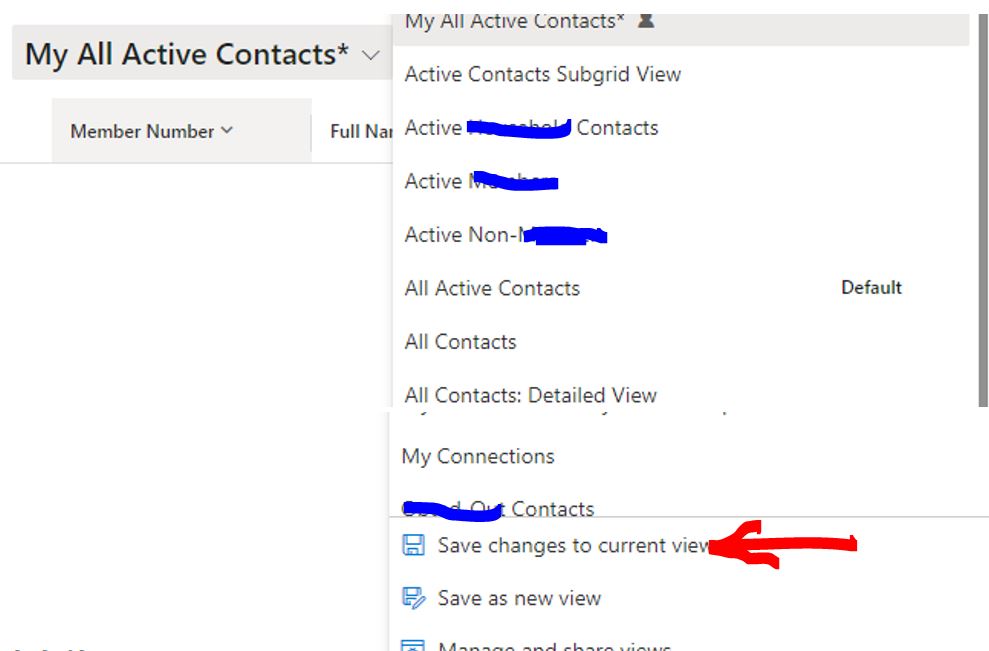
view3.JPG


Anybody encounter similar problem? How to resolve it? Thank you so much.

I have the same question (0)
  • Suggested answer
    Leco Lv Profile Picture
    Microsoft Employee on at

    Hi partner,

    Views with * represent temporary views, which means that you have made changes but have not saved them yet. I tested in my environment according to your description, "Save changes to current view" works for me.

    I know you recently updated the 2023 wave1 version as I did, so I ruled out the environment update causing the bug.

    pastedimage1676539878986v1.png

    Please test that after you click "Save changes to current view", open the developer tool to see if there is an error reported for this item. (Please provide the screenshot)

    pastedimage1676540286249v2.png

    BTW, could you tell me in which dynamic 365 product your contact entity exists? Just guessing, maybe a newer version of the product can fix it.

  • ALAN365 Profile Picture
    2 on at

    Thank you Leco.

    Our product is Dynamics 365 CE.

    This issue happened a couple of days ago and every instance is same issue. Before that it was working well.

    As your suggestion, here is my screen

    view4.JPG

    Anything not normal you can find? Thank you again.

  • ALAN365 Profile Picture
    2 on at

    Update: double click UpdateRecentItems, pop up new window showing:  {"error":{"code":"","message":"No HTTP resource was found that matches the request URI 'xxxx.crm3.dynamics.com/.../UpdateRecentItems'."}}

    Useful above?

  • Verified answer
    Leco Lv Profile Picture
    Microsoft Employee on at

    Hi partner,

    I noticed that this might be a bug. I guess your server version is 23015. You can find it in Settings-> About. Microsoft Teams is working on a fix. My environment is not affected probably because my server version is 23012.

    pastedimage1676620610532v1.png

    Work arounds would be to create a new view instead of editing an existing one, or to use the PA One grid instead of the default grid, which has this functionality working as expected.

    pastedimage1676620731181v2.png

    learn.microsoft.com/.../the-power-apps-grid-control

  • ALAN365 Profile Picture
    2 on at

    Thank you for your important information. I checked my server version, it is 23015.

    Just wonder, can you estimate how long time MS will be used to fix this kind of Bug?

  • Verified answer
    Leco Lv Profile Picture
    Microsoft Employee on at

    Hi partner,

    Probably in the following time period.

    pastedimage1676857262661v1.png

Under review

Thank you for your reply! To ensure a great experience for everyone, your content is awaiting approval by our Community Managers. Please check back later.

Helpful resources

Quick Links

Introducing the 2026 Season 1 community Super Users

Congratulations to our 2026 Super Stars!

Congratulations to our 2025 Community Spotlights

Thanks to all of our 2025 Community Spotlight stars!

Leaderboard > Microsoft Dynamics 365 | Integration, Dataverse, and general topics

#1
André Arnaud de Calavon Profile Picture

André Arnaud de Cal... 69 Super User 2026 Season 1

#2
BillurSamdancioglu Profile Picture

BillurSamdancioglu 55 Most Valuable Professional

#2
Abhilash Warrier Profile Picture

Abhilash Warrier 55 Super User 2026 Season 1

Last 30 days Overall leaderboard

Product updates

Dynamics 365 release plans



