web
You’re offline. This is a read only version of the page.
close
Skip to main content

Notifications

Announcements

No record found.

Community site session details

Community site session details

Session Id :
Microsoft Dynamics AX (Archived)

Inventory Journal Import (DIEF)

(0) ShareShare
ReportReport
Posted on by

Hello,

We are looking to import counting journal data using the DIEF. The goal is to import up to 800 records for posting a Physical Inventory adjustment. I have successfully:

  • Created a Group Name
  • Setup the Entity (Inventory Journal)
  • Generated the Source Mapping
  • Validated OK in AX
  • Staged, and Imported the Data to AX into a Journal

I have used these fields in the mapping:

  • JOURNALID
  • TRANSDATE
  • JOURNALNAMEID
  • LINENUM
  • ITEMID
  • COUNTED
  • INVENTSITEID
  • INVENTLOCATIONID
  • WMSLOCATIONID

The issue I'm having is even though the data imports successfully, AX does not appear to be updating certain fields appropriately. 

The Site, Warehouse, and Location are all populated in the journal, and the quantity I want populated in "Counted" is present. The "On Hand" column seems to be automatically populated with the same quantity as "Counted" instead of what is actually on hand in the inventory dimension combination:
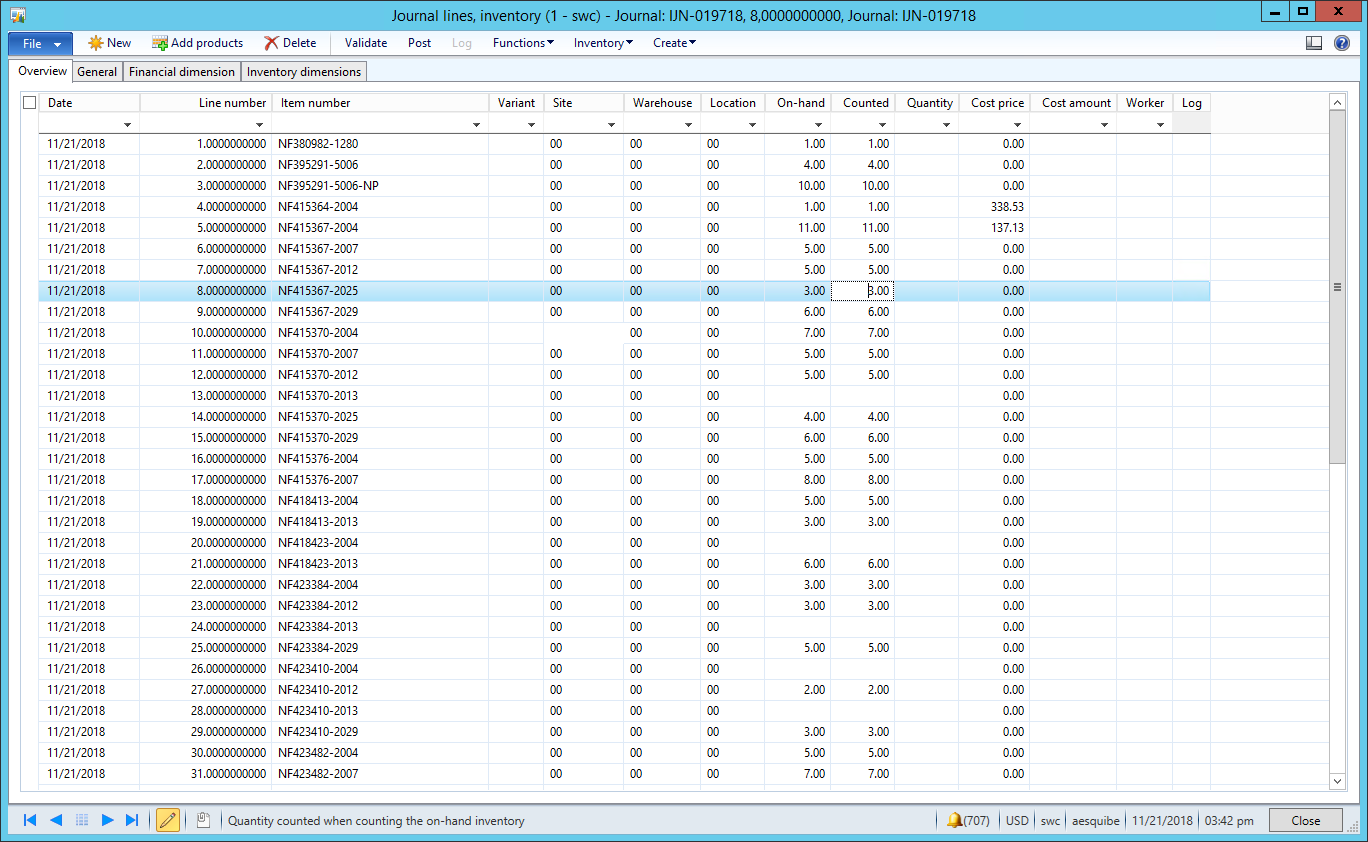
Counting-Journal-1.png

Then, if I "update" the location on the line (retype 00), the "On Hand" updated to the appropriate quantity in that dimension, and the "Counted" field has been populated with the adjustment quantity. Now, even though the "Quantity" has updated, the "Cost Price" has not pulled in, and the "Cost Amount" has not adjusted
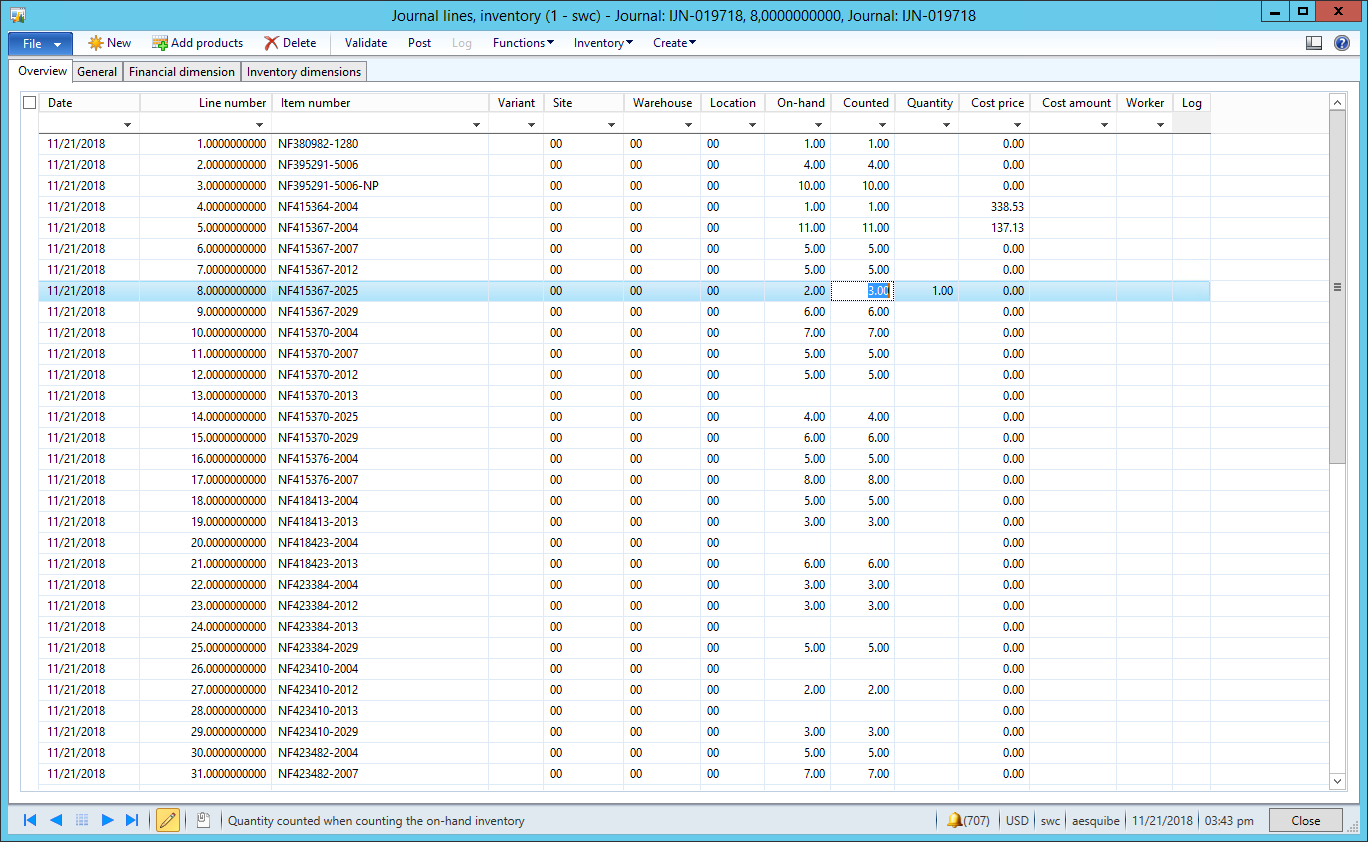
6786.Counting-Journal-2.png

If I "update" the "Counted" field to 0, it will update the cost price and cost amount. I set the counted back to "3" and now the line looks appropriate:
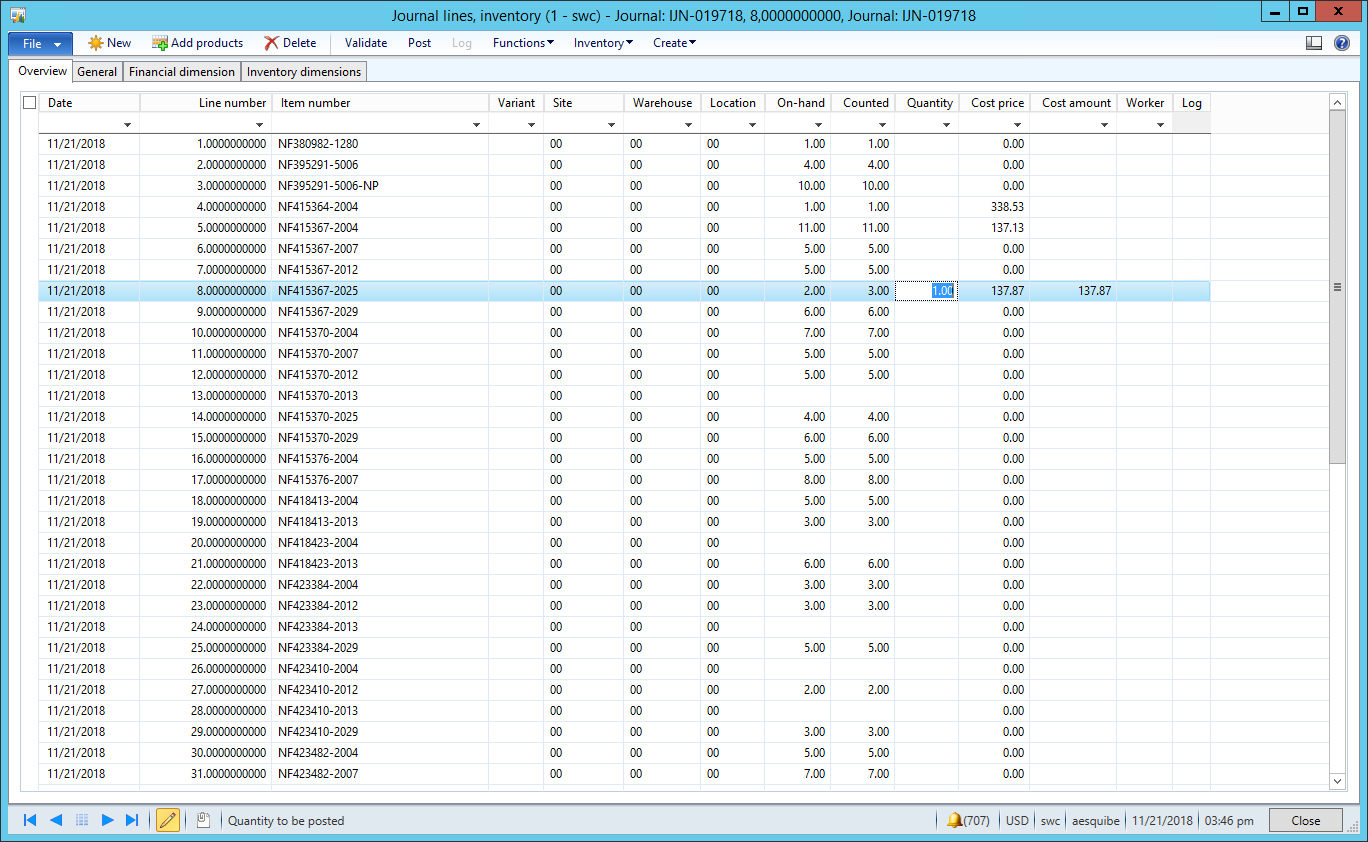
Counting-Journal-3.png

Obviously having to do all this more or less defeats the purpose of using the DIEF. Am I doing something wrong, missing a step, other? 

Thank you!

*This post is locked for comments

I have the same question (0)
  • Ludwig Reinhard Profile Picture
    Microsoft Employee on at

    Hi,

    There is a blog post available for this import process. Have you checked it already?

    [View:https://blogs.msdn.microsoft.com/axsupport/2016/09/30/how-to-use-dixf-to-import-an-inventory-counting-journal-into-ax-2012-from-an-excel-source-file/]

    Best regards

    Ludwig

  • Community Member Profile Picture
    on at

    Yes, I did use that post to (re)build my import process, yet I have the results I posted above. Any help would be greatly appreciated.

  • Community Member Profile Picture
    on at

    Does anyone know if there's a bulk way to get AX to "refresh" or "touch" the lines to cause them to update based on data entered?

  • Community Member Profile Picture
    on at

    If that is more of a "developer" function, unfortunately we have no resource to achieve that. If it's more of a user interface I can click into and run, can you elaborate please? Or, something easily achieved in the AOT (without actual coding/changes)?

  • Suggested answer
    André Arnaud de Calavon Profile Picture
    301,082 Super User 2025 Season 2 on at

    Hi SWC,

    The field InventOnHand is also a field in the source mapping. It is assumed that this field is provided as part of the source file. The Microsoft Blog is not mentioning this. In fact this part if completely missing here.

    If you are able to get the InventOnHand in your source file, it would be a solution for you. Otherwise, you have to customize the entity to get the OnHand quantity during staging to target process.

  • Community Member Profile Picture
    on at

    Thank you all so far,

    I did bring the InventOnHand into the template as well, though when I imported, it seemed to completely disregard the values I put in there, and instead, populated the actual on hand of the items, but also put the actual on hand in the "counted" field as well. Essentially the opposite issue I had originally, but still not displaying the proper numbers or costing.

    It seems there is an underlying issue in the process I can't put my finger on.

  • André Arnaud de Calavon Profile Picture
    301,082 Super User 2025 Season 2 on at

    Hi SWK,

    In MSDyn365FO, the on-hand is populated automatically without using any value in the source. The design is different for AX2012. Probably you can review together with a developer what exactly is being done in the background. The debugger can help here. Probably the field order can play a role or you should enable the execution for business logic on the target entity settings and the processing group details.

Under review

Thank you for your reply! To ensure a great experience for everyone, your content is awaiting approval by our Community Managers. Please check back later.

Helpful resources

Quick Links

Responsible AI policies

As AI tools become more common, we’re introducing a Responsible AI Use…

Neeraj Kumar – Community Spotlight

We are honored to recognize Neeraj Kumar as our Community Spotlight honoree for…

Leaderboard > 🔒一 Microsoft Dynamics AX (Archived)

#1
Martin Dráb Profile Picture

Martin Dráb 4 Most Valuable Professional

#1
Priya_K Profile Picture

Priya_K 4

#3
MyDynamicsNAV Profile Picture

MyDynamicsNAV 2

Last 30 days Overall leaderboard

Featured topics

Product updates

Dynamics 365 release plans
