web
You’re offline. This is a read only version of the page.
close
Skip to main content

Notifications

Announcements

No record found.

Community site session details

Community site session details

Session Id :
Microsoft Dynamics NAV (Archived)

Error sending invoice with email on Nav 2009

(0) ShareShare
ReportReport
Posted on by

Hello,
I am having difficulty trying to send invoices with email. Every time it stops showing an error message (check image attached). I have outlook configured properly, the dll files of mail are on place.
I would really appreciate if you could help me resolve this problem since this has happened on different clients installation of NAV.
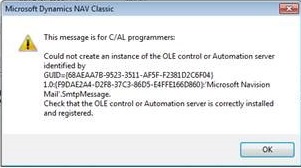
111.jpg

*This post is locked for comments

I have the same question (0)
  • Suggested answer
    Suresh Kulla Profile Picture
    50,243 Super User 2025 Season 2 on at

    Are you using NAV 2009 Classic or RTC ?

  • Community Member Profile Picture
    on at

    Hi Suresh, thank you for answering.

    I am using NAV 2009 Classic

  • Suggested answer
    Suresh Kulla Profile Picture
    50,243 Super User 2025 Season 2 on at

    Can you please share the code you are using ?

  • Verified answer
    Amol Salvi Profile Picture
    18,698 on at

    It seems you have not install the client and just copy the installed folder of Navision from another machine. Try to install navision with installed and then check

  • Community Member Profile Picture
    on at

    Suresh here is the code:

    Sale := "Sales Header";

    Sale.SETRECFILTER;

    IF REPORT.SAVEASHTML(SendReport, GetFileName, FALSE, Sale) THEN

     IF Mail.NewMessage(Vmail, '', Subject, Body, GetFileName, FALSE) THEN

       NoOfEmials := NoOfEmials + 1;

    But I don't think it is a code related problem. Because the same code works on other nav clients, and on some others no..

  • Community Member Profile Picture
    on at

    Hi Amol, okay I'll try this and let you know.

    Thank you.

  • Community Member Profile Picture
    on at

    Hello Amol. I am sorry for replying so late. I followed your instructions and you were right. Now it works, since I tried this with 2 clients installation. But on 2 other clients, reinstalling the NAV still doesn't fix the problem. On these clients, I get a slightly different error message. I am attaching it so if you know what is the difference and how to solve this particular problem, I would really appreciate it.

    Best Regards,

    Stela.

    7418.1.png

Under review

Thank you for your reply! To ensure a great experience for everyone, your content is awaiting approval by our Community Managers. Please check back later.

Helpful resources

Quick Links

Responsible AI policies

As AI tools become more common, we’re introducing a Responsible AI Use…

Neeraj Kumar – Community Spotlight

We are honored to recognize Neeraj Kumar as our Community Spotlight honoree for…

Leaderboard > 🔒一 Microsoft Dynamics NAV (Archived)

Last 30 days Overall leaderboard

Featured topics

Product updates

Dynamics 365 release plans



