web
You’re offline. This is a read only version of the page.
close
Skip to main content

Announcements

No record found.

News and Announcements icon
Community site session details

Community site session details

Session Id :
Finance | Project Operations, Human Resources, ...
Answered

assign value to C# list<KeyValuePair<string,string> from X++

(0) ShareShare
ReportReport
Posted on by 225

Hello,

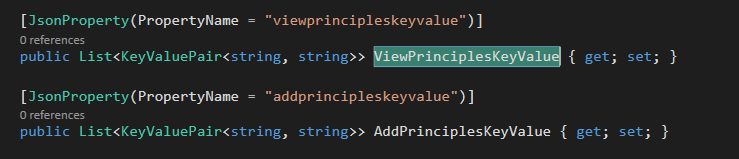
I have C# class. in that I have two properties of type "List<KeyValuePair<string,string>>" as shown in below screenshot. can anyone tell me how I can assign value to this from X++ ?
pastedimage1614361187741v1.png

In X++ I have created object of this class. and I want to assign value like:

object.ViewPrinciplesKeyValue = [{"Key":"Everyone","Value":"Everyone"}].

Is there anything like JsonArray, JsonObject in X++?

I have the same question (0)
  • Martin Dráb Profile Picture
    238,782 Most Valuable Professional on at

    X++ doesn't officially support generics, therefore working with generic types from X++ isn't easy. Usually the best option is providing an alternative, non-generic interface that you can easily call from X++.

    By the way, does C# support an implicit deserialization of strings to JsonProperty objects, as your examples suggests? I would think that you need to explicitly call a deserializer (e.g. JsonConvert.DeserializeObject).

    Anyway, if you intention is to assign a string, create a string property (such as ViewPrinciplesJson) which will do the deserialization and assing the value of ViewPrinciplesKeyValue.

  • Pratik Rami Profile Picture
    225 on at

    We have to call JsonConvert.DeserializeObject in C#.

    Martin, sorry but i am not able to understand what you said in last para. Can you please explain little more. I have to assign list to this property.

    What I am doing is: I create object of this class in X++...assign all properties values and then send this object as parameter to C# method which will call external api. In that method this object will be serialised and used as a requestData(body).

  • Verified answer
    Martin Dráb Profile Picture
    238,782 Most Valuable Professional on at

    You said you wanted to assign a string. To do that, you need to call JsonConvert.DeserializeObject to convert the string to a generic list. So why don't you wrap this logic in a string property of the C# class? It could look somehow like this:

    public string ViewPrinciplesJson
    {
        get
        {
            return JsonConvert.SerializeObject(ViewPrinciplesKeyValue);
        }
        set
        {
            ViewPrinciplesKeyValue = JsonConvert.DeserializeObject(value);
        }
    }

    Using such a property from X is trivial - you'll simply assign a string to it, as you asked for:

    object.ViewPrinciplesJson = [{"Key":"Everyone","Value":"Everyone"}];

Under review

Thank you for your reply! To ensure a great experience for everyone, your content is awaiting approval by our Community Managers. Please check back later.

Helpful resources

Quick Links

Introducing the 2026 Season 1 community Super Users

Congratulations to our 2026 Super Stars!

Congratulations to our 2025 Community Spotlights

Thanks to all of our 2025 Community Spotlight stars!

Leaderboard > Finance | Project Operations, Human Resources, AX, GP, SL

#1
André Arnaud de Calavon Profile Picture

André Arnaud de Cal... 512 Super User 2026 Season 1

#2
Giorgio Bonacorsi Profile Picture

Giorgio Bonacorsi 386

#3
Adis Profile Picture

Adis 259 Super User 2026 Season 1

Last 30 days Overall leaderboard

Product updates

Dynamics 365 release plans
