web
You’re offline. This is a read only version of the page.
close
Skip to main content

Announcements

News and Announcements icon
Community site session details

Community site session details

Session Id :
Customer Insights - Journeys forum

Alert Notifications after Form Submission

(1) ShareShare
ReportReport
Posted on by 25

How do I set an alter notification to myself and another in my organization once a form has been (filled or) submitted. Is there a way to do this during a customer journey I've created?

I have the same question (0)
  • Suggested answer
    Pawar Pravin Profile Picture
    5,237 on at

    Hi,

    Do you mean to say that after submission (created event) of data in record, you should get alert notification ?

  • Suggested answer
    Abhinav Sunku Profile Picture
    350 on at

    Hello Patrick Garcia,

    As per my understanding, you can set an alert notification by using trigger in the Customer Journey, in properties set rule Source: New marketing form and Condition: Form submitted.

    Note: Minimum Trigger timeout should be 1 hr

    Trigger.PNG

    Hope it helps,

    Best regards,

    Abhinav sunku.

    “If this has answered your question, please mark as Verified!”

  • cloflyMao Profile Picture
    25,210 on at

    Hi Partick,

    If you want to get a notification of new contacts in a customer journey,

    you could add an Activity tile in your customer journey pipeline as below: 

    0624.png

    After user submitted form then he will be created as a contact in DB and joins in this customer journey as a segment member(even if there is no segments tile),

    then an activity will be added for him, and regarding value will be set to that contact. See here for how to generate activities from customer journey and what is an inbound customer journey.

    In addition, because the Owner field of those contacts that generated from form submit is SYSTEM,

    you could trigger workflow when a contact is created which its owner is System as criteria or create a custom view to filter out contacts from submit form.

    Regards,

    Clofly

  • Patrick Garcia Profile Picture
    25 on at

    Thanks, Abhinav!

    What if I want more than just myself to be included in the notification? Noted, both my form and marketing message that says “Thank You for your Submission” are live – so when someone from our site fills out a form which is embedded in Dynamics, I want to have 3 people receive an “email notification” that someone submitted a form. Does this make sense?

  • Patrick Garcia Profile Picture
    25 on at

    Thank you, Clofly – can you give me a better view of that image? I just need a simple email notification that I can insert in the Customer Journey.. Forms (someone filled it out) > Marketing Message (Thank You) > (email my staff) <

  • Suggested answer
    Stephan_ec4u Profile Picture
    5 on at

    Just put in an Engagement E-Mail to the flow and replace the 'To address... ' with a static one of your choice.

    pastedimage1563968185639v1.png

  • IronPatriot Profile Picture
    290 on at

    This isn't rocket-science, and it's a MAJOR oversight on Microsoft's behalf.  Users shouldn't have to create Workflows, Customer Journeys, and/or anything to simply get notified when someone submits a form!  ClickDimensions has had this for as long as I can remember.  It's a given that the person running a campaign wants to know if someone has signed up for something, submitted a form, whatever.  The Form should, like, ClickDimensions, have an ACTIONS tab:

    TOOLBOX | PROPERTIES | ACTIONS

    The Actions tab should have different options for what has to happen when a Form is submitted: Email the Owner of the Record; Email the Owner of the Form; Email the person who submitted the form to thank them; etc, etc, etc.

  • megcda Profile Picture
    2,192 on at

    Hi IronPatriot,

    Thank you for the feedback.  I suggest that you visit our Dynamics 365 for Marketing Ideas portal and submit this as a feature request.  Community votes do impact our roadmaps and our PMs regularly review the Ideas.

    Thanks,

    Megan

  • Suggested answer
    cloflyMao Profile Picture
    25,210 on at

    Hi Patrick,

    Sorry to have kept you waiting so long. 

    I met trouble while I execute send email workflow, it always gives me error and thus notification email can't be sent while I using default onmicrosoft mailbox 

    Now I got success with add another mailbox as CRM email server (Gmail).

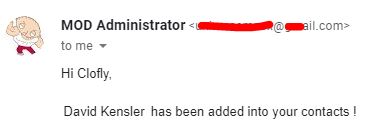
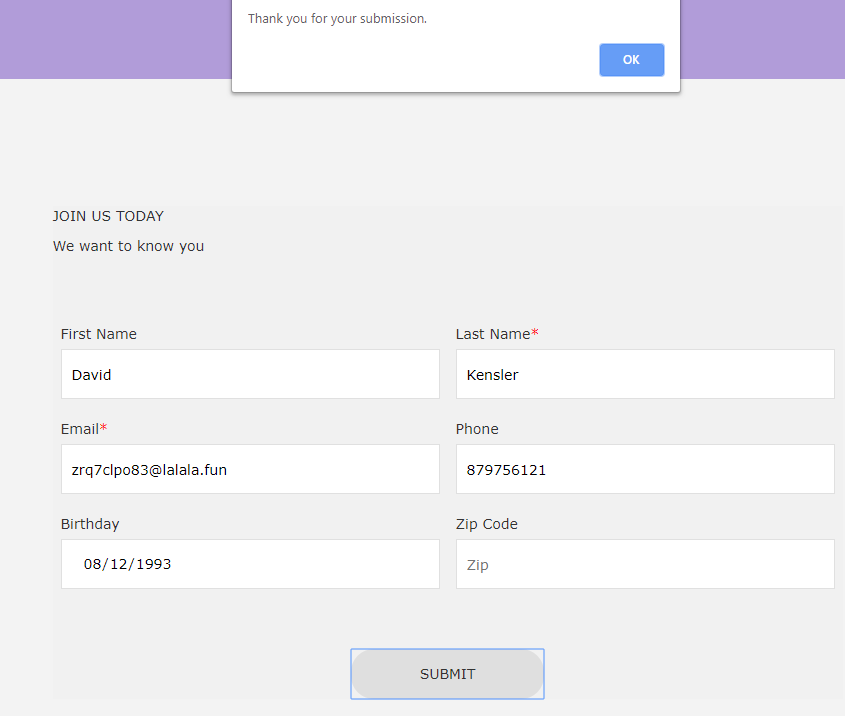
    My implementation is that adding a custom two option field called "Is From Marketing Form" and set its default value to No in Contact entity Customization,

    then I also add same two option field on marketing form and map it to the previous field, set its default value to Yes and enable "Hide field" option for it. 

    Result are below:
    1665.png

    4370.JPG

    My customer journey setting: 

    Set your landing page as start tile, add a trigger to detect whether form submitted, finally add workflow as end tile.
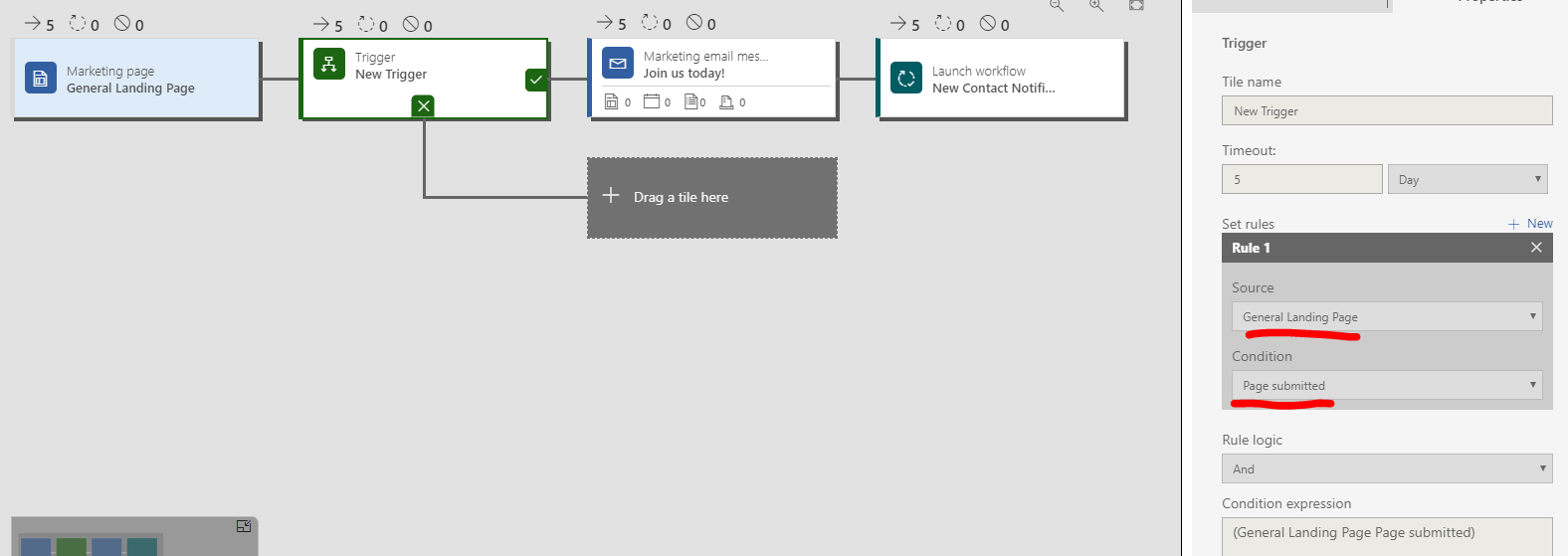
    pastedimage1564108916627v1.png

    The workflow can be simply configured with "If contact Is From Marketing Form equals Yes" and an "send email" action, new contact name will be automatically tracked with dynamic value.

    Please check "As an on-demand process" option before activation, it will make the workflow be an available option in Workflow tile drop-down list. 
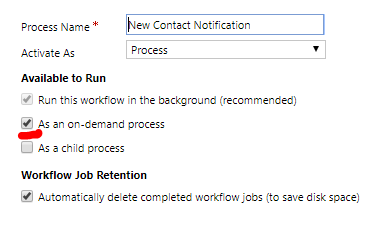
    pastedimage1564109353318v2.png

    Be aware of that once a workflow is added into customer journey to execute, Start when and Scope fields will be ignored.

    Finally, you could read this thread for Gmail integration in CRM.

    Regards,

    Clofly

Under review

Thank you for your reply! To ensure a great experience for everyone, your content is awaiting approval by our Community Managers. Please check back later.

Helpful resources

Quick Links

November Spotlight Star - Khushbu Rajvi

Congratulations to a top community star!

Forum Structure Changes Coming on 11/8!

In our never-ending quest to help the Dynamics 365 Community members get answers faster …

Dynamics 365 Community Platform update – Oct 28

Welcome to the next edition of the Community Platform Update. This is a status …

Leaderboard > Customer Insights - Journeys

Last 30 days Overall leaderboard

Featured topics

Product updates

Dynamics 365 release plans