web
You’re offline. This is a read only version of the page.
close
Skip to main content

Notifications

Announcements

No record found.

Community site session details

Community site session details

Session Id :
Microsoft Dynamics NAV (Archived)

Access to Global Variables when using events in NAV 2016

(0) ShareShare
ReportReport
Posted on by 652

Hi,

I have added an event publisher to codeunit 90 that exposes the global variables:
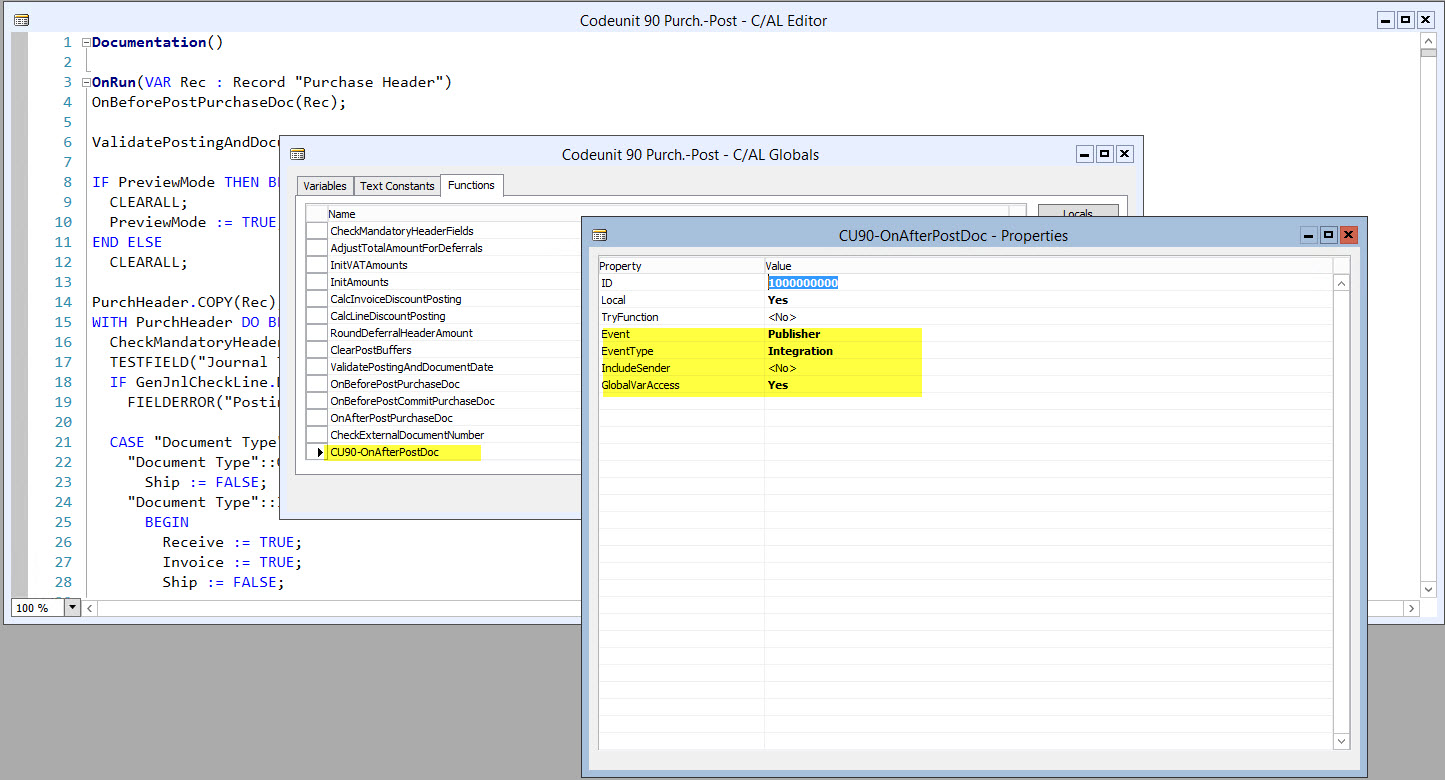
Publisher.jpg

I call the event in the same codeunit 90. Just above the call, I enter my name in a global variable "MyNameGbl".
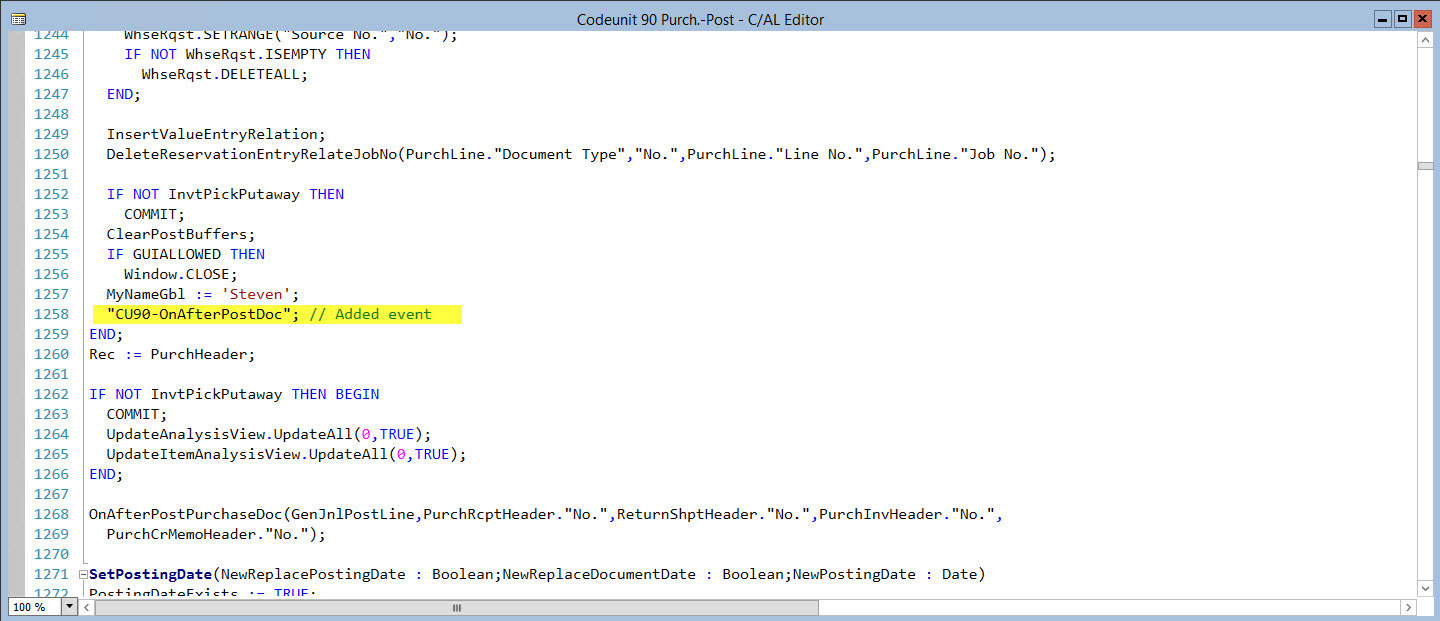
EventTrigger.jpg

In a subscriber function, I show the variable MyNameGbl, but unfortunately it is empty. I have already defined the MyNameGbl variable as local or global. I expected that I could access my global variable from the publisher function but I do not succeed.

Subscriber.jpg

Am I doing something wrong?

Many thanks,

Steven

*This post is locked for comments

I have the same question (0)
  • Suggested answer
    keoma Profile Picture
    32,729 on at

    how do you call the var. MyNameGbl in cu 50002 ? did you declare it (also) in this cu, maybe as local var.? if yes, that could be the reason.

    don't know the syntax of calling global vars from other nav objects in nav2016, but i think it should be like cu90-MyNameGbl in your case.

  • stevdeb Profile Picture
    652 on at

    Hi Jonathan,

    Thanks for your help. I have tried declaring the MyNameGbl variable as a global and local variable in cu 50002, but it doesn 't work. It's not clear to me how you can access a global variable from the publisher codeunit.

    Regards,

    Steven

  • keoma Profile Picture
    32,729 on at

    i'll try your sample and give you then feedback.

  • Suggested answer
    Mohana Yadav Profile Picture
    61,005 Super User 2025 Season 2 on at

    Did you try removing local variable?

    try only with global variable.

  • stevdeb Profile Picture
    652 on at

    Hi,

    Yes, I tried with only global and only local.

    Thx

  • Suggested answer
    keoma Profile Picture
    32,729 on at

    following the instructions from the Remarks section in

    https://msdn.microsoft.com/en-us/library/mt299522(v=nav.90).aspx

    Remarks

    When you set the GlobalVarAccess property to Yes, event subscriber functions that subscribe to an event can call the global variable parameters in the object that is specified by the EventPublisherObject Property, which contains the event publisher function that declares the event. You must add variable parameters to the event subscriber functions manually and use a name and type that matches the variable declaration in the event publisher object.

    -------------------------------------------------------

    That conecpt and usage comes from .Net., bit strange, but it works.

    -------------------------------------------------------
    ... so i did the following:

    i declared a global vaiable "GlobVar" of datatype text in the Publisher object "Publisher CU", in your case cu 90.

    nav2016_2D00_pic4.png

    then edited the parameter list of the subscriber function and simply added a new parameter at the end of the parameter list with the same name and datatype than the global variable in the publisher object.

    nav2016_2D00_pic1.png

    nav2016_2D00_pic2.png

    then executed the test CU with the subscriber event.

    result:

    nav2016_2D00_pic4.png

    Voila! It works fine. :-D :-D

  • Jan Veenendaal Profile Picture
    510 on at

    From the NAV 2016 help on GlobalVarAccess property, section Remarks:

    You must add variable parameters to the event subscriber functions manually and use a name and type that matches the variable declaration in the event publisher object.

  • stevdeb Profile Picture
    652 on at

    Hi Jonathan,

    Thanks for your research. I tried it with the text variable and it works. But when I try to use the "PurchHeader" record variable in CU90 (and add it as a parameter in the subscriber function), it does not enter my subscriber function. It simply doesn't show my message. Does it work with record variables with you?

    SubscriberWithRecord.jpg

    Thanks,

    Steven

  • Suggested answer
    keoma Profile Picture
    32,729 on at

    hm, seems that complex datatypes like records are not supported, but only simple ones like text, integer, etc. but i will check that. as a solution you  could work with the "document no." of the purchase header instead as global variable and load the purch. header in your code with fct. get  and given doc no.

  • Suggested answer
    Mohana Yadav Profile Picture
    61,005 Super User 2025 Season 2 on at

    You can add a parameter to pass the PurchHeader in Published function and same signature can be used in subscription

Under review

Thank you for your reply! To ensure a great experience for everyone, your content is awaiting approval by our Community Managers. Please check back later.

Helpful resources

Quick Links

Responsible AI policies

As AI tools become more common, we’re introducing a Responsible AI Use…

Neeraj Kumar – Community Spotlight

We are honored to recognize Neeraj Kumar as our Community Spotlight honoree for…

Leaderboard > 🔒一 Microsoft Dynamics NAV (Archived)

Last 30 days Overall leaderboard

Featured topics

Product updates

Dynamics 365 release plans
