web
You’re offline. This is a read only version of the page.
close
Skip to main content

Notifications

Announcements

No record found.

Community site session details

Community site session details

Session Id :
Finance | Project Operations, Human Resources, ...
Suggested Answer

Workflow licensing

(0) ShareShare
ReportReport
Posted on by 5

1, Our client would like to use D365 F&O purchasing workflows (Vendor invoice workflow, Purchase order workflow, Purchase agreement approval workflow, Purchase requisition review workflow) and they have a lot of managers who would only click on the Approve/Reject workflow button within the process. So, they would have a user and worker in the system but wouldn’t create and edit any transactions. Since they have only an approver role in D365, our client hopes that a Team member licence would be enough for them regardless of the workflow that they use.

We have checked the License Guide's Appendix F: Operations – Activity Approval Privileges section but we couldn’t find the Vendor invoice workflow, Purchase requisition workflow and the Purchase order workflow. The Approve purchase agreement duty can be seen in the list with Activity license type but we are not sure if it is right, since it would be a quite expensive licence for a manager (approver) who doesn’t work in the system at all.

Is there anybody who know which license is required to approve purchase agreements, purchase requisitions, purchase orders and pending vendor invoices?

2, Based on the Licence Guide, our understanding is that users with Team member licence can see all forms of all modules in the system, so if they don’t need to create or edit transactions (for e.g., a controller) this licence would be enough for them. Is there anybody who is using Team member licence and can confirm it?
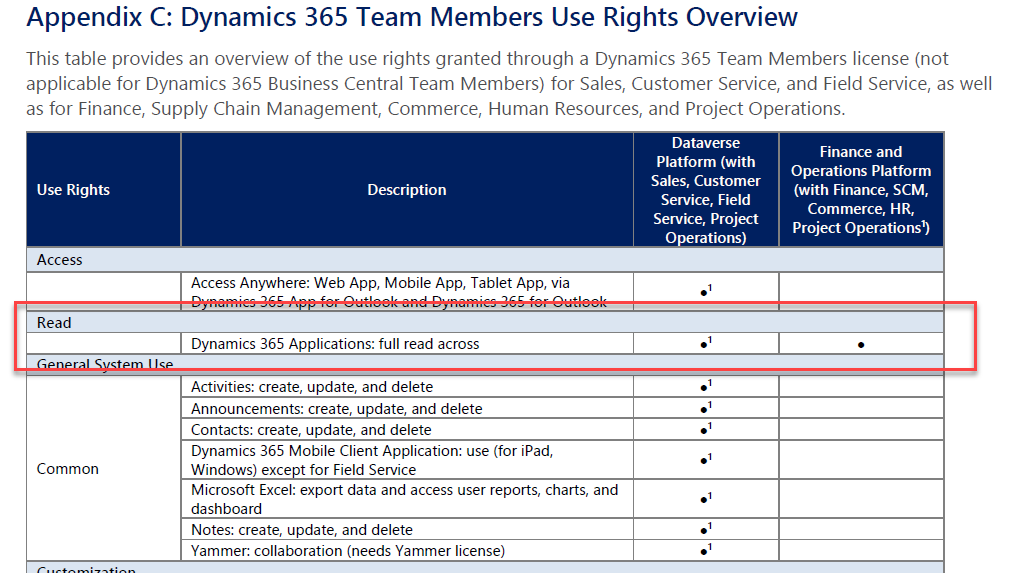
 Appendix-F.png

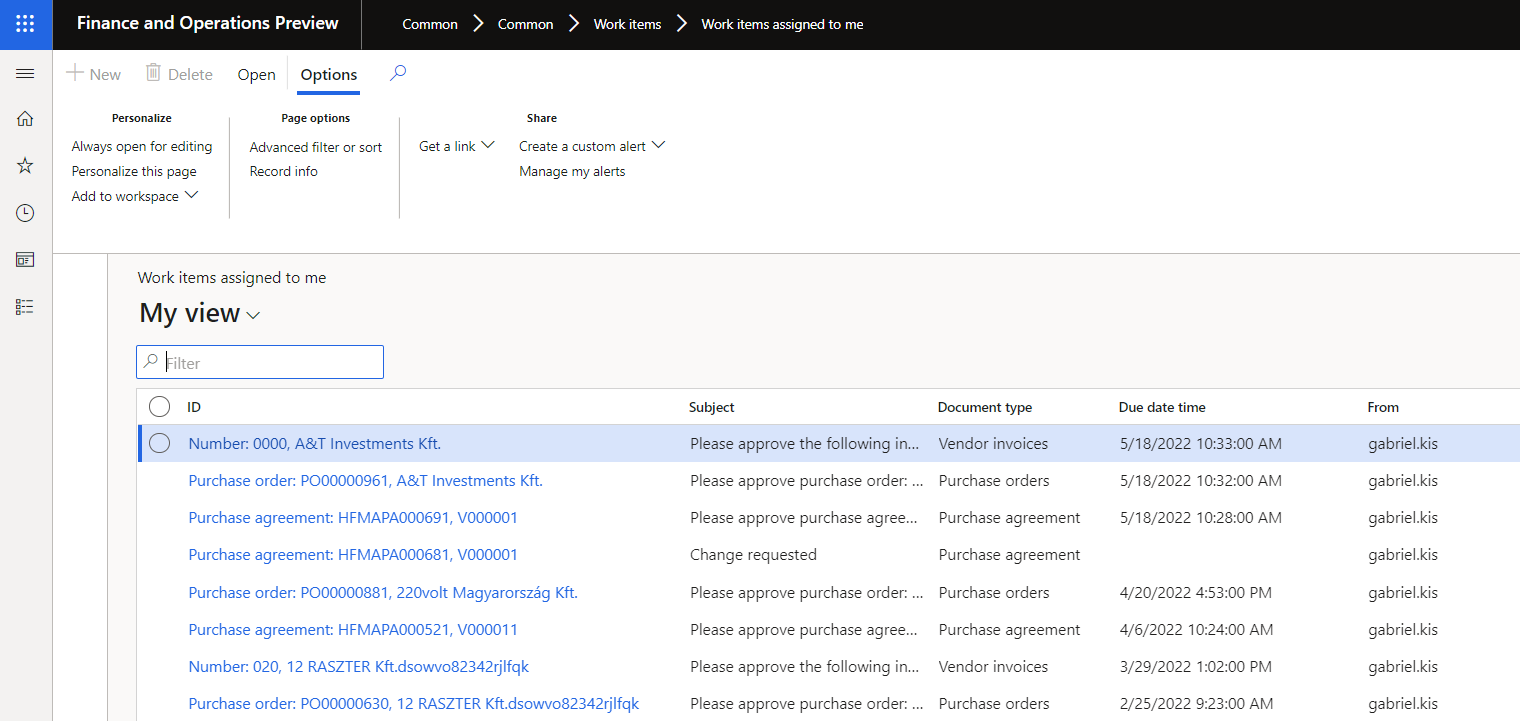
3,  We wanted to test what a user can do with Team member license. We assumed that we could do that if we assign all roles to the users that are marked by Microsoft as Team member. However, even if we do that, we cannot see all forms (point 2) and cannot approve purchase agreements, orders, pending invoices (point 1).

All pending vendor invoices, Purchase orders and agreements are not even visible. Work items assigned to me form is visible and the users can see the items waiting for their approval, however the Approve option is missing (and they cannot open the order, agreement, invoice transactions).
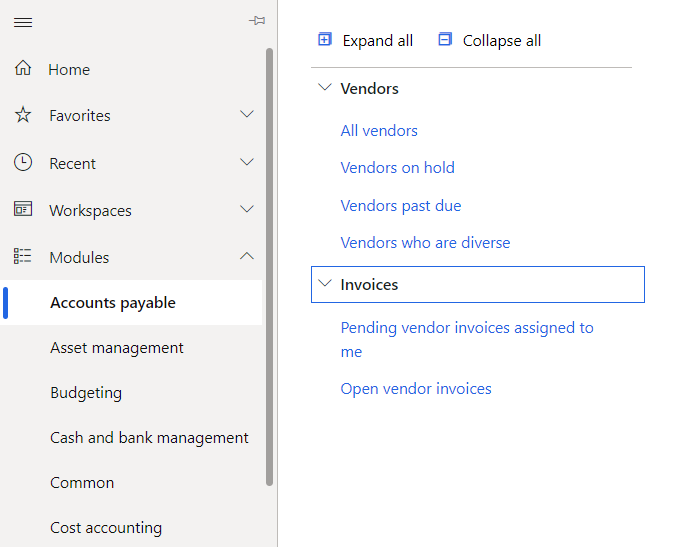
 Missing-menu-items.png

 missing-approval.png

If our approach is not correct, is there any way to test in practice what the Team member (or any other license type) is capable of?


4, As far as I know there are three D365 license types Full (Finance, SCM, etc.) Activity and Team member. If I check the D365 F&O roles, I see Activity and Operation license types too. Do I understand well that Activity = Operation, so with an Activity license users can use Operation roles too?
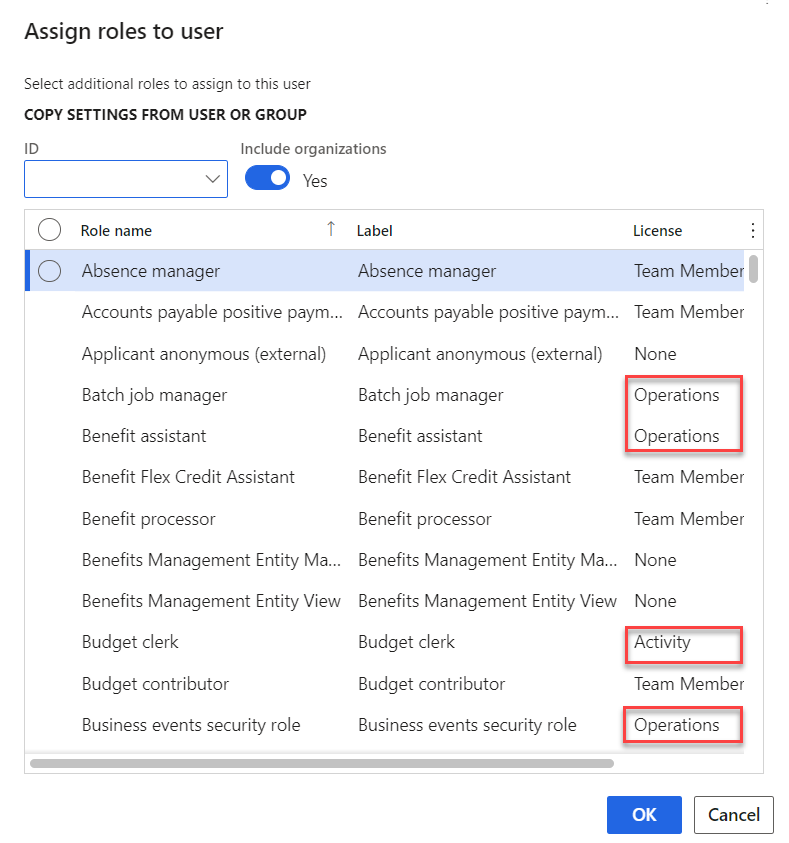
5545.roles.png

Thank you for your help in advance,

Gabriel

I have the same question (0)
  • Suggested answer
    saurabh bharti Profile Picture
    15,039 Moderator on at

    Here are few things to be considered:

    1. In my opinion any approval or rejection can be managed with Team memebr licence

    2. Why don't you use business evets with power automate where approval will be out side F&O using power automate?

  • Ian Waring Profile Picture
    436 on at

    We put the approval process out to Power Automate (largely because of our approvals and cost centre structure not fitting well to use conventional workflows).

    The only gotcha we’re working through is the goods receipt by users (in our system) currently requires sufficient security that the licensing slips over to needing Ops licenses - something we’re trying earnestly to mitigate down again. Very much work in progress.

  • Mark Zerr from Indiana Profile Picture
    4 User Group Leader on at

    Hi Gabriel, we are looking at doing the same thing.  I created a role but it's not fulling under the Team license it appears.  Curious if you found a answer?

    Thanks

    Mark

  • André Arnaud de Calavon Profile Picture
    301,158 Super User 2025 Season 2 on at

    Hi Mark,

    This is an older question which I missed. Taking some of the notes from Gabriel to explain more. He assigned all Team member roles assuming the user would have all options available which could be accessed. This is not the case as these roles don't give access to all forms with read permissions. Missing menu entries can be managed with custom or configured security objects.

    Some "Approve" privileges are tagged with Team member, but others also as Operations - Activity or even Finance and SCM. Can you tell which workflow types you will be using in your environment?

  • Mark Zerr from Indiana Profile Picture
    4 User Group Leader on at

    Andre, thanks for the reply.  I did a little more research realized I think I knew the answer but just didn't realize it.  I found a article about the D365 Security Configurate and checking permissions on roles.  I reviewed the role I created, yes from a D365 role I stripped down, and removed the duties and privileges(reviewed last column) that were elevating it beyond a Team Member license for my PO workflow approvers till I saw it confirm in the license field Team Member.

    pastedimage1684497624946v1.png

Under review

Thank you for your reply! To ensure a great experience for everyone, your content is awaiting approval by our Community Managers. Please check back later.

Helpful resources

Quick Links

Responsible AI policies

As AI tools become more common, we’re introducing a Responsible AI Use…

Neeraj Kumar – Community Spotlight

We are honored to recognize Neeraj Kumar as our Community Spotlight honoree for…

Leaderboard > Finance | Project Operations, Human Resources, AX, GP, SL

#1
André Arnaud de Calavon Profile Picture

André Arnaud de Cal... 449 Super User 2025 Season 2

#2
Martin Dráb Profile Picture

Martin Dráb 422 Most Valuable Professional

#3
BillurSamdancioglu Profile Picture

BillurSamdancioglu 239 Most Valuable Professional

Last 30 days Overall leaderboard

Product updates

Dynamics 365 release plans
