web
You’re offline. This is a read only version of the page.
close
Skip to main content

Notifications

Announcements

No record found.

Community site session details

Community site session details

Session Id :
Customer experience | Sales, Customer Insights,...
Suggested Answer

Excel Account import being blocked by previous failed import

(1) ShareShare
ReportReport
Posted on by 15

Sorry if this is a Newbie question, but I am trying to learn as I go.

I sucessfully added about 4k accounts in a previous excel import of Account's and it had some failures, but i somewhat expected that.  I recently added another 1k, but accently had the "Primary Contact" name populated which caused an error for all the Account records as this is a Lookup from the account to the Contact object.

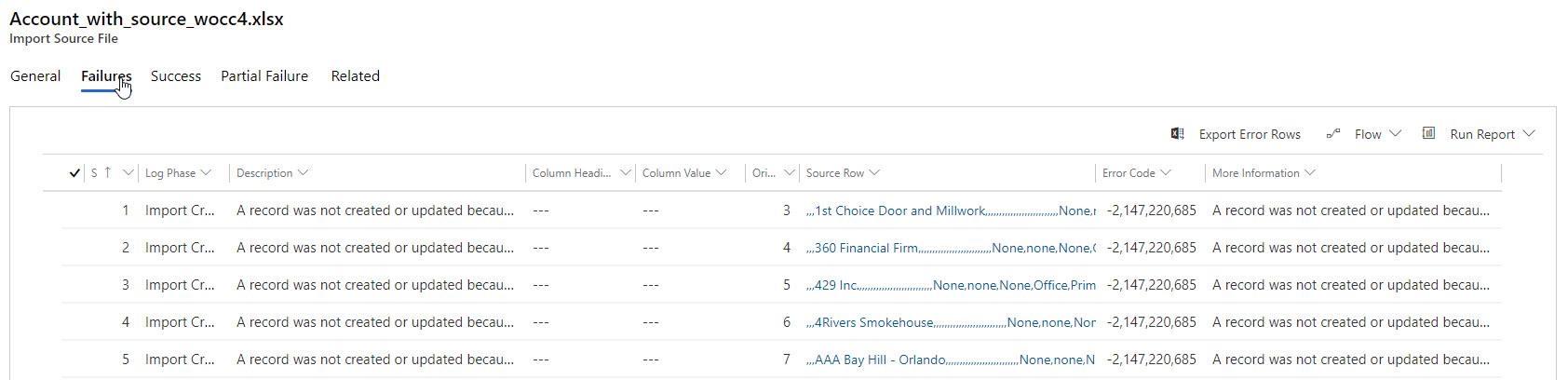
The issue is that now when I attempt to reload the Account records I get the error (0x80040333 -2147220685 Name: DuplicateRecordsFound
Message: A record was not created or updated because a duplicate of the current record already exists.) that there is an existing account record, which of course there really isn't (they are likely in a pending state??) as they all errored off.

I have been searching for the past few hours and not really finding any way to resolve this.
dynam_2D00_crm_2D00_error.jpg

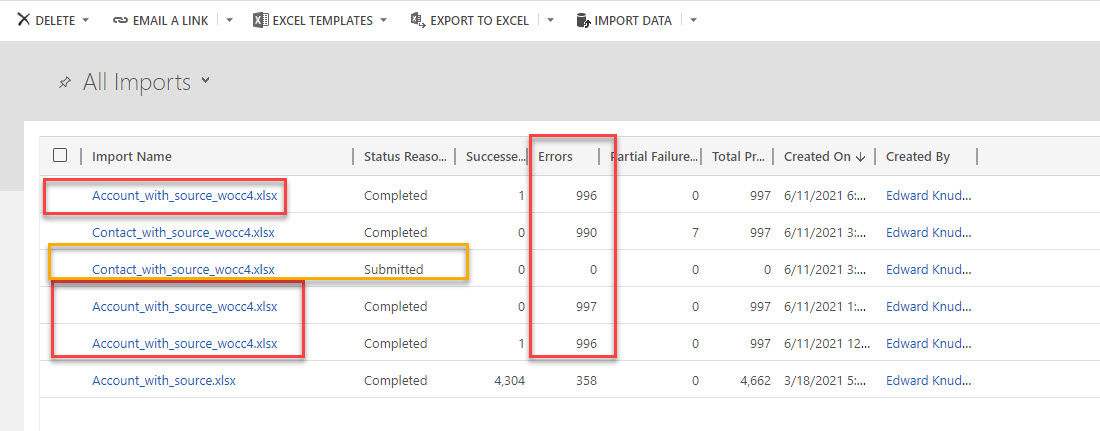
This is the list of the imports - the bottom one is from the initial load and has no overlapping accounts.
dynam_2D00_crm_2D00_error_2D00_2.jpg

Just want to drop any pending and reload the corrected file, but can't seem to get past this??

I have the same question (0)
  • Suggested answer
    Charan Raju C R Profile Picture
    7 Moderator on at

    Hi eknudhol,

    Check what is the duplicate detection criteria/columns for account and ensure that there are no account records exist in the system which matches (duplicate detection columns) data you are trying to import.

  • eknudhol Profile Picture
    15 on at

    I basically jumped into the deep end and not quite sure yet to find everything.  Where do I find "duplicate detection criteria/columns" and if there are data is the solution to remove it?

    Environments -> "My Environment" -> Settings -> Data Management -> Duplicate detection rules ???

    There are 9 rules that are published.

    One additional detail, the records that were in the file being imported (that errored off) are not in the ALL ACCOUNT listing and don't exist anywhere that I can see.

  • Suggested answer
    Charan Raju C R Profile Picture
    7 Moderator on at

    Open Duplicate Detection rules related to Account and see what are the fields defined in criteria.

    Example, below duplicate detection rule is defined to stop creation of account record with same Account Name.

    AccountDD.PNG

    You need to find out which duplicate detection rule is stopping your import. If you are importing to non-production environment, you can try unpublishing a duplicate detection rule and try importing data. Repeat this for all the rules until you find out the rule. Once you find the duplicate detection rule which is stopping import, check file data against the data in the system for the criteria columns defined in that rule.

    For a quick confirmation, you can unpublish all 9 duplicate detection rules (only in non-prod environment. Take note/screenshot of all 9 duplicate detection rules for publishing later) and try importing the file. If you are able import without any error, there must be a duplicate detection rule which is stopping import due to some column data already exist in the system. Then you need to find out the particular rule and the criteria columns.

  • eknudhol Profile Picture
    15 on at

    So I unpublished the duplicate detection rules and now the Import File Parse job seems to run forever.  There really seems to be something strange going on with the jobs, when I attempted to run an import, the job showed submitted and never got to the Parse phase.

    I a going to regroup on the tomorrow (2:30am ET now) and will need to regroup tomorrow - THANKS for the input.

    I may just purge the environment and start over, not sure whats going on.

  • eknudhol Profile Picture
    15 on at

    Final note, looks like removing the rules worked. Now I just need to figure out why since none of these accounts exist in the target account table and there shouldnt be anything blocking on the location details...

    thanks again for the help.

  • Suggested answer
    Charan Raju C R Profile Picture
    7 Moderator on at

    Good to hear that. You can try importing few records each time by publishing duplicate detection rules one-by-one to identify the rule which is blocking.

    Please mark the post as 'Suggested Answer' if it has helped to address your problem.

Under review

Thank you for your reply! To ensure a great experience for everyone, your content is awaiting approval by our Community Managers. Please check back later.

Helpful resources

Quick Links

Responsible AI policies

As AI tools become more common, we’re introducing a Responsible AI Use…

Neeraj Kumar – Community Spotlight

We are honored to recognize Neeraj Kumar as our Community Spotlight honoree for…

Leaderboard > Customer experience | Sales, Customer Insights, CRM

#1
Tom_Gioielli Profile Picture

Tom_Gioielli 170 Super User 2025 Season 2

#2
#ManoVerse Profile Picture

#ManoVerse 70

#3
Jimmy Passeti Profile Picture

Jimmy Passeti 50 Most Valuable Professional

Last 30 days Overall leaderboard

Product updates

Dynamics 365 release plans
