web
You’re offline. This is a read only version of the page.
close
Skip to main content

Notifications

Announcements

No record found.

Community site session details

Community site session details

Session Id :
Microsoft Dynamics CRM (Archived)

CRM 2016 On premise Document Management

(0) ShareShare
ReportReport
Posted on by 905

Dear Team,

I have integrated CRM 2016 On premise with SharePoint 2013. Everything working fine and from SharePoint, they are creating the Folders and Sub folders for Documents Storing. But when i open the Main Folder from CRM, i am unable to open the Sub Folders and other documents also. Even if i upload from CRM also i am unable to click and open the documents from Sub folders. I have Checked in All browsers. I dont know whats the problem. Please help me on this. I have attached the images.
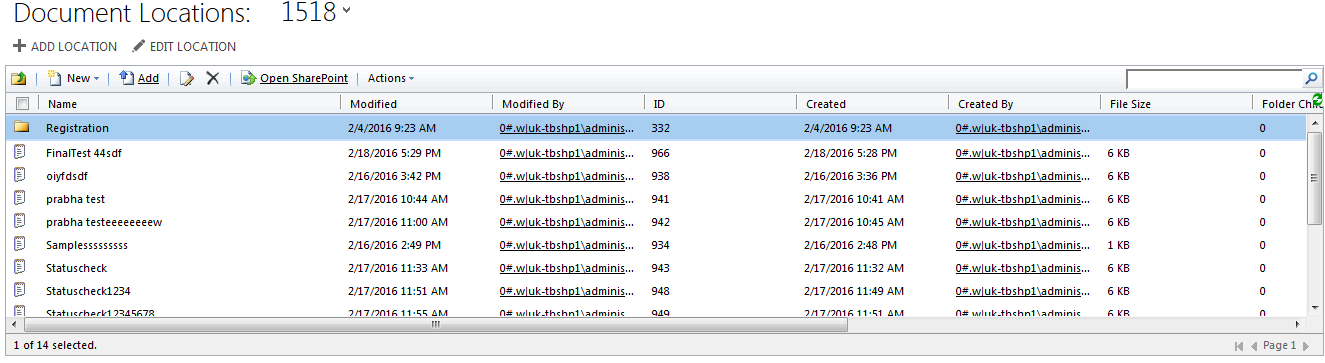

7041.1.png

1665.2.png

*This post is locked for comments

I have the same question (0)
  • Suggested answer
    Krishnam Raju Profile Picture
    on at

    Hi,

    It has to be the other way round.  You will be able to access and upload documents to folders and sub folders created from CRM and not from SharePoint.

    Basically, when you integrate CRM with SharePoint either by server side sync or using List component, you need to mention for which Entities you would like to create folders in SharePoint Site using the Document Management Settings in the Document Management section in CRM.

    Regards,

    Krishna

  • Verified answer
    VenkataSambasivaRao K Profile Picture
    905 on at

    Its solved the issue, its because of Permissions in SharePoint.

Under review

Thank you for your reply! To ensure a great experience for everyone, your content is awaiting approval by our Community Managers. Please check back later.

Helpful resources

Quick Links

Responsible AI policies

As AI tools become more common, we’re introducing a Responsible AI Use…

Neeraj Kumar – Community Spotlight

We are honored to recognize Neeraj Kumar as our Community Spotlight honoree for…

Leaderboard > 🔒一 Microsoft Dynamics CRM (Archived)

#1
SA-08121319-0 Profile Picture

SA-08121319-0 4

#1
Calum MacFarlane Profile Picture

Calum MacFarlane 4

#3
Alex Fun Wei Jie Profile Picture

Alex Fun Wei Jie 2

Last 30 days Overall leaderboard

Featured topics

Product updates

Dynamics 365 release plans



