web
You’re offline. This is a read only version of the page.
close
Skip to main content

Notifications

Announcements

No record found.

Community site session details

Community site session details

Session Id :
Finance | Project Operations, Human Resources, ...
Suggested Answer

expense categories not showing on D365 F&O mobile app

(0) ShareShare
ReportReport
Posted on by 104

Hi 

We have a problem where some expense categories are not available to select on the D365 F&O mobile app. 

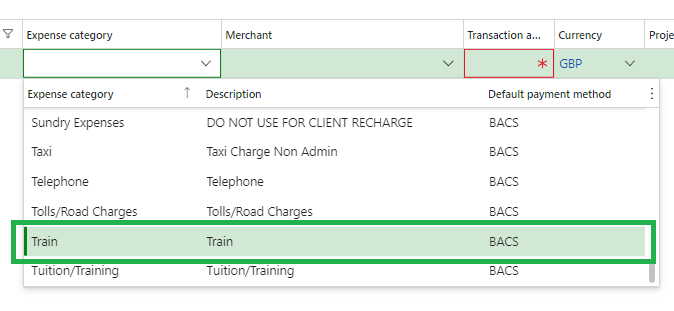
I will use the Expense Category Train as an example if I make a new expense on Dynamics 365 F&O web portal I can select the Expense report Train no problem - 
pastedimage1679904719176v1.png

But if you try to add an expense via the  Dynamics 365 Finance & Operations mobile app the same Expense category is not available (you can also see others which are not available on the mobile app compared to the web portal) -

Screenshot_5F00_20230327_2D00_081621.jpg

I have looked at the Train expense category in the expense category setup section of the system, comparing it against one of the other categories that is visible but I cant see anything that would cause one to display and the other not. 

I thought there might be something not setup in the Category setup section but I get lost here as I don't know what I'm looking at - 

train-category.png

Any guidance you guys could give me would be greatly appreciated.

Cheers;

Median

I have the same question (0)
  • André Arnaud de Calavon Profile Picture
    301,020 Super User 2025 Season 2 on at

    Hi Median,

    Are you in the same environment and/or the same legal entity? It is hard to judge what might be missing here.

  • Median Profile Picture
    104 on at

    Hi Andre

    Thanks for your response, and your right I should of included that info apologies.

    So let me confirm the above info and screen shots are taken from the same environment (our live environment) and they are the same legal entity. Also the screen shots are all from my account we had this issue reported by another user so I tested it myself and confirmed the problem.

    I have had to just learn what I can about Dynamics myself (I believe I have watched a few of your yourtube videos about it so thanks :) )  so I'm by no means an expert.

    Any guidance you can give or setting to check in a specific place to try and resolve this would be much appreciated

    Thanks in advance

    Median

  • Suggested answer
    Gaurangkumar Jani Profile Picture
    4,534 User Group Leader on at

    Hi Median,

    Are you selecting this expense with any project or without project in mobile application?

    There is one control that if category is not activated for Project, you can not see while selecting category with project on expense line.

    If that is not the issue, I would suggest raising a ticket with Microsoft regarding SYNC issue between App and System.

    Let us know if this helps.

    Thanks,

  • Median Profile Picture
    104 on at

    Hi CA

    Thanks for the response, I'm not to sure about this so I will test it next week and come back to you.

    Cheers;

    Median

  • André Arnaud de Calavon Profile Picture
    301,020 Super User 2025 Season 2 on at

    Hi Median,

    Were you able to test the suggestion from CA Gaugangkumar already? It would be great if you can share an update.

  • Suggested answer
    Median Profile Picture
    104 on at

    Hi Thanks both.

    Right I looked at this and the way I (and I assume the end user who reported this) is putting the expense in is :

    • Within the mobile app "Finance and Operations" click on Expense Management
    • Click on Enter an expense
    • tap the drop down to view the list of expense categories
    • Select the expense (this is where the Train expense is missing). 

    So its before you can assign the expense to a project. That said you guys responding made me revisit this and I searched for the Train expense instead of scrolling down. At first it doesn't appear but I then clicked search more and eventually it appears.

    I'm thinking this is just a querk in the app as I know its stopped being developed now. Once the Train option is visible I can select it, enter some basic details and save it. Once that is done if i create an expense report and attach the expense I can tap into it, scroll down the details to More Details. Tap More details and the project assignment ability is there.

    I have gone back to the user with my findings so I will update this post once I know if this resolves the users problem.

    Thanks again

    Median

Under review

Thank you for your reply! To ensure a great experience for everyone, your content is awaiting approval by our Community Managers. Please check back later.

Helpful resources

Quick Links

Responsible AI policies

As AI tools become more common, we’re introducing a Responsible AI Use…

Neeraj Kumar – Community Spotlight

We are honored to recognize Neeraj Kumar as our Community Spotlight honoree for…

Leaderboard > Finance | Project Operations, Human Resources, AX, GP, SL

#1
Martin Dráb Profile Picture

Martin Dráb 646 Most Valuable Professional

#2
André Arnaud de Calavon Profile Picture

André Arnaud de Cal... 529 Super User 2025 Season 2

#3
Sohaib Cheema Profile Picture

Sohaib Cheema 285 User Group Leader

Last 30 days Overall leaderboard

Product updates

Dynamics 365 release plans
