web
You’re offline. This is a read only version of the page.
close
Skip to main content

Notifications

Announcements

No record found.

Community site session details

Community site session details

Session Id :
Finance | Project Operations, Human Resources, ...
Suggested Answer

How to import data from an excel to Project and Project Taks table

(0) ShareShare
ReportReport
Posted on by 80

Hi there,

We are currently migrating to Project Operations from a third party system. We have currently exported the data into an excel file for project and project operations. Now we need to import that data into our project and Project tasks. We are currently clueless on how to import data in to project operations.

We have a license for Kingswaysoft for other purposes. I am not sure if this software can be used to import data into Project Operations tables.

Please suggest.

Thanks,

Venu

I have the same question (0)
  • Lucky Dog Profile Picture
    670 on at

    I have the same question.

    In addition - how do we import task assignments, expense and material estimates and of course quote and contract line details. Any suggestions would be very much appreciated.

  • Lucky Dog Profile Picture
    670 on at

    I have the same question.

    In addition - how do we import task assignments, expense and material estimates and of course quote and contract line details. Any suggestions would be very much appreciated.

  • Suggested answer
    ashish12 Profile Picture
    3,079 on at

    Hi,

    Added a few links which may help you.

    daytodaydynamics365.com/.../

    docs.microsoft.com/.../import-estimate-project-contract-line

    Thanks,

    Ashish

  • Suggested answer
    antc Profile Picture
    2,909 on at

    Hi Venu

    Can confirm that currently you can create projects via several methods including Kingswaysoft.

    The issue is that you can't create project tasks via import / kingswaysoft / API (i.e. msdyn_projecttasks)

    We should be able to import times etc, it's more just the Project for Web area (aka Tasks) in Lite deployment that's difficult.

    There are some actions on the scheduler API for CRUD of this area however at this time it seems the fields that we would want to update are not available for create / update. I am having a go with postman without success keep getting the message to perform action in the UI.

    docs.microsoft.com/.../schedule-api-preview

    So in short you can't update effort.

    Also be aware that you can update via web api and it reflects on a project task view but not in the P4W tasks tab as we can see below I had changed "Task 8D 8E" to "Task 8D 8E Postman" and effort to 50.
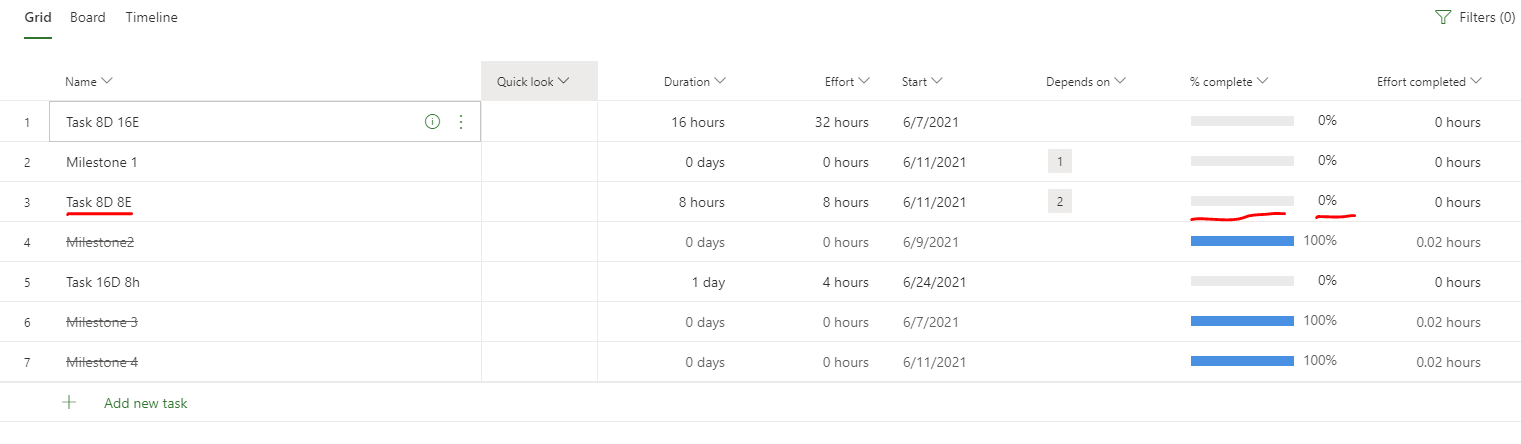
    pastedimage1623325361975v1.png

    pastedimage1623325432584v2.png

    Another key issue we are facing is the ability in P4W where you can select task/task's and set to 25, 50, 75, 100% where as in PO it appears that we need to create an approved time entry that covers the effort required. I'm looking at a flow or plugin to allow a boolean like switch on a task view that when tripped will get effort for task, create a time entry for that amount and submit and approve it to show Tasks as complete with the line through them. Changing the msdyn_progress aka % complete has no effect on P4W iframe tab.

    Regards

    Antony

Under review

Thank you for your reply! To ensure a great experience for everyone, your content is awaiting approval by our Community Managers. Please check back later.

Helpful resources

Quick Links

Responsible AI policies

As AI tools become more common, we’re introducing a Responsible AI Use…

Neeraj Kumar – Community Spotlight

We are honored to recognize Neeraj Kumar as our Community Spotlight honoree for…

Leaderboard > Finance | Project Operations, Human Resources, AX, GP, SL

#1
Martin Dráb Profile Picture

Martin Dráb 664 Most Valuable Professional

#2
André Arnaud de Calavon Profile Picture

André Arnaud de Cal... 522 Super User 2025 Season 2

#3
Sohaib Cheema Profile Picture

Sohaib Cheema 303 User Group Leader

Last 30 days Overall leaderboard

Product updates

Dynamics 365 release plans



