web
You’re offline. This is a read only version of the page.
close
Skip to main content

Notifications

Announcements

No record found.

Community site session details

Community site session details

Session Id :
Customer experience | Sales, Customer Insights,...
Suggested Answer

Authentication ASP.net application to Dynamics 365 using Azure Active Directory

(0) ShareShare
ReportReport
Posted on by 5

HI Team,

I am having a normal Asp.Net Framework application. In this application i have Aspx.cs file which gets the data that user is inputing on Aspx.Page. Now i am trying to authentciate this application with Dynamics 365 using Azure Active Directory. As everyone Aware of that it can be done by creating Application User in  Dynamics 365 and also Registering Application in Azure Active Directory through Azure Portal. 

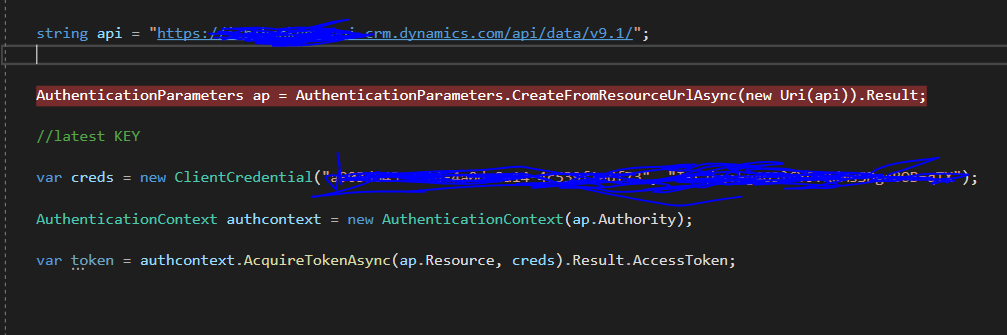
By using Console Application i can get the token and authetication process has been done successfully but when i place the same code in Aspx.cs file  I am facing a issue with Authentication and the application was hanging when the debugging point come AuthenticationParameter.
pastedimage1587470093504v1.png

The code which was in the picture was in ASPX.cs file 

Please kindly Help me on this!!!

Kind Regards

Santiii

I have the same question (0)
  • Suggested answer
    Vijay Tailor Profile Picture
    431 on at

    Hi Shanti,

    can you try with lower version of Active Directory Nuget Package.

    pastedimage1587471377554v1.png

    In New Version "CreateFromResourceUrlAsync" depricated.

    hope it will reslove your issue.

  • Santiii Profile Picture
    5 on at

    HI Vijay,

    I am using the Version 2.22.0.0 and runtime version is 4.0.30319.

    Thank  you for your response!

  • cloflyMao Profile Picture
    25,210 on at

    Hi Santiii,

    Could you share me tutorial about how did you authenticate?

    I always authenticate with username and password directly, you could try it.

    private static async Task  Authenticate() {
        string userName = "xxx";
        string password = "pwd";
        string clientId = "xxxx-yyyy";
        // based on you crm region
        string adminUrl = "https://admin.services.crm3.dynamics.com/";
        var credentials = new UserPasswordCredential(userName, password);
        var authenticationContext = new AuthenticationContext("https://login.microsoftonline.com/common/");
        var result = await authenticationContext.AcquireTokenAsync(adminUrl, clientId, credentials);
        return result;
    }

    Regards,

    Clofly

Under review

Thank you for your reply! To ensure a great experience for everyone, your content is awaiting approval by our Community Managers. Please check back later.

Helpful resources

Quick Links

Responsible AI policies

As AI tools become more common, we’re introducing a Responsible AI Use…

Neeraj Kumar – Community Spotlight

We are honored to recognize Neeraj Kumar as our Community Spotlight honoree for…

Leaderboard > Customer experience | Sales, Customer Insights, CRM

#1
Tom_Gioielli Profile Picture

Tom_Gioielli 170 Super User 2025 Season 2

#2
#ManoVerse Profile Picture

#ManoVerse 70

#3
Jimmy Passeti Profile Picture

Jimmy Passeti 50 Most Valuable Professional

Last 30 days Overall leaderboard

Product updates

Dynamics 365 release plans



