web
You’re offline. This is a read only version of the page.
close
Skip to main content

Notifications

Announcements

No record found.

Community site session details

Community site session details

Session Id :
Microsoft Dynamics AX (Archived)

ProductDescription for EcoResProductCreate form!!!

(0) ShareShare
ReportReport
Posted on by 1,883

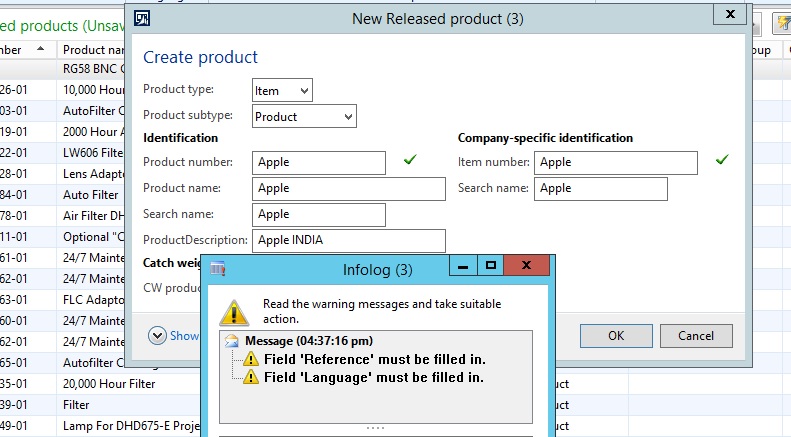
Dear All - I have a requirement to display Product Description while we creating new products. For that I added new data source EcoResProductTranslation(Description) to EcoResProductCreate form. But while creating a new product I received following warning message. Could you please help me to sort out this issue..

produ.jpg

*This post is locked for comments

I have the same question (0)
  • Mariano Gracia Profile Picture
    on at

    You don't need to add the datasource, there is a much easier way to do it, just look at the write method in the EcoResProudctCreate, it calls the method createOrUpdateTranslation from the EcoResProductTranslation table, the third parameter is empty, wich is the description, just add a FormStringControl in the form (without datasource) and then modify the call to the createOrUpdateTranslation method with the string value.

    EcoresProductDescription.JPG

  • Faqruddin Profile Picture
    1,883 on at

    Thanks for your reply Mariano. I added new StringControl(ProductDescription) and please tell me which properties I need to change for new control. I pass the parameter value for above method as follows...

    EcoResProductTranslation  productTranslation;

    if (identification_Name.text())

           {

               EcoResProductTranslation::createOrUpdateTranslation(ecoResProduct.RecId, identification_Name.text(), productTranslation.Description);

           }

  • Verified answer
    Mariano Gracia Profile Picture
    on at

    Set autodeclaration propierty to yes in your formStringControl, then call the method using ProductDescription.text() just like AX does with indentification_Name fromStringControl

  • Faqruddin Profile Picture
    1,883 on at

    Have a look my code what I did. It doesn't returns ProductDescription..

    EcoResProductCreat:Methods

    public void setProductDescription(EcoResDescription _productDescription)

    {

       if (!ProductDescription.text())

       {

           ProductDescription.text(_productDescription);

           ProductDescription.modified();

       }

    }

    ProductDescription formStringControl(Methods.modified()):

    public boolean modified()

    {

       boolean             ret = super();

       EcoResDescription   eProductDescription = ProductDescription.text();

       if (eProductDescription)

       {

           element.setProductDescription(eProductDescription);

       }

       return ret;

    }

  • Mariano Gracia Profile Picture
    on at

    Yo don't need to do that. Just modify the line I told you before, AX calls the method createOrUpdateTranslation with an empty string in the third parameter, replace it with ProductDescription.text(). This is the only code you need to write

  • Faqruddin Profile Picture
    1,883 on at

    Unfortunately, I did some extra effort. Thanks for your solution!!!  

Under review

Thank you for your reply! To ensure a great experience for everyone, your content is awaiting approval by our Community Managers. Please check back later.

Helpful resources

Quick Links

Responsible AI policies

As AI tools become more common, we’re introducing a Responsible AI Use…

Neeraj Kumar – Community Spotlight

We are honored to recognize Neeraj Kumar as our Community Spotlight honoree for…

Leaderboard > 🔒一 Microsoft Dynamics AX (Archived)

#1
Martin Dráb Profile Picture

Martin Dráb 4 Most Valuable Professional

#1
Priya_K Profile Picture

Priya_K 4

#3
MyDynamicsNAV Profile Picture

MyDynamicsNAV 2

Last 30 days Overall leaderboard

Featured topics

Product updates

Dynamics 365 release plans



