web
You’re offline. This is a read only version of the page.
close
Skip to main content

Notifications

Announcements

No record found.

Community site session details

Community site session details

Session Id :
Customer experience | Sales, Customer Insights,...
Answered

Phone Call - Dynamically change activity's status

(0) ShareShare
ReportReport
Posted on by 165

Hello,

I've added a custom two-options field in the phone call form, where user can select if the phone call is Completed or Scheduled.
The requirement is that when user selects 'Completed', the Activity status of the phone call should automatically change to 'made' and the user shouldn't have to manually close the activity via the dialogue.

I've made a workflow where I change status to 'Made' if user has selected 'Completed' but it does not seem to work.

Any help would be much appreciated.

I have the same question (0)
  • Bipin D365 Profile Picture
    28,983 Moderator on at

    Hi,

    Can you use Change status option instead of update record in workflow.

    Please mark my answer verified if i were helpful

  • irenegr Profile Picture
    165 on at

    I use 'change status'

  • Suggested answer
    Rawish Kumar Profile Picture
    13,758 on at

    Could you please check the process sessions of the workflow and check last run. if not there try triggering it again.

    see if something is failing there?

  • Suggested answer
    Kokulan Profile Picture
    18,054 on at

    On top of what others have already suggested,  make sure the workflow scope is set to Organisation level and also make sure the workflow is set to trigger on the two options field value change.   Could you share a screenshot of your workflow?

  • Verified answer
    Community Member Profile Picture
    on at

    Hi irenegr,

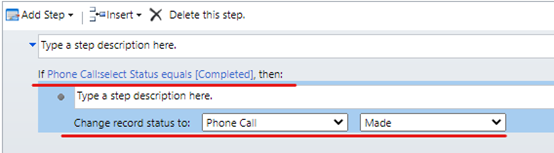
    1.workflow.

    You can create a workflow to change status when field value has changed with ‘completed’

    pastedimage1599213555430v1.pngpastedimage1599213563873v2.png

    You can go settings > System Job to see running details of the workflow.

    Through test, I notice that the workflow only run when record create, though option field change, it can’t trigger the workflow.

    So if you want to change status when option field change, add Js code to onChange event is a good way.

    2.JS

    (1) JS code.

    function setState(executionContext) {
        var formContext = executionContext.getFormContext();
        var option = formContext.getAttribute("new_selectstatus").getValue();
        if(option==true)
        {
        Xrm.Page.getAttribute("statecode").setValue(1);
        }
    }

    (2) Add your JavaScript code in a Script web resource.

     pastedimage1599213577386v3.png

    (3) Add an OnChange event with this Script web resource to the Phone call entity form.

    pastedimage1599213584089v4.pngpastedimage1599213593668v5.png

    (4) Test

    pastedimage1599213603230v6.png 


    Regards,

    Leah Ju

    Please mark as verified if the answer is helpful. Welcome to join hot discussions in Dynamics 365 Forums.

Under review

Thank you for your reply! To ensure a great experience for everyone, your content is awaiting approval by our Community Managers. Please check back later.

Helpful resources

Quick Links

Responsible AI policies

As AI tools become more common, we’re introducing a Responsible AI Use…

Neeraj Kumar – Community Spotlight

We are honored to recognize Neeraj Kumar as our Community Spotlight honoree for…

Leaderboard > Customer experience | Sales, Customer Insights, CRM

#1
Tom_Gioielli Profile Picture

Tom_Gioielli 108 Super User 2025 Season 2

#2
Jimmy Passeti Profile Picture

Jimmy Passeti 50 Most Valuable Professional

#3
Gerardo Rentería García Profile Picture

Gerardo Rentería Ga... 49 Most Valuable Professional

Last 30 days Overall leaderboard

Product updates

Dynamics 365 release plans