web
You’re offline. This is a read only version of the page.
close
Skip to main content

Notifications

Announcements

Community site session details

Community site session details

Session Id :
Customer experience | Sales, Customer Insights,...
Suggested Answer

How to change default Test Send view

(0) ShareShare
ReportReport
Posted on by 130

Hi, 

I think there was a change with an update, as in the past I never had this issue. 

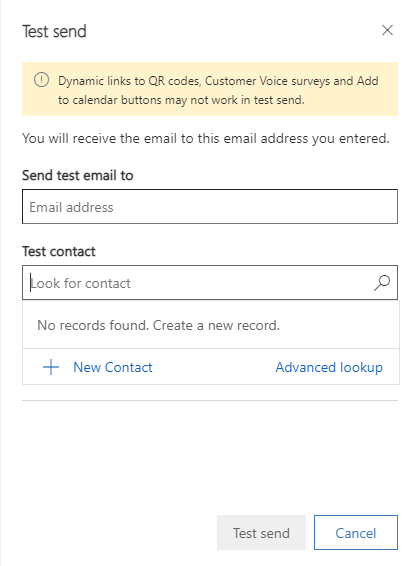
Does anybody know how to change the default view of the Test contact search in test send function of dynamics marketing?
pastedimage1644932393506v1.png

I know, I can setup a default test contact (in standard it is firstname lastname), but regularly I need to do some tests with male, female and divers contacts to check the salutation etc. So I need to click on the search option which is fine, but I just see the contacts that are assigned to my user. So I need to click on advanced search and change the view to "active contacts". My idea is to change the default view there directly to "active users" so that I don't need to do the additional clicks.

Has anybody an idea how to do it? It is not using the default contact view, this is something that I already tested.

Thank you for your help in advance.

Best regards,

Daniel

I have the same question (0)
  • Daniel H Profile Picture
    130 on at

    Hi, 

    I think there was a change with an update, as in the past I never had this issue. 

    Does anybody know how to change the default view of the Test contact search in test send function of dynamics marketing?

    7774.pastedimage1644932393506v1.png

    I know, I can setup a default test contact (in standard it is firstname lastname), but regularly I need to do some tests with male, female and divers contacts to check the salutation etc. So I need to click on the search option which is fine, but I just see the contacts that are assigned to my user. So I need to click on advanced search and change the view to "active contacts". My idea is to change the default view there directly to "active users" so that I don't need to do the additional clicks.

    Has anybody an idea how to do it? It is not using the default contact view, this is something that I already tested.

    Thank you for your help in advance.

    Best regards,

    Daniel

  • Suggested answer
    Nya Profile Picture
    29,060 on at

    Hi Daniel,

    I'm wondering if you'd like to test send a marketing email to a user.

    If yes, it cannot be done since the recipients of marketing emails can be contacts only.

    You can create multiple test contacts to cover as many test scenarios as you need.

  • Daniel H Profile Picture
    130 on at

    Hi Nya,

    sorry for the late reply. I oversaw your answer.

    No, my issue is, that when I use test sent I can just choose from contacts that belongs to me (created by me or assigned to me). If I want to use other contacts I need to click on "Advanced Lookup", change the View from "my contacts" to "all contacts" or "active contacts" and then Iam able to search.

    I just don't want to make these few additional clicks so ideally there would be an option like changing the default to "all contacts" in this view.

    Best regards,

    Daniel

Under review

Thank you for your reply! To ensure a great experience for everyone, your content is awaiting approval by our Community Managers. Please check back later.

Helpful resources

News and Announcements

Season of Giving Solutions is Here!

Quick Links

Responsible AI policies

As AI tools become more common, we’re introducing a Responsible AI Use…

Neeraj Kumar – Community Spotlight

We are honored to recognize Neeraj Kumar as our Community Spotlight honoree for…

Leaderboard > Customer experience | Sales, Customer Insights, CRM

#1
Pallavi Phade Profile Picture

Pallavi Phade 101

#2
Tom_Gioielli Profile Picture

Tom_Gioielli 69 Super User 2025 Season 2

#3
TAHER Mehdi Profile Picture

TAHER Mehdi 58

Last 30 days Overall leaderboard

Product updates

Dynamics 365 release plans
