web
You’re offline. This is a read only version of the page.
close
Skip to main content

Notifications

Announcements

No record found.

Community site session details

Community site session details

Session Id :
Microsoft Dynamics AX (Archived)

Labels missing in AX 2012 Spanish language

(0) ShareShare
ReportReport
Posted on by 369

Hello,

We have installed Foundation Labels and using Spanish language on the client certain labels are not shown correctly:
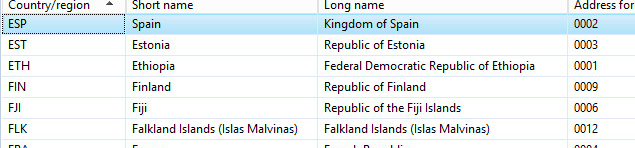
4130.label.PNG


I have tried this :

1) Stop AOS
2) Delete .ali , .ald and .alc files
3) Restart AOS.  

But, doesn't work.

If I switch my client to English this labels are shown

4130.label.PNG

I have seen we have a custom label file in AOT  (I don't know which is the reason and if it's related).

Any idea?

Thanks

*This post is locked for comments

I have the same question (0)
  • André Arnaud de Calavon Profile Picture
    300,915 Super User 2025 Season 2 on at

    Hi axrookie,

    Can you elaborate? What labels are not shown correctly? I can see two screenshots which are exactly the same. Did you upload the wrong screenshot?

  • arey Profile Picture
    369 on at

    Sorry, yes, the first one is wrong.

    This is how I see when switch to Spanish.

     4150.label.PNG

    Thanks

  • Suggested answer
    André Arnaud de Calavon Profile Picture
    300,915 Super User 2025 Season 2 on at

    Did you first forgot to install the foundation labels? So is it installed after you initialized AX? If so the labels were not known at time of creating the countries; thus having label IDs instead of Spanish texts.

    You can try to create a script in AX (job) to correct the labels. I have seen this for additional languages which were installed later. You need to have development skills for this.

  • arey Profile Picture
    369 on at

    Yes, I forgot install the foundation labels and installed later.

    The problem not only affects to that labels, there are many that are shown right in English and wrong in Spanish

    On the other hand there are many others that not shown rigat even when I switch to English. Some examples:

    Title.PNG

    Title.PNG

    Addre.PNG

    Thanks

  • André Arnaud de Calavon Profile Picture
    300,915 Super User 2025 Season 2 on at

    Is it possible to do a new fresh installation or is there already some setup done and possibly some transactions? Creating correction jobs might be cumbersome. If you have some setup, you might look into Data Import Export Framework to export some settings first before install a new environment.

  • arey Profile Picture
    369 on at

    No, now is not possible, we are already working with a lot of transactions.

    I don't understand. Install foundation labels is not a required step so it should not be so problematic. Don't you think so?

    Thanks

  • Suggested answer
    André Arnaud de Calavon Profile Picture
    300,915 Super User 2025 Season 2 on at

    Hi axrookie,

    There are some dependencies which you need to be aware of. E.g. database logging is also not required, but sometimes you need to know who changed a customer name. Then you are also too late.

    You can create a job in the AOT and copy/paste the next coding. Then run the job. You can first run the job where it only checks for incorrect labels. Then do the full update. It will try to find country descriptions that are noted like label ID's. Then it will try to find the translation in the label files and correct the records. Note that using the script is at your own risk and should be tested in a separate environment first.

    static void FixCountryRegionLabels(Args _args)
    {
        LogisticsAddressCountryRegionTranslation    countryRegionTranslation;
        
        Dialog          dialog = new Dialog('Fix country/region labels');
        DialogField     dialogCheckOnly;
        Label           label;
    
        boolean         changed;
        boolean         checkOnly;
        int             i;
        LabelType       labelString;
        ;
    
        dialogCheckOnly = dialog.addFieldValue(extendedTypeStr(NoYesId), NoYes::Yes, 'Check only');
    
        if (dialog.run())
        {
            checkOnly   = dialogCheckOnly.value();
    
            ttsBegin;
            
            while select forUpdate countryRegionTranslation
            {
                changed = false;
    
                label = new Label(countryRegionTranslation.languageId);
                
    
                if ((SysLabel::isLabelId(countryRegionTranslation.LongName) && label.exists(countryRegionTranslation.LongName)))
                {
                    labelString = label.extractString(countryRegionTranslation.LongName);
    
                    if (labelString != countryRegionTranslation.LongName)
                    {
                        info(strFmt('Country %1, Language %2 – LongName – from %3 to %4.', countryRegionTranslation.CountryRegionId, countryRegionTranslation.LanguageId, countryRegionTranslation.LongName, labelString));
    
                        countryRegionTranslation.LongName = labelString;
                        changed = true;
                        i++;
                    }
                }
    
                if ((SysLabel::isLabelId(countryRegionTranslation.ShortName) && label.exists(countryRegionTranslation.ShortName)))
                {
                    labelString = label.extractString(countryRegionTranslation.ShortName);
    
                    if (labelString != countryRegionTranslation.ShortName)
                    {
                        info(strFmt('Country %1, Language %2 – ShortName – from %3 to %4.', countryRegionTranslation.CountryRegionId, countryRegionTranslation.LanguageId, countryRegionTranslation.ShortName, labelString));
    
                        countryRegionTranslation.ShortName = labelString;
                        changed = true;
                        i++;
                    }
                }
                if (changed && !checkOnly)
                {
                    countryRegionTranslation.doUpdate();
                }
            }
    
            ttsCommit;
    
            info(strFmt('Number of country/region translations with wrong label: %1', i));
     
            if (checkOnly)
            {
                info('Parameter was set to check only. No updates executed.');
            }
            else
            {
                info('Reported log is updated.');
            }
        }
    }
    

Under review

Thank you for your reply! To ensure a great experience for everyone, your content is awaiting approval by our Community Managers. Please check back later.

Helpful resources

Quick Links

Responsible AI policies

As AI tools become more common, we’re introducing a Responsible AI Use…

Neeraj Kumar – Community Spotlight

We are honored to recognize Neeraj Kumar as our Community Spotlight honoree for…

Leaderboard > 🔒一 Microsoft Dynamics AX (Archived)

#1
Martin Dráb Profile Picture

Martin Dráb 4 Most Valuable Professional

#1
Priya_K Profile Picture

Priya_K 4

#3
MyDynamicsNAV Profile Picture

MyDynamicsNAV 2

Last 30 days Overall leaderboard

Featured topics

Product updates

Dynamics 365 release plans



