web
You’re offline. This is a read only version of the page.
close
Skip to main content

Notifications

Announcements

No record found.

Community site session details

Community site session details

Session Id :
Microsoft Dynamics AX (Archived)

Customer Aging in Account Receivable (Getting All Zeros)

(0) ShareShare
ReportReport
Posted on by 120

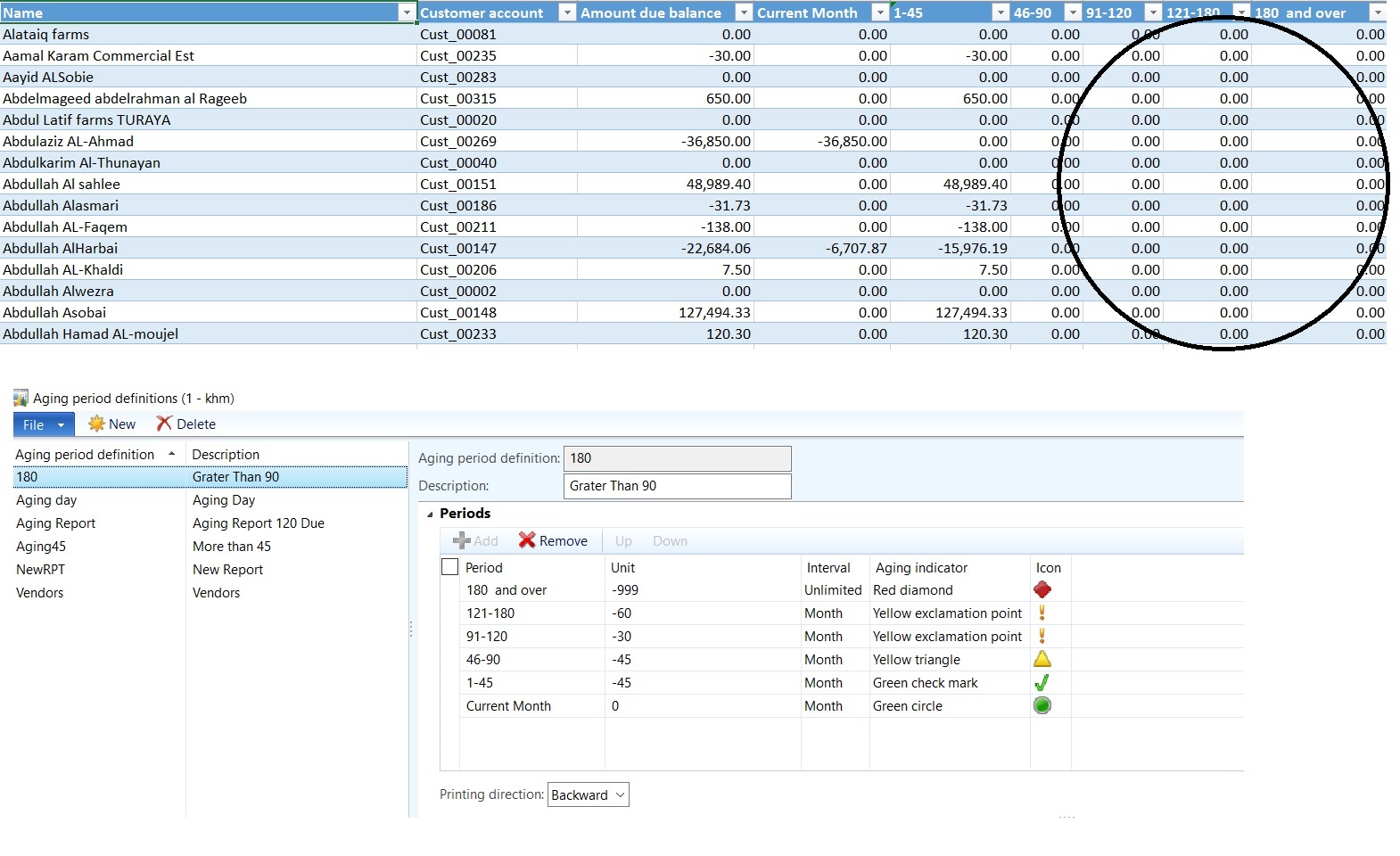
Hi Everyone, In Customer Aging(In AC) Report I'm Getting All Zero's when I make aging between 

46-90 and 91-120, 121-180 and .. See the Image attached with Aging definition  ' Send help me I need the ASAP
Aging.jpg

*This post is locked for comments

I have the same question (0)
  • Suggested answer
    Ludwig Reinhard Profile Picture
    Microsoft Employee on at

    Hello Mujeeb,

    What you show above is an extract from an Excel template. Can you double check whether you get the same data via the Standard SSRS report under AR/Reports/Status/Customer aging?

    Another thing that you could check is whether the allocation of the different open amounts to your columns is correct. From the screenprint above I can actually not identify an error as the amount that you can identify in the amount due balance column is fully split up and distributed to the different columns (1-45, 46-90, ...). If the total due Balance column is included in the "current months" and 1-45 column all other columns should show you a 0-$-amount.

    Hope this helps,

    Ludwig

  • Muzeeb Profile Picture
    120 on at

    Hi Ludwig, How to remove current Month from this,

    I need 1-45 ,46-90, 91-120, 121-180, 180 and Over

    Kindly Give me the Aging Period Definition, Plz

  • Suggested answer
    Ludwig Reinhard Profile Picture
    Microsoft Employee on at

    Hi Mujeeb,

    You cannot remove your "current month" column as AX always asks to to enter a "0 column". It would require an adjustment to get it removed but be careful when considering this as adjusting the aging periods can easily get complex.

    All the best,

    Ludwig

  • Muzeeb Profile Picture
    120 on at

    Period          Unit          Interval      

    180 +

    121-180

    91-120

    46-90

    1-45

    I need the Unit  Values in Aging .. Plz

  • Suggested answer
    Ludwig Reinhard Profile Picture
    Microsoft Employee on at

    Hi Mujeeb,

    Probably try something like this:

    ap.png

    Note that you need to define your own aging indicator as I have not done that

    Hope this helps,

    Ludwig

  • Muzeeb Profile Picture
    120 on at

    one.jpg

     In AR--Common-- Collections

    I don't want the Due Date, I need like this as Follows. Please Help me. I will be thankful to do

    one.jpg

  • Muzeeb Profile Picture
    120 on at

    6523.one.jpg

  • Suggested answer
    Ludwig Reinhard Profile Picture
    Microsoft Employee on at

    Hello Mujeeb,

    You cannot get rid of the due date column in the collection list page form. Please note that the collection list page form shows you the balance of your customers as of today (!) and not as of a specific day in the past (e.g. month end previous period).

    I believe that you can create the report you need by using the standard AX customer aging report (AR/reports/Status/customer aging). You can select your aging period definition in this report to get the distribution over the different aging buckets. For details please see: technet.microsoft.com/.../aa575855.aspx

    Hope this helps,

    Ludwig

  • Ludwig Reinhard Profile Picture
    Microsoft Employee on at

    Hello Mujeeb,

    Just wondering whether you have been able to fix your issue with the aging buckets. Please let us know if you need some additional assistance.

    Thanks,

    Ludwig

  • Muzeeb Profile Picture
    120 on at

    Hi Ludwig, Sorry for Delay. It's Working Now. Thanks for your great Suggestions.

    Can you provide me the Functional Notes of Trade and Logistics and Production Module. we have finished the AMC with partner company, so if you provide me this I will be thankful to you..

Under review

Thank you for your reply! To ensure a great experience for everyone, your content is awaiting approval by our Community Managers. Please check back later.

Helpful resources

Quick Links

Responsible AI policies

As AI tools become more common, we’re introducing a Responsible AI Use…

Neeraj Kumar – Community Spotlight

We are honored to recognize Neeraj Kumar as our Community Spotlight honoree for…

Leaderboard > 🔒一 Microsoft Dynamics AX (Archived)

#1
Martin Dráb Profile Picture

Martin Dráb 4 Most Valuable Professional

#1
Priya_K Profile Picture

Priya_K 4

#3
MyDynamicsNAV Profile Picture

MyDynamicsNAV 2

Last 30 days Overall leaderboard

Featured topics

Product updates

Dynamics 365 release plans



