web
You’re offline. This is a read only version of the page.
close
Skip to main content

Notifications

Announcements

No record found.

Community site session details

Community site session details

Session Id :
Microsoft Dynamics AX (Archived)

Object 'CLRObject' could not be created when uploading Product Image

(1) ShareShare
ReportReport
Posted on by

Hi,

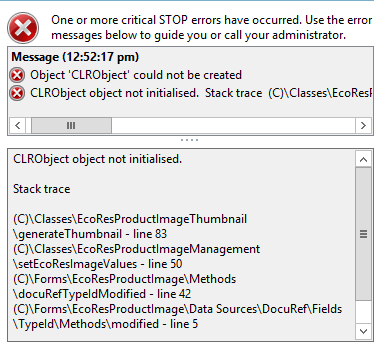
I am having error CLRObject could not be created when uploading product image.

It is coming with stack trace

CLRObject object not initialised.

Stack trace

(C)\Classes\EcoResProductImageThumbnail\generateThumbnail - line 83
(C)\Classes\EcoResProductImageManagement\setEcoResImageValues - line 50
(C)\Forms\EcoResProductImage\Methods\docuRefTypeIdModified - line 42
(C)\Forms\EcoResProductImage\Data Sources\DocuRef\Fields\TypeId\Methods\modified - line 5
(C)\Classes\FormStringControl\modified

Seems like AX is not able to use System.IO dll run time.

Exception is thrown from WinAPI copyFile method

System.IO.File::Copy(fileName, newFileName, overwrite);

I wonder if I can regenerate this dll? or refresh GAC it may resolve the issue? Has anyone faced this issue and refreshed assemblies or anything else in this regard.

I have already tried Full compile, Full CIL and AOS restart.
*This post is locked for comments

I have the same question (0)
  • Faisal Fareed Profile Picture
    10,796 User Group Leader on at

    Are you running this code in a batch job?

  • Faisal Fareed Profile Picture
    10,796 User Group Leader on at

    You can have a look on this thread too.

    community.dynamics.com/.../123103.aspx

  • Community Member Profile Picture
    on at

    I assume you are not having any customization around this function

    If yes I suggest you to compile forward the class

    EcoResProductImageThumbnail

    Please verify and update us if this helps you.

  • Community Member Profile Picture
    on at

    No, its not from any batch job. Its from AX client.

    There is no customization at all. Its out of box. i did try forward compile and all other tricks. Also full compile, full CIL, service restart etc.

    I have already tried what i found from different links from search.

    It is out of box functionality and working fine with other environments so definitely assembly load issue or GAC is not having correct references. Interested to know if anyone has faced the issue or suggestion.

  • Faisal Fareed Profile Picture
    10,796 User Group Leader on at

    What does event viewer say? If it seems to you the assembly issue so you can try register assembly files again from your running system.

    Is it new installation or have your restored model store or database backup from another system?

  • Community Member Profile Picture
    on at

    These Dlls are part of .net framework

    so you need to review if you have made any changes related to visual studio

    can you please confirm that you have Visual studio working fine and everything good there.

    Please verify and update us with your findings

  • Verified answer
    Community Member Profile Picture
    on at

    Thanks Faisal and Nitesh for your guidance. However, I got it resolved differently.

    Message "CLRObject object not initialised." was really misleading. I was debugging and as soon as it went to read WINAPI -> System.IO.CopyFile(*,*,*) it was always returning error as mentioned above.

    In order to see what the actual thrown message is, I had to write custom code in copyFile method of WinAPI class (highlighted code is the code to display actual message)

      System.Exception ex;

       try

       {

           System.IO.File::Copy(fileName, newFileName, overwrite);

           return true;

       }

       catch(Exception::CLRError)

       {

           ex = ClrInterop::getLastException();

            if (ex != null)

            {

               ex = ex.get_InnerException();

               if (ex != null)

               {

                   throw error(ex.ToString());

               }

           }

           return false;

       }

    }  

    Now the actual message was related to un authorized access to the folder where it saves temp image files (selected on parameters form of document management). I went to that folder and assigned write permissions to domain users. This was the magic trick.

  • Muhammad Yousaf Profile Picture
    1,339 on at

    Hi Syed Ali, 

    how can i access this folder, can you please guide me to that

    if you can write steps, it is much better

    i have exactly the same issue

    Regards

    Yousaf

Under review

Thank you for your reply! To ensure a great experience for everyone, your content is awaiting approval by our Community Managers. Please check back later.

Helpful resources

Quick Links

Responsible AI policies

As AI tools become more common, we’re introducing a Responsible AI Use…

Neeraj Kumar – Community Spotlight

We are honored to recognize Neeraj Kumar as our Community Spotlight honoree for…

Leaderboard > 🔒一 Microsoft Dynamics AX (Archived)

#1
Martin Dráb Profile Picture

Martin Dráb 4 Most Valuable Professional

#1
Priya_K Profile Picture

Priya_K 4

#3
MyDynamicsNAV Profile Picture

MyDynamicsNAV 2

Last 30 days Overall leaderboard

Featured topics

Product updates

Dynamics 365 release plans



