web
You’re offline. This is a read only version of the page.
close
Skip to main content

Notifications

Announcements

No record found.

Community site session details

Community site session details

Session Id :
Finance | Project Operations, Human Resources, ...
Answered

Custom field dropdown list does not appear after deploying to Test environment

(0) ShareShare
ReportReport
Posted on by 55

Hi All,

We are adding a custom Transfer Number field to the InventQualityOrderTable form. This is just a custom field I've added to the InventQualityOrderTable table that the user would manually enter in or select an existing transfer order number from the InventTranferTable table.

I have an EDT, InventTransferId, set on the field.

In our dev environment it is working as expected. The user edits the quality order record and selected the dropdown on the field, allowing them to select an existing transfer order: 
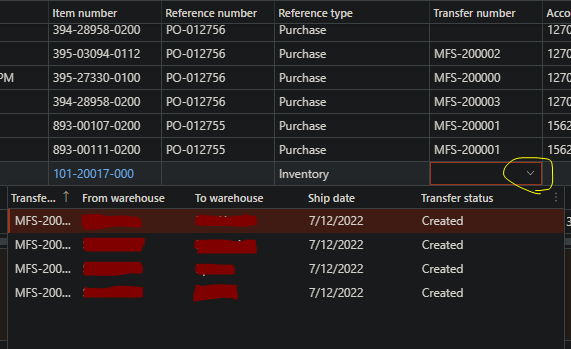
pastedimage1665515611228v1.png

The issue is that after deploying this code to our test environment. The dropdown never appears. There are existing transfer orders in InventTranferTable, and the quality orders are open and editable. The user can even manually type in the transfer number and the grid will validate whether the transfer order exists or not. So the validation the grid does is still seeing the connection to InventTranferTable. Its just that when the user presses the down arrow to get the dropdown list, nothing happens: 
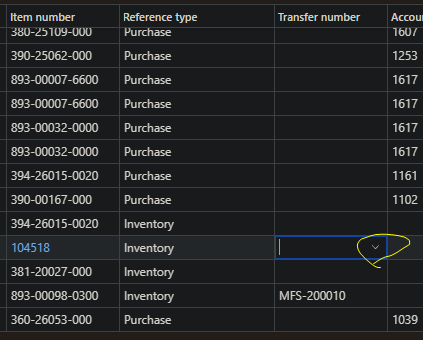
pastedimage1665515974559v2.png

It is the same code in Dev and in Test. I have tried clearing my browser cache and trying multiple browsers in case it was a browser issue and the machine I'm accessing Test from, and that didn't resolve it. Searching around I found similar posts where people were having issues setting up the dropdown/autolookup and the solution was to make sure an EDT is set for the field, but in this case the field is using an EDT and it works as expected in Dev, and the validation for the field is still working in Test, so the connection is still there.

I am using System Admin users in both Dev and Test, so I don't think permissions would be an issue.

If anyone has any suggestions or has experience with this issue, any help would be greatly appreciated. Thank you! 

I have the same question (0)
  • Komi Siabi Profile Picture
    13,109 Most Valuable Professional on at

    Hello Cody,

    It is likely that your custom field dropdown customization did not actually reach the UAT environment.

    You might want too be sure that the package deployable contains the model in which you have done that modification. Also doublecheck that the right deployable package was move to the UAT.

    For you to be very sure and certain, I would recommend you just create new DP and apply it again.

  • Cody M Profile Picture
    55 on at

    Hi Komi,

    Thank you for the response. I checked the changesets in our DevOps and the changes I made were definitely included in the package. Other changes to the same form were also included in the package and I can see working in out Test environment.

    The custom field is present in Test, and even the field validation is working, so it will only let me manually enter in Transfer Numbers that exist in InventTranferTable, which is expected.

    I didn't add anything specific to make the dropdown window. It appeared since I added the standard EDT InventTransferId, which is related to  InventTranferTable. In my development environment, when I press the dropdown it opens and shows all the transfer orders in InventTranferTable.

  • Komi Siabi Profile Picture
    13,109 Most Valuable Professional on at

    Are both environment currently on same version?

  • Cody M Profile Picture
    55 on at

    Yes. Both are on 10.0.26 Update50.

  • Suggested answer
    Komi Siabi Profile Picture
    13,109 Most Valuable Professional on at
    [quote user="Cody M"]I didn't add anything specific to make the dropdown window. It appeared since I added the standard EDT InventTransferId, which is related to  InventTranferTable. In my development environment, when I press the dropdown it opens and shows all the transfer orders in InventTranferTable.[/quote]

    The standard way to have a dropdown on a form, looking into a table is using the relation node on tables. I make use of reference EDT when building a report parameter or when I need to have a drop down on a dialog. 

    Please, do specify relation on your table on Dev and deploy to UAT. You would be fine afterwards. 

  • Cody M Profile Picture
    55 on at

    I have the relation to InventTranferTable added on my table extension:

    pastedimage1665595802508v1.png

    pastedimage1665595908544v2.png

    EDTRelation in properties is set to No, but I left it as no since this post said that it was a legacy feature:
     

  • Cody M Profile Picture
    55 on at

    Hi Komi, 

    After some more testing the dropdown started to work. I'm thinking that it must have just been a browser or performance issue.

    I appreciate the help in troubleshooting. Thank you!

Under review

Thank you for your reply! To ensure a great experience for everyone, your content is awaiting approval by our Community Managers. Please check back later.

Helpful resources

Quick Links

Responsible AI policies

As AI tools become more common, we’re introducing a Responsible AI Use…

Neeraj Kumar – Community Spotlight

We are honored to recognize Neeraj Kumar as our Community Spotlight honoree for…

Leaderboard > Finance | Project Operations, Human Resources, AX, GP, SL

#1
Martin Dráb Profile Picture

Martin Dráb 451 Most Valuable Professional

#2
André Arnaud de Calavon Profile Picture

André Arnaud de Cal... 428 Super User 2025 Season 2

#3
BillurSamdancioglu Profile Picture

BillurSamdancioglu 239 Most Valuable Professional

Last 30 days Overall leaderboard

Product updates

Dynamics 365 release plans
